Cinematic AI Couple Video with Google Flow – Master Prompt
SCROLL DOWN FOR FULL PROMPT
AI couple videos are a great way to make simple photographs into creative, cinematic video content. Whether you have a picture of yourself with your lover or a female friend, a video generation AI coupled with Flow can turn this simple image into a new cinematic creation.
In this guide, we will briefly explore how to create AI couple videos using Flow, a couple of reference images, your requirements, and an ultimate prompt.
What You Need
Before diving into the tutorial, make sure that you have a couple of clear images available. One of the photos can be your own image, and the other can be a photo of your friend or lover.
As for the concept of the video, decide what kind of video you need. It can be a cinematic, romantic, friendship, travel, or lifestyle video — anything goes!
Step 1: Open Flow
The first step is to open the Flow app. Once there, make sure to hit New Project and follow the screen instructions to arrive at the video creation screen.
Select the option to generate an AI video and set the necessary preferences for your project.
Make sure to choose a vertical ratio if you’re planning on posting the finished product on Instagram as a Reel.
Step 2: Upload Your Photos
The next step is to upload your photos. Make sure to select the best and most clear picture of yourself and your friend or lover.
The best thing about this AI tool is that you can use almost any concept and any two photographs to generate a video. So, use your creative thinking and select two pictures that spark an idea.
Step 3: Define Your Requirements
This stage is completely optional but highly recommended. Before pasting the final prompt, define the requirements for the generated video.
You can define such things as:
Video ratio
Video length
Location
Characters’ actions
Camera movement
Lighting
Attire
Facial expressions
Cinematic style
Define a 9:16 ratio for Instagram Reels, describe the location (outdoor, urban, suburban), and describe what actions the characters should perform.
Having a rough concept of the video before generating it helps you define a prompt better.
Step 4: Paste the Secret AI Video Prompt
Now, this prompt is the most crucial part of this tutorial. After preparing your media and setting your requirements, it’s time to define the actual prompt.
A good couple video prompt will define what the AI couple should do not what the AI should do.
Describe in detail what you want to see in the video, the location, weather, characters’ facial expressions, and actions, cinematography, and lighting.
Make sure to define the camera movement and the atmosphere of the video.
Also, remember that you can define different scenes and actions for different parts of the video. For example, the characters can be walking to each other, sitting down, and looking into the camera.
If using this AI couple prompt for an Instagram reel, make sure to describe the final result that you want to see.
A cinematic Instagram reel should look like a movie, so describe the characters’ actions and the camera movement in detail. The characters should move from short scene to scene, imitating a movie’s operation.
As for the length of the video, divide it into several scenes. A 30-second Instagram reel can be divided into 3 ten-second scenes.
For the first scene, describe what the characters should be doing for ten seconds; then, move on to the next scene, and so on.
Finally, make sure that the characters move naturally enough throughout the video. There is no need for complex actions in a short Instagram reel. Several simple actions, such as walking, sitting, turning to each other, or smiling, will make the video look natural and engaging.
Additionally, you can prompt your actors to blink naturally or move their facial muscles to show more emotions.
Create More Than Just Couple Videos
Creating AI couple videos is not the only option for this concept. You can use different characters and movements to create a multitude of videos.
Create a romantic scene between a couple, a friendship scene, a travel journal, a cinematic couple photo edit, a birthday celebration, a wedding, or a festival — there are literally limitless possibilities.
The only things that you need to change are your prompts and the pictures that you use for the two characters. Make sure to describe different locations, objects, and actions for different videos.
Final Tips
Make sure to use good quality pictures whenever possible. Avoid using photos with a heavily pixelated face or a low-resolution picture.
Also, make sure to organize your prompt properly. Describe the characters and the setting, the required actions and camera ratio, the lighting, and the overall cinematography style.
If you plan on uploading the finished video on Instagram, make sure to select a vertical ratio.
Once you’ve created the video, make sure to review it and fix any issues if needed. As a creator, you may not get everything right on the first attempt, so be prepared to edit your video multiple times.
PROMPT
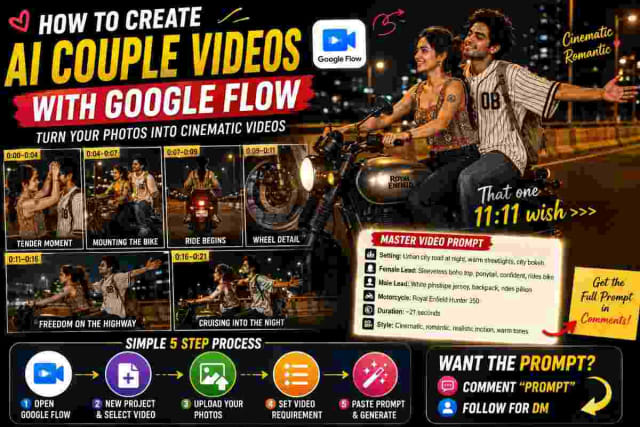
✨ AI PromptMaster Video Prompt Create a cinematic romantic nighttime video, approximately 21 seconds long, featuring the same young woman and young man throughout the entire sequence. Setting & Environment: A wide urban city road and overpass at night, illuminated by warm ambient overhead streetlights with blurred city bokeh in the background. Use warm golden and amber nighttime hues to create a cinematic, romantic atmosphere. Female Lead: She wears a sleeveless, multi-colored boho-print top with tied shoulder straps and dark fitted jeans. Her hair is tied back in a neat ponytail/braid with loose strands framing her face. Include a small circular tattoo on her upper right arm. She is confident, cheerful, and rides the motorcycle throughout the journey. Male Lead: He wears an oversized white baseball-style pinstripe jersey with black accents, blue jeans, and red/white/black high-top sneakers. He carries a canvas backpack with a vintage graphic print. He rides as the pillion passenger, smiling warmly, holding onto her, and enjoying the night air. Motorcycle: A modern matte grey/silver and black Royal Enfield Hunter 350, featuring round retro mirrors and turn indicators. On-screen text: Keep a consistent caption centered near the lower third throughout the video: “That one 11:11 wish >>>" Timeline 0:00–0:04 — Tender Moment The couple stands beside the parked motorcycle under warm streetlights. The woman gently reaches up to fix and stroke the man's hair. He smiles shyly while adjusting his hair with his hands. They share a soft, affectionate look. 0:04–0:07 — Mounting the Bike The woman turns and sits on the rider seat, taking the handlebars. The man watches her with a soft smile and then gets onto the back seat. 0:07–0:09 — Ride Begins Show a rear-angle shot of the motorcycle accelerating away down the empty road, with its illuminated red taillight visible. Cut to a medium tracking shot showing her driving while he leans close behind her. Both are smiling as the night breeze moves around them. 0:09–0:11 — Wheel Detail A dynamic close-up of the spinning alloy front wheel and disc brake rolling across the asphalt. 0:11–0:16 — Freedom on the Highway A smooth cinematic side-profile tracking shot follows them cruising along the highway barrier. The man opens both arms wide, leaning back and embracing the wind in a classic cinematic gesture of freedom. 0:16–0:21 — Cruising Into the Night The motorcycle briefly passes through a darker shadow and then emerges into the warm golden glow of the next streetlight, continuing smoothly down the road into the night. Cinematography: Use a mix of static medium two-shots, low-angle tracking shots, close-up detail shots, rear motorcycle shots, and smooth side-profile tracking shots. Maintain realistic motorcycle movement, natural body motion, realistic fabric and hair movement, cinematic depth of field, warm nighttime lighting, realistic shadows, and a premium romantic film aesthetic.
Conclusion
Creating AI couple videos can be a fun way to experiment with different content types. Whether you’re making an Instagram reel or a YouTube shorts, the process of making this kind of video is simple and fast.
All that you need is a couple of images, your requirements, and a well-constructed final prompt. Open Flow and create a new project, upload your media, set your requirements, and paste the following secret AI couple prompt.
Finally, enjoy your new video and post it on your favorite social network.
dinxsh7
EditorEditorial contributor researching practical guides, tech discoveries, and curated recommendations for Dinesh Picks.
Continue Reading