How to Easily Make Viral Miniature Bike Videos with Google Flow
SCROLL DOWN FOR FULL RPOMPT
Miniature vehicle videos are an emerging AI video category and have gained popularity on Instagram Reels, YouTube Shorts, and other social media visual platforms. They involve transforming a vehicle into a miniature and putting it into a miniature environment with a cinematic style. However, using an AI video prompt, one can easily generate a similar miniature bike video without advanced video editing skills.
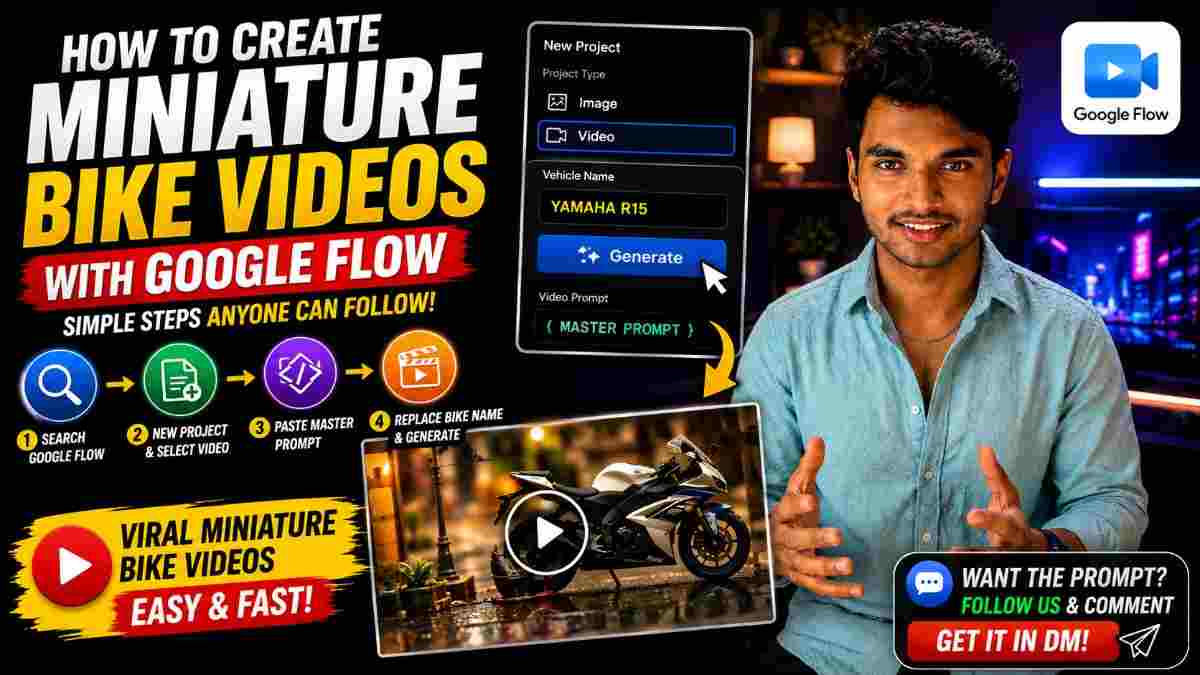
The process involves selecting the desired bike, visiting Google Flow, pasting the required video prompts, modifying the vehicle name and several other elements, and generating the video.
What Are Miniature Bike Videos?
A miniature bike video is an AI video that presents a vehicle as a miniature or puts it in a miniature environment. The videos can feature the miniature bike or any other vehicle class moving in small size, exploring tiny surroundings, or using a cinematic camera.
Notably, the juxtaposition of miniature vehicles and realistic environments makes the videos surprising and engaging. Moreover, a thorough description of textures, lighting, angles, field of view, and other elements makes the miniature video convincing as a real-world picture.
Furthermore, this concept can be applied to various vehicles and classes of vehicles, including motorcycles, scooters, bikes, and other vehicles depending on the prompt.
How to Create a Miniature Bike Video with Google Flow
The first step towards generating a miniature bike video is to open Google and search for Google Flow. Then, the user must enter the platform and create a new project by selecting the video option available there.
The second step involves pasting the master prompt, which typically involves a detailed description of the miniature environment, vehicle, camera, and other elements.
Next, one must edit the vehicle name based on the desired miniature bike video. Lastly, the user must generate the video by clicking the designated button.
Step 1: Open Google
To begin, the user must go to google.com and search for Google Flow. On the next page, the user must create a New Project and select the video option. Then, the user can set up the Google Flow settings according to the desired video quality and ratio. It is recommended to use the vertical ratio for social media platforms such as Instagram Reels and YouTube Shorts.
Step 2: Paste the Master Prompt
The next step involves pasting the master prompt. Notably, a detailed prompt can be used to describe the miniature environment and bike, camera and angles, lighting and shadows, depth of field, object textures, motion, and cinematic feel. For instance, the prompt can be highly descriptive of the miniature setting and include specific details such as a realistic miniature environment or a tiny bike as the main subject. It is hypothesized that the more specific and detailed the prompt is, the more realistic the video will appear.
Step 3: Change the Vehicle Name
One of the simplest aspects of this process is changing the name of the vehicle. In most cases, the initial prompt will have a suggested name, which the user can replace with their desired name. For instance, the user can specify the type of motorcycle or scooter they want for their miniature bike video. This step can be repeated to generate multiple miniature bike videos instead of starting from scratch each time.
Step 4: Generate the Video
After modifying the vehicle name, the next step is to click the generate button. The Google Flow engine will analyze the provided prompt and generate the video. During this process, one may receive different results based on the overall description, generation options, referenced images, and other factors. If the initial result does not meet expectations, the user can adjust the prompt and regenerate the video.
Why Detailed Prompts Are Important
A detailed description in a prompt provides more information to the AI about the desired outcome. When generating miniature bike videos, it is important to specify elements such as the bike’s appearance and size, miniature environment, and other aspects described in the following subsections.
Details to Include When Generating Miniature Bike Video
When generating a miniature bike video, one should provide specific details to the AI so that it can produce an image that meets their expectations. Details such as the following are crucial in this scenario:
• Miniature bike description
• Size comparison
• Miniature environment description
• Realistic elements
• Camera parameter description
• Depth of field
• Natural shadows and lighting
• Camera position and perspective
• Video motion and objects
• Video background
Each of these aspects should be included in the prompt so that the generated video is realistic and of high quality. Specifically, the emphasis should be on creating a miniature effect rather than generating a realistic video of a large bike.
Ideas for Miniature Video Concepts
After preparing the master prompt, one can easily construct various concepts for miniature vehicle videos. For instance, the video can feature a miniature sports-bike garage, a miniature scooter, or a miniature classic-bike garage. In addition, the videos can star a miniature motorcycle, miniature car, and miniature delivery van or truck. Moreover, the environment in which the miniature vehicle is placed can change dramatically from one video to another, resulting in entirely different videos with the same prompt.
Tips for Generating Better AI Videos
When generating AI videos, it is important to provide a detailed prompt so that the video aligns with the intended concept. However, it is advisable to avoid using contradictory statements and unnecessary information. If one intends to generate a realistic miniature bike video, they should describe the size, lighting, camera position, environment, and other elements in detail.
In addition, the primary subject should be the main focus of the video. The inclusion of additional objects or actions increases the likelihood that the generated video will diverge significantly from the intended concept. After generating the video, it is essential to review the results and ensure that all aspects of the prompt are reflected in the video. If a specific element appears to be underrepresented or improperly displayed, the user should edit the prompt and regenerate the video.
PROMPT
✨ AI PromptMINIATURE VEHICLE - 10 SEC 377 VEHICLE: [VEHICLE NAME] Create exactly one 10-second ultra-realistic 9:16 macro cinematic miniature [VEHICLE NAME] build video. Automatically match the real vehicle's exact design, proportions, chassis, engine/motor, wheels, suspension, steering, body, seat, lights, controls, drivetrain, colors and recognizable details. ONE ADULT MAN ONLY builds it by hand on a warm wooden workshop table. No tiny workers or extra people. 0-1s: Install engine/motor into chassis and tighten mounts. 1-2s: Install front fork, suspension, front wheel, axle and handlebar/steering. 2-3s: Install authentic body/tank/front cover and seat. 3-4s: Install rear wheel, suspension, brakes and chain/drivetrain if applicable. 4-5s: Attach remaining body panels, footrests, exhaust/electric parts, lights and mirrors. 5-6s: Open fuel cap and pour fuel from a tiny metal container if petrol; for electric vehicles, connect the battery/charging system instead. 6-7s: Close fuel/charging system and adjust controls/throttle. 7-8s: Dashboard/instrument cluster turns on; show key vehicle details. 8-9s: Vehicle starts realistically; subtle vibration and exhaust smoke only if applicable. 9-10s: Smooth pull-back reveals the COMPLETE finished miniature vehicle. IDENTITY LOCK: [VEHICLE NAME] must remain the same exact real-world vehicle throughout. Never change its category, proportions, wheels, body, drivetrain or recognizable design. STYLE: Ultra-photorealistic miniature scale, realistic man's hands/skin, authentic metal/rubber/plastic, tiny screws, realistic physics, macro lens, shallow DOF, warm workshop lighting, cinematic focus pulls, 4K/8K, satisfying mechanical ASMR. NO: morphing, magical assembly, floating parts, teleportation, duplicate hands, extra people, tiny workers, cartoon/CGI look, wrong parts, wrong fuel system, unrealistic physics, text or fake logos. Every listed step must visibly happen.
Conclusion
Overall, generating miniature bike videos with Google Flow is a straightforward process that can be mastered in a single session. One does not have to rewrite the entire prompt for each video; a minor adjustment to the vehicle name and, if necessary, environment or concept will suffice. The basic steps include visiting Google Flow, creating a new project, selecting the video option, pasting the master prompt, editing the vehicle name, and generating the video.
Using creative environments, detailed prompts, cinematic visual effects, and varying vehicle concepts, one can generate a series of engaging AI videos for social media platforms.

Continue Reading