How to Create AI Videos with Your Photo Using ChatGPT & Gemini
SCROLL DOWN FOR ALL PROMPTS
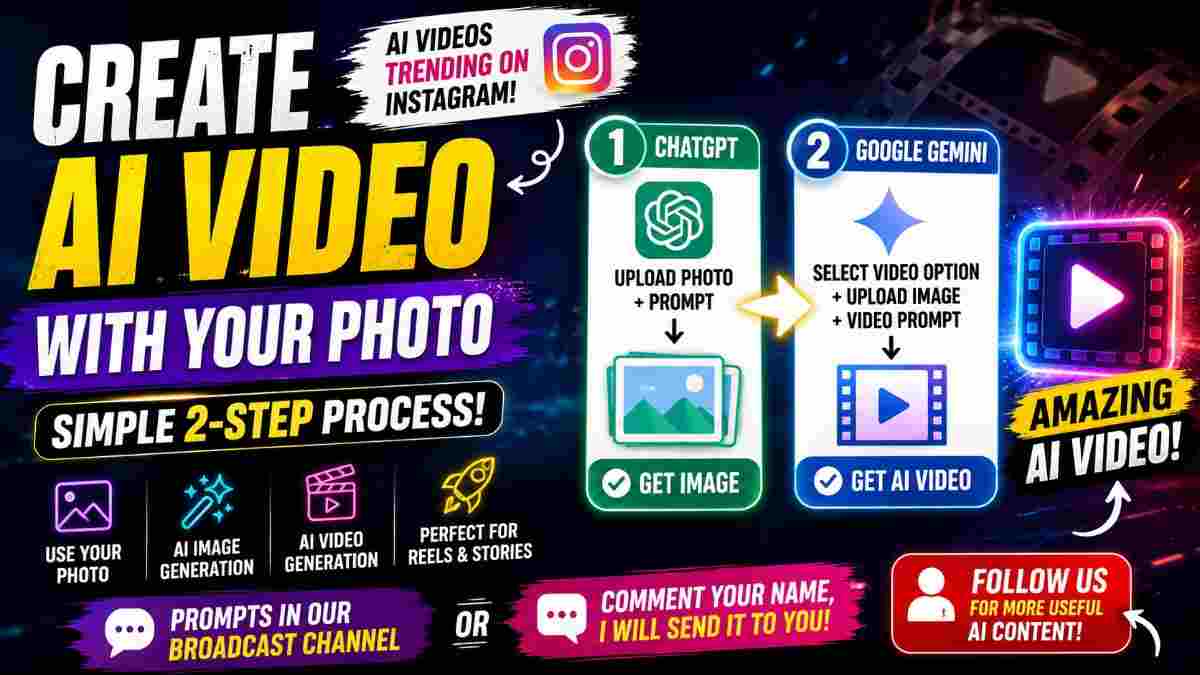
AI photos are trending in Instagram as videos and can be made into eye-catching photos with your own photo by following a simple AI workflow. You will not need any advanced video-editing skills. You can use ChatGPT to generate the image you want and use Google Gemini to generate an AI video with the image.
In this tutorial, we will go through the simple steps for making an AI video with your photo using image and video prompts.
What is an AI Photo to Video Trend?
The AI photo to video trend enables creators to transform a still image from a photograph into a dynamic video with minimal editing. Instead of recording a traditional video you can start from one still image and utilize an AI to generate a video based on your instructions.
This is a popular trend across Instagram Reels, Stories and other platforms as it can be utilized to create visually interesting content with minimal editing.
Step 1: Open ChatGPT
The first step is to open ChatGPT and upload the photo you want to generate your AI video with.
For the best results, make sure to use a photo where your face and overall appearance is visible. Once you have uploaded your image, enter your AI image prompt and send your request.
Your prompt should explain how you want the image to appear. You can describe the intended environment, pose, lighting, clothing, camera style and overall visuals.
After you have generated an image, review the result before moving on to the next step.
Step 2: Generate Image
After sending your prompt, ChatGPT will generate an image based on your instructions.
This will become the visual starting point for the video. If the result is not what you were aiming for, you can refine your prompt and generate a new image. Using a detailed prompt can also help you achieve a specific visual style while maintaining the key elements of your reference photo.
Step 3: Open Google Gemini
After you have generated an image, open Google Gemini and choose the video-generation option in your account.
You will need to upload the image that you have generated with ChatGPT.
Next, enter your AI video prompt which should explain what should occur in the video including the subject's movement, the camera's movement, the expressions, and overall visual style. You can describe a cinematic camera movement, subtle body movement, or realistic environment.
Step 4: Generate Your AI Video
After uploading your image and entering your AI video prompt, submit your request.
Gemini will process the image and generate the video according to the instructions in your prompt. The result can then be used as an Instagram Reel, Story, or other short-form platform. Depending on the prompt, you can experiment with different movements, cinematic styles, and creative concepts.
Tips for Better AI Videos
There are a few simple practices you can follow when generating AI videos.
Use a clear photo: Using a high-quality reference photo can give the AI more visual information to work with.
Write specific prompts: Make sure to describe what you want the image or video to look like.
Keep movements natural: Movement in photo to video generation can often look more natural when you utilize subtle movements and realistic camera movement.
Experiment with prompts: You can try out different environments, camera angles, lighting, and movements to explore different ideas.
Why are AI Photo Videos Popular on Instagram?
AI videos are garnering attention as they enable creators to generate unique visual content with minimal traditional filming and editing process. A single photo can serve as a starting point for many different creative concepts.
Creators can utilize these tools for entertainment, tutorials, storytelling, personal content, and experimental visual effects.
The combination of ChatGPT image generation and Google Gemini video generation also offer a simple workflow: generate the required image and use it as the starting point for the video.
IMAGE
Prompt
✨ AI PromptUse the uploaded image as the reference for pose, outfit, framing, and overall composition, but replace the person's face with my face from the face-reference image I provide. Create a highly photorealistic full-body studio portrait of a young Indian man standing confidently against a clean, seamless pure-white background. Use my uploaded face reference and preserve my facial identity accurately, including my natural face shape, skin tone, hairstyle, eyes, nose, lips, and overall facial proportions. Match the reference image's exact body pose, camera angle, composition, outfit, and proportions. The man is standing upright, facing directly toward the camera with a relaxed, friendly smile. Both hands are casually placed inside the trouser pockets, with elbows slightly bent. He is wearing a teal/turquoise linen button-down shirt, relaxed slightly oversized fit, with a classic collar, white buttons, a single chest pocket, and sleeves rolled up to the elbows. The top few buttons are casually open. The shirt has natural linen texture and subtle realistic wrinkles. He is wearing loose, wide-leg black trousers with a relaxed silhouette and black leather loafers with thick soles. Include realistic wrist accessories similar to the reference, including a metallic watch and bracelet. Full body visible from head to shoes, with comfortable space around the entire body. Keep the same centered composition as the reference. Professional fashion photography, soft diffused studio lighting, subtle natural floor shadow, realistic skin texture, accurate fabric details, natural body proportions, sharp focus, high dynamic range, premium editorial photography. Background: completely clean pure white seamless studio backdrop with no objects, no furniture, no text, no patterns. Important: My face must remain highly consistent with the provided face reference. Do not alter my facial identity or make me look like a different person. Keep the clothing, pose, camera perspective, lighting, framing, and overall visual style closely matched to the reference image. Aspect ratio: 4:5, photorealistic, ultra-detailed, high resolution.
VIDEO
Prompt
✨ AI PromptShot 1: The Walking Intro (00:00 – 00:02) Camera: Low-angle tilt-up, tracking shot moving backwards. Scene: A stylish young man walking through a modern urban plaza with glass high-rises. He wears wide-leg black trousers, black chunky sneakers, and an emerald green button-up shirt. He wears black futuristic sunglasses, holds an orange smartphone to his ear, and carries a plastic iced latte cup with a black straw. Shot 2: The Collision and Freeze-Frame (00:03 – 00:04) Camera: Eye-level wide shot, sudden slow-motion time-freeze. Scene: The man accidentally collides with a passing woman, causing him to dramatically fall backward mid-air in shock. White papers, his sunglasses, phone, and coffee detach and hover suspended around him. Shot 3: Bullet-Time Props (00:05 – 00:10) Camera: 3D bullet-time sequence zooming into the floating objects. Scene: Close-ups feature the sunglasses with a green spirit-level, the orange iPhone showing an active call timer, and the upright iced coffee cup. Shot 4: The Fall (00:11 – 00:12) Camera: Wide shot returning to normal speed. Scene: Time resumes as the man crashes onto the pavement amidst falling papers. Shot 5: The Unspilled Sip (00:13 – 00:18) Camera: Ground-level medium shot. Scene: Lying among scattered documents, he notices his coffee standing perfectly upright. He grabs it, takes a sip, and smiles. Shot 6: Direct-to-Camera (00:19 – 00:22) Camera: Medium close-up. Scene: Sitting upright on the ground, he looks into the camera and speaks to the viewer while white captions appear on-screen.
Conclusion
Generating an AI video with your photo can be an easy process when you follow the right steps and utilize the right prompts. Begin with uploading your photo and generate the required image by providing an image prompt to ChatGPT. Next, upload the generated image into Gemini video option and finally, add your video prompt and generate your video.
If you're exploring with AI content for Instagram, this ChatGPT to Gemini AI video workflow is a quick way to explore photo to video generation and develop your Reel and Story concepts.
Continue Reading