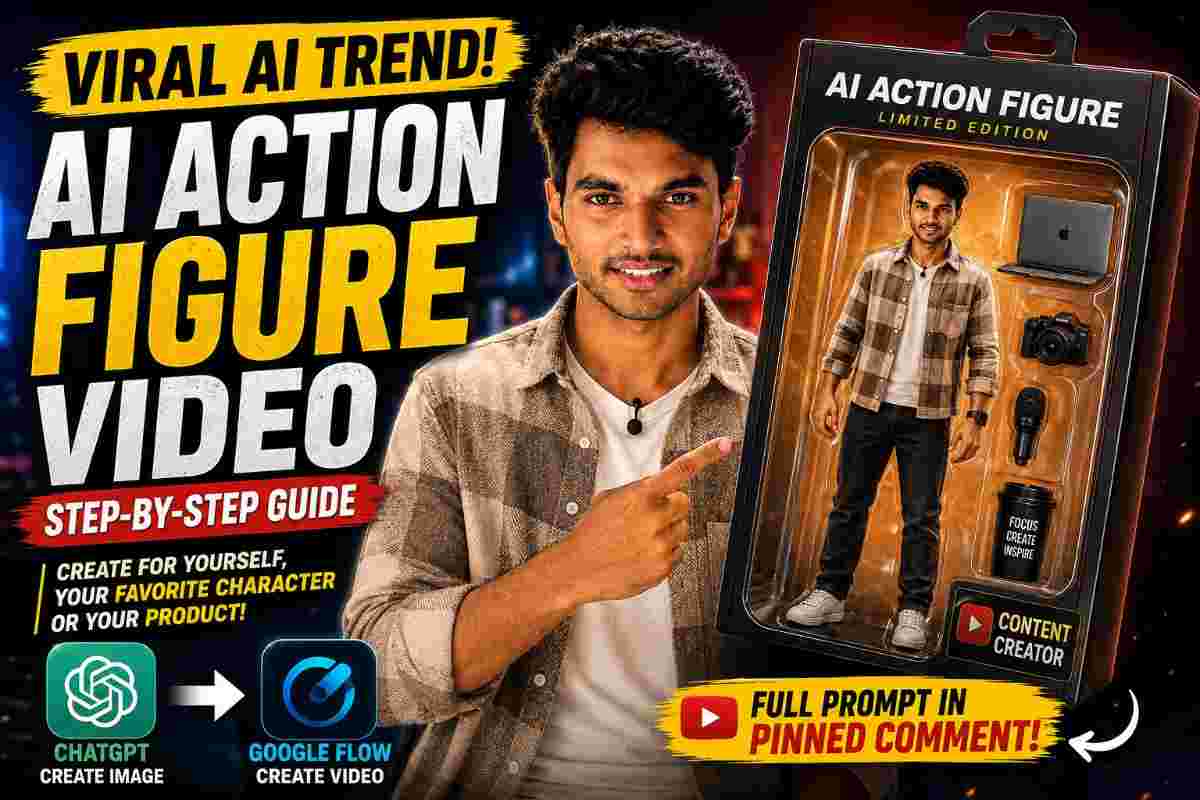
AI Action Figure Trend: Create AI Videos with ChatGPT & Google Flow
SCROLL DWON FOR ALL PROMPTS
AI action figure trend is a fun way to turn an ordinary photo into a vivid action figure image or an entertaining video. There is no need for complex photo-to-something-else transformations – just make the person or the product look like an action figure, or turn an action figure into an animated video. That’s it!
But how to learn AI action figure trend and make action figure videos? Well, creating an AI action figure is one thing, but turning it into an action figure video is a whole new level of entertainment.
In this article, I’m going to show you how to make an AI action figure image out of a photo: you can make an action figure out of your favorite celebrity, a product you are advertising, or turn your face into an action figure. Then, we will enhance our creation, and make an action figure video out of it.
What is AI Action Figure Trend?
AI action figure is a fun way of transforming an existing photo of a celebrity or a product into a high definition collectible-sized action-figure with an accompanying miniature environment, product placement, accessories and cinematography-inspired lighting.
But what makes the AI action figure trend even hotter is that it can be used to create an action figure video.
An action figure video is a short movie featuring a computer-generated action figure. This way you can animate your creation, add some special effects, camera angles and movements to make it look like a real movie.
I think that this is a really cool way of doing product placement or social media marketing. It does not require much effort and has incredible results. Let’s see how you can actually make an AI action figure image and then turn it into an action figure video.
How to Make AI Action Figure Image With ChatGPT
Let’s start with the creation of an AI action figure image.
Go to chatgpt.com and upload a clear picture of the subject you want to appear in your action figure. I would suggest that you choose a full-body shot, so the clothes and the accessories are also visible.
It is also a good idea to add a picture of the product, if you are making a product placement action figure.
Now, type in a prompt to let the AI know what you want. Describe in detail what you want to see in your action figure: the subject of your choice (the person, the product), the surrounding environment, accessories, composition, lighting and the overall aesthetic of the action figure.
For example, you can ask for a high-end collectible action figure with intricate detailing and realistic materials, accompanied by a product placement and an elegant cinematic lighting.
Then, take a look at the generated image and make sure that the major elements of the picture are there. Once you are satisfied, we can move on to the next step and generate an action figure video out of our image.
Create AI Action Figure Video With Google Flow
The next step is to turn this neat action figure image into a video. This is a neat AI action figure trick that allows you to make an action figure video and post it to your favorite social media network.
Go to googleflow.com and create an account, if you do not have one. Then, go to the “Create” section, upload the image, adjust the settings according to your needs and choose the model suggested in the tutorial (Omni Flash in this case).
Next, we need to provide the video generation AI with the necessary information: a video prompt. Describe the kind of video you want to see. For instance, you can ask to slowly focus on the action figure, add some movement in the environment, and end the video with a close-up of the character.
Once you are done, hit the “Generate” button and enjoy your action figure video!
AI Action Figures for Product Advertising
Creating an AI action figure is not only a cool way to showcase your favorite celebrity or an interesting product – it is also a great way to use AI to create a product placement video that would fit perfectly both on a YouTube channel and a social media page.
For example, a gaming company could turn one of its popular gamers into a collectible action figure, complete with product placement. A clothing brand could create an action figure with clothes from their catalog – or a tech gizmo company could place one of its innovative products inside the action figure’s packaging or equip the character with this cool tech accessory.
But how to learn AI action figure trend? I think that the most important advice is to choose a good reference image. A clear picture of the subject (a person or a product) will allow the AI to understand what it is supposed to generate. Also, make sure that you describe what you want to see in detail. Instead of asking for an “action figure,” try to describe the kind of clothes, accessories and overall atmosphere you want to see in the action figure.
When you are making an action figure video out of an action figure image, remember to keep the movement simple. The simplest and most elegant movement would be to move the camera around the action figure. Also, do not forget to specify that the product should stay the same throughout the video, if you are using product placement.
Summary
AI action figure trend is a fun way of generating action figure images and action figure videos out of an ordinary photo. Using a few simple prompts, you can turn any picture of a celebrity or a product into a high-end action figure with intricate detailing and realistic materials.
You can even make an action figure video and post it on your social media to entertain your audience and promote your product. To recap, here are the key steps of making an AI action figure:
-
Upload a picture of the subject (person or product) you want to see in the action figure.
-
Provide a detailed description of the action figure you want to see.
-
Specify what kind of action figure video you want (camera movements, special effects, etc.).
Image
prompt
✨ AI PromptCreate a 5x2 storyboard grid. Maintain absolute consistency with the uploaded person as the character design, the uploaded outfit as the costume, and the uploaded accessories as props. Preserve facial features, hairstyle, proportions, colors, textures, and materials throughout all frames. Use photorealistic premium collectible quality with cinematic three-point studio lighting and shallow depth of field. Frame 1: Black collector box labeled "King" being opened. Frame 2: Top-down view revealing foam insert with disassembled character parts, outfit pieces, and accessories. Frame 3: Rocky base pieces interlocking. Frame 4: Lower body wearing the uploaded outfit attached to the base. Frame 5: Upper body assembly preserving exact appearance of the uploaded person. Frame 6: Head attachment with detailed facial features and hairstyle matching the uploaded person. Frame 7: Uploaded accessories and props attached to the figure. Frame 8: Completed hero pose of the action figure. Frame 9: Smooth 360-degree showcase revealing all details. Frame 10: Extreme close-up portrait emphasizing face, outfit textures, and accessories. Photorealistic, physically accurate, premium toy commercial, cinematic macro lens, professional studio lighting, epic and majestic mood. Make the aspect ratio 9:16
VIDEO
PROMPT
✨ AI PromptUse the uploaded storyboard images as the visual reference and maintain complete continuity between all scenes. The uploaded person remains the main character design throughout the video. Preserve the uploaded outfit exactly, including colors, textures, embroidery, and fabric details. Preserve the uploaded accessories and props exactly as shown in the storyboard images. Create a photorealistic premium collectible commercial with cinematic studio lighting, shallow depth of field, and physically accurate materials. Begin with a box opening to reveal organized figure components inside custom foam packaging. Show a satisfying step-by-step assembly process where the base is connected, followed by the lower body, upper body, head, and accessories. Hands interact naturally while assembling the figure. Maintain exact facial features, hairstyle, outfit, body proportions, and costume consistency from the uploaded storyboard images. No morphing, distortion, redesign, or surreal transformations. Use macro and portrait lenses with smooth cinematic movements, subtle push-ins, focus pulls, and elegant product-commercial framing. During the final reveal, the completed figure performs a smooth 360-degree rotation while the camera slowly orbits around the subject at eye level. Add a gentle push-in toward the face for the climax, emphasizing intricate craftsmanship, realistic textures, and premium collectible quality. Mood is epic, majestic, devotional, and awe-inspiring. Professional three-point lighting, realistic shadows, cinematic depth, premium product commercial quality, ultra-detailed, photorealistic, physically accurate.
Continue Reading