150 Google Flow AI Video Codes for Creative Product Ads
Introduction
Creating scroll stopping product advertising no longer requires a full production team, expensive equipment and days of editing - with the use of an AI video generation tool, a prompt code can transform a plain photo of a product into a cinematic hero shot, a surreal fantasy world, or a polished luxury commercial within seconds.
Below is a curated library of the 150 most useful AI product ad prompt codes, grouped into ten categories, so you can find the perfect style for your next campaign, whether you're promoting skincare, tech gadgets, fashion or food and beverage products.
Why Use AI Product Ad Prompt Codes?
Instead of writing a lengthy creative brief every time you want a new ad concept, prompt codes give you instant, repeatable creative directions, as each code prompts a specific visual style, lighting or camera movement, letting brands and creators test multiple ad concepts from a single product image.
This solves a common problem for creative teams, having the same ad visuals for weeks as the performance of the campaigns drops with audiences becoming blind to repetitive content - with a solid library of prompt codes on hand, you can rotate styles constantly while production costs remain close to zero.
These codes are particularly useful for e-commerce sellers refreshing paid ad creative, D2C brands building a distinct vision, social media marketers creating high volume content, agencies managing multiple client accounts at once, and freelancers speeding up concept development before final production begins.
How These Codes Are Organized
The list below is grouped into ten categories based on what each code primarily dictates, such as hero-shot concepts, environmental worlds, surface materials, lighting, camera movement, transitions, natural elements and surreal effects, animation styles and premium look campaign codes - use a single code at a time, or combine codes from each category, for example, a world code and a lighting code with a camera code, to build a fully custom ad.
Product Ad / Hero Shot Codes
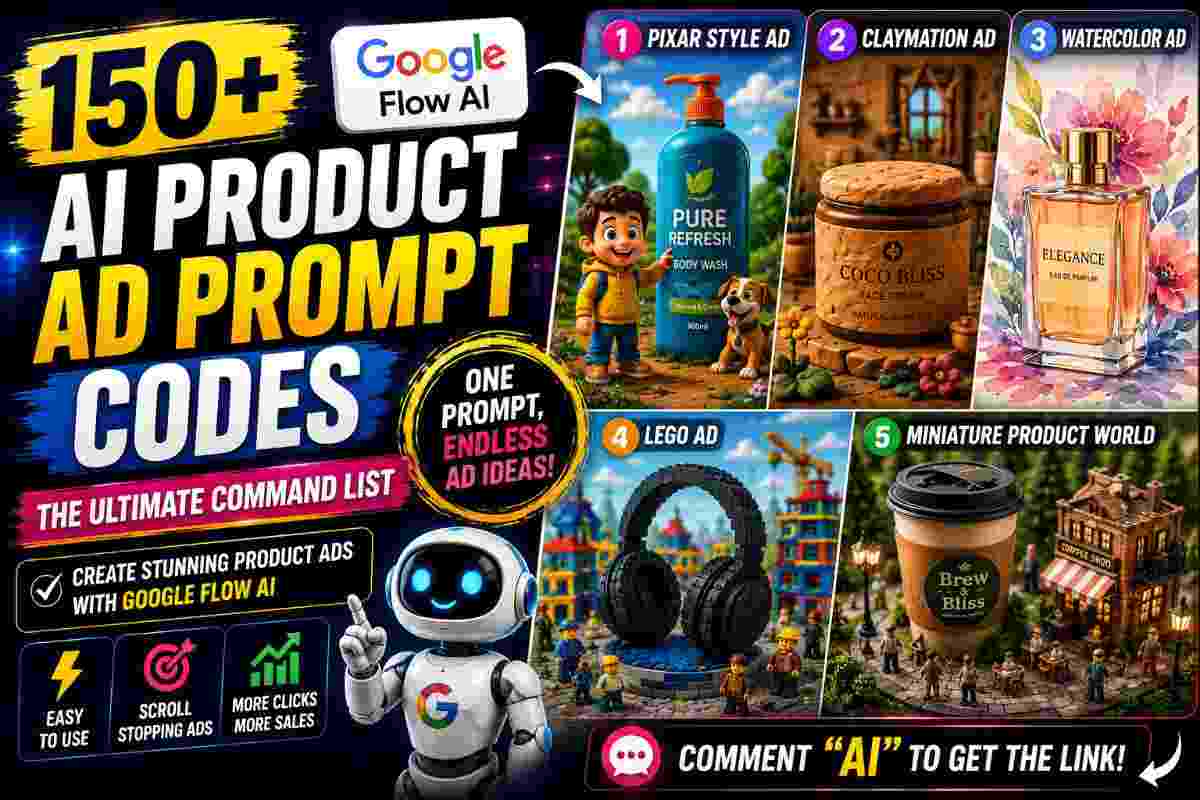
The most versatile category, covering animated styles from Pixar and claymation to dramatic reveals using fire, ice, smoke and glass, these work well as a starting set for any product, including as a foundation for the rest of your prompt.
| Prompt Code | Style Description |
|---|---|
| /PixarStyleAd | Turns your product into a playful high end animated advertisement |
| /ClaymationAd | Creates a handcrafted claymation style product advertisement |
| /WatercolorAd | Gives your product ad a soft artistic watercolor aesthetic |
| /LegoAd | Reimagines your product inside a colorful LEGO world |
| /MiniatureProductWorld | Places your product inside a detailed miniature world |
| /ProductHeroShot | Creates a dramatic hero shot making your product the main focus |
| /LuxuryProductReveal | Reveals your product with a premium luxury commercial aesthetic |
| /CinematicProductReveal | Creates a dramatic cinematic reveal around your product |
| /Product360Spin | Shows your product rotating smoothly through a full 360 degrees |
| /ProductSlowMotion | Creates elegant slow motion product movement |
| /ProductFloating | Makes your product appear to float effortlessly in space |
| /ProductGravityDefy | Creates a gravity defying scene where your product moves unsupported |
| /ProductLightSweep | Uses sweeping light reflections to highlight the product |
| /ProductMacroReveal | Reveals detailed product features through extreme macro close ups |
| /ProductCloseUp | Creates premium close up shots focusing on product details |
| /ProductRotation | Creates a smooth rotating product showcase |
Creative World Codes
Environment dictates the mood before a viewer registers the product, place your product in space, underwater, in a candy world or in a cyberpunk city without the need to shoot on location.
| Prompt Code | Style Description |
|---|---|
| /ProductInNature | Places the product inside a beautiful natural environment |
| /ProductInSpace | Creates a futuristic advertisement set in outer space |
| /ProductOnTheMoon | Places the product on a cinematic lunar landscape |
| /ProductUnderwater | Creates an underwater product commercial |
| /ProductInTheClouds | Places the product above the clouds in an epic environment |
| /ProductInTheDesert | Creates a cinematic product scene in a vast desert |
| /ProductInTheJungle | Surrounds the product with a lush tropical jungle |
| /ProductInTheOcean | Builds an ocean inspired product advertisement |
| /ProductInTheMountains | Creates a dramatic mountain setting around the product |
| /ProductInTheArctic | Places the product inside a frozen Arctic environment |
| /ProductInVolcano | Creates a dramatic volcanic environment around the product |
| /ProductInTheSky | Makes the product appear dramatically suspended in the sky |
| /ProductInTheCity | Places the product into a cinematic urban environment |
| /ProductCyberpunkWorld | Creates a futuristic cyberpunk product advertisement |
| /ProductFantasyWorld | Places the product inside a magical fantasy environment |
Material & Texture Style Codes
Surface texture has a strong impact on how premium a product appears on screen, apply material aesthetics from metallic and velvet to marble and holographic to instantly change the perceived value of a product.
| Prompt Code | Style Description |
|---|---|
| /MetallicProductAd | Gives the product a polished metallic advertising aesthetic |
| /ChromeProductAd | Creates a futuristic chrome inspired product environment |
| /GoldProductAd | Gives the product an extravagant gold commercial aesthetic |
| /SilverProductAd | Creates a sleek silver toned product advertisement |
| /CrystalProductAd | Uses crystal textures and sparkling highlights around the product |
| /MarbleProductAd | Creates a luxurious marble inspired product setting |
| /VelvetProductAd | Uses rich velvet textures for an elegant premium look |
| /SilkProductAd | Adds flowing silk fabrics and soft luxury lighting |
| /LeatherProductAd | Creates a sophisticated leather inspired environment |
| /WoodProductAd | Uses warm natural wood textures around the product |
| /PaperProductAd | Gives the advertisement a tactile paper crafted aesthetic |
| /FabricProductAd | Surrounds the product with flowing fabric textures |
| /ConcreteProductAd | Creates an industrial concrete inspired environment |
| /GlassProductAd | Uses transparent glass elements and reflections |
| /LiquidMetalAd | Creates flowing molten metal visuals around the product |
Lighting Effect Codes
Lighting is often the defining factor that separates amateur work from a professional commercial, control everything from golden hour warmth to sharp studio light and neon glow.
| Prompt Code | Style Description |
|---|---|
| /GoldenHourProduct | Uses warm golden hour lighting for a premium lifestyle feel |
| /SunsetProductAd | Creates a dramatic product advertisement during sunset |
| /SunriseProductAd | Uses soft sunrise lighting for a fresh visual aesthetic |
| /BlueHourProduct | Creates a sophisticated blue hour atmosphere around the product |
| /StudioLightingAd | Uses professional studio lighting for a clean commercial look |
| /DramaticLightingAd | Adds high contrast dramatic lighting to the product |
| /SoftLightingAd | Creates soft flattering lighting around the product |
| /HardLightProduct | Uses sharp directional lighting for strong shadows and contrast |
| /RimLightProduct | Highlights the product edges with cinematic rim lighting |
| /BacklightProduct | Creates a glowing backlit product silhouette |
| /SpotlightProduct | Places the product under a dramatic focused spotlight |
| /VolumetricLightAd | Adds visible cinematic rays of light to the scene |
| /MoonlightProduct | Creates a cool moonlit product advertisement |
| /CandlelightProduct | Uses warm candlelight for an intimate premium aesthetic |
| /DiscoLightProduct | Adds dynamic colorful disco style lighting |
Motion & Camera Codes
Camera movement adds cinematic flair that cannot be achieved with just static imagery, simulate push ins, orbits and drone shots without the need for specialist equipment or a camera operator.
| Prompt Code | Style Description |
|---|---|
| /CinematicPushIn | Slowly pushes the camera towards the product for a cinematic reveal |
| /CinematicPullOut | Pulls the camera away to reveal the surrounding environment |
| /FastPushIn | Uses a rapid camera push towards the product |
| /SlowPushIn | Creates a smooth luxurious camera push in |
| /TopDownProduct | Shows the product from a clean overhead perspective |
| /LowAngleProduct | Uses a powerful low angle shot to make the product feel dominant |
| /HighAngleProduct | Creates an elegant elevated product perspective |
| /SideProfileProduct | Showcases the product through a clean side profile shot |
| /FrontProfileProduct | Creates a direct frontal product hero shot |
| /OverShoulderProduct | Uses an over the shoulder perspective to showcase the product |
| /DroneProductShot | Creates an aerial style product shot |
| /HandheldProductAd | Gives the advertisement a natural handheld camera feel |
| /SteadicamProduct | Creates smooth professional camera movement |
| /OrbitReveal | Reveals the product while the camera circles around it |
| /SpiralCameraMove | Creates a spiral camera movement around the product |
Transition Codes
For multi-scene ads and short form video, transitions can tie everything together, from elegant liquid morphs to fast paced glitch effects for a trend content.
| Prompt Code | Style Description |
|---|---|
| /LiquidTransition | Creates a smooth transition using flowing liquid |
| /SmokeTransition | Transitions between scenes through cinematic smoke |
| /FireTransition | Uses flames to transition between product shots |
| /IceTransition | Creates a frozen transition effect between scenes |
| /GlassTransition | Uses glass distortion to transition between shots |
| /MirrorTransition | Transitions through a reflective mirror effect |
| /LightTransition | Uses a bright sweep of light to change scenes |
| /FlashTransition | Creates a fast cinematic flash transition |
| /ParticleTransition | Uses particles to morph one scene into another |
| /EnergyTransition | Creates an electric energy based scene transition |
| /PortalTransition | Transitions through a dimensional portal |
| /VortexTransition | Uses a swirling vortex to transition between scenes |
| /ZoomTransition | Transitions through an extreme camera zoom |
| /WhipPanTransition | Uses a rapid whip pan between scenes |
| /MatchCutTransition | Matches shapes or movements between different scenes |
Nature & Element Effect Codes
Rain, snow, wind and flowers bring organic energy to a product ad, particularly effective for beauty, wellness, food and lifestyle brands.
| Prompt Code | Style Description |
|---|---|
| /BotanicalGloom | Creates a dark moody botanical environment around the product |
| /FlowerExplosion | Surrounds the product with a dramatic burst of flowers |
| /PetalStorm | Creates a cinematic storm of floating flower petals |
| /LeafStorm | Uses swirling leaves for a dynamic natural effect |
| /RainProductAd | Creates a cinematic product advertisement in the rain |
| /WaterDropMacro | Uses macro water droplets to highlight product details |
| /OceanSplashAd | Adds powerful ocean style splashes around the product |
| /WaveReveal | Reveals the product through a cinematic wave |
| /BubbleProductAd | Surrounds the product with floating bubbles |
| /DewDropProduct | Adds delicate morning dew drops for a fresh aesthetic |
| /SnowfallProductAd | Creates a cinematic snowfall around the product |
| /SnowStormProduct | Adds dramatic swirling snow and wind |
| /LightningProductAd | Uses cinematic lightning flashes around the product |
| /ThunderstormProduct | Creates a dramatic storm environment |
| /WindProductAd | Uses powerful wind movement to create energy |
Surreal & Fantasy Ad Codes
For advertisements that need to feel imaginative and impossible to ignore, floating islands, impossible architecture and magical portals is perfect for bold storytelling.
| Prompt Code | Style Description |
|---|---|
| /MagicPortalAd | Creates a magical portal surrounding the product |
| /FairytaleProductAd | Gives the product a cinematic fairytale environment |
| /DreamscapeProduct | Creates a surreal dreamscape around the product |
| /SurrealProductAd | Turns the advertisement into an imaginative surreal scene |
| /FloatingIslandProduct | Places the product on a floating fantasy island |
| /GiantHandsProduct | Creates a surreal scene with giant hands interacting with the product |
| /TinyPeopleProduct | Adds miniature people interacting with the product |
| /GiantProductWorld | Makes the product gigantic inside a miniature environment |
| /InfiniteRoomProduct | Creates an endless room filled with repeating product elements |
| /ImpossibleArchitecture | Places the product inside surreal impossible architecture |
| /GravityShiftAd | Changes the direction of gravity for a surreal product scene |
| /UpsideDownProduct | Creates an upside down cinematic product environment |
| /FloatingObjectsAd | Makes surrounding objects float around the product |
| /DreamCloudProduct | Creates a soft dream like environment made from clouds |
| /FantasyCrystalAd | Builds a magical crystal environment around the product |
Animation & Art Style Codes
Not every ad has to be photorealistic, illustrated aesthetics including anime, comic book and pop art can make a product stand out on a crowded feed.
| Prompt Code | Style Description |
|---|---|
| /AnimeProductAd | Creates a stylized anime inspired product advertisement |
| /ComicBookAd | Turns the product campaign into a comic book inspired visual |
| /PopArtProduct | Gives the product a bold colorful pop art aesthetic |
| /RetroCartoonAd | Creates a nostalgic retro cartoon product advertisement |
| /StopMotionProduct | Gives the advertisement a handcrafted stop motion feel |
| /PaperCutoutAd | Creates a layered paper cutout animation around the product |
| /OrigamiProductAd | Builds an origami inspired animated product campaign |
| /SketchProductAd | Turns the product into a hand drawn sketch advertisement |
| /InkProductAd | Creates an expressive ink art product advertisement |
| /OilPaintingAd | Gives the product campaign an oil painting aesthetic |
| /PencilSketchAd | Creates a detailed pencil sketch version of the advertisement |
| /NeonAnimationAd | Creates an animated neon inspired product commercial |
| /PixelArtProduct | Turns the product into a retro pixel art advertisement |
| /RetroGameAd | Creates a video game inspired product commercial |
| /ArcadeProductAd | Gives the product a colorful arcade inspired environment |
Premium / Brand Campaign Codes
For brands positioning at the higher end of the market, this category borrows from high fashion and premium commercial advertising.
| Prompt Code | Style Description |
|---|---|
| /LuxuryFashionAd | Creates a high end fashion campaign aesthetic around the product |
| /PremiumCommercial | Produces a polished premium brand commercial |
| /HighEndCampaign | Gives the product the look of an expensive advertising campaign |
| /EditorialProductAd | Creates a sophisticated editorial style product campaign |
| /MinimalLuxuryAd | Combines minimalist composition with luxury branding aesthetic |
| /BlackLuxuryAd | Creates a dark elegant luxury product advertisement |
| /WhiteLuxuryAd | Creates a bright clean luxury product campaign |
| /GoldLuxuryAd | Uses gold tones and premium lighting for an extravagant campaign |
| /LuxuryStudioShot | Creates a high end studio shoot around the product |
| /LuxuryMacroAd | Highlights premium product details through macro cinematography |
| /LuxurySlowMotion | Combines slow motion with an elegant luxury aesthetic |
| /LuxuryReflectionAd | Uses sophisticated reflections for a premium commercial look |
| /LuxuryLightSweep | Uses controlled light sweeps to create a high end campaign |
| /LuxuryProductFilm | Turns the product into a cinematic luxury brand film |
How to Use These Prompt Codes
- Start with a clean reference. Use a clear product photo or short clip with good visibility of shape, color, and detail.
- Pick a base concept. Choose one code from Hero Shot or Creative Worlds - for example, /ProductHeroShot for a clean commercial look, or /ProductCyberpunkWorld for something futuristic.
- Layer in lighting. Add a code like /GoldenHourProduct or /StudioLightingAd to define the mood.
- Add camera movement. A code like /OrbitReveal or /CinematicPushIn gives the shot a directed, cinematic feel.
- Include a transition for video sequences. Codes like /LiquidTransition or /GlitchTransition connect multiple scenes smoothly.
- Refine with texture. Optionally add a material code like /VelvetProductAd or /ChromeProductAd to emphasize surface quality.
- Test variations. Generate two or three combinations before settling on a final version - testing is fast and low-cost.
Tips for Better Results
- Don't overload a single prompt - two or three codes usually work better than five.
- Match the style to your brand voice - skincare suits /SoftLightingAd, tech suits /HolographicProductAd.
- Keep the product visible and central, particularly with surreal or fantasy codes.
- Repurpose a single generated concept across Reels, Shorts, banners and paid ads.
- Save successful code combinations in a swipe file for future launches.
Frequently Asked Questions
Can I combine codes from different categories?
Yes - combining codes from different categories is where this system works best, layering environment, lighting and camera movement on to a single product reference.
Do these codes work for images and videos?
Most are built for video, particularly motion, camera and transition codes, but hero-shot, material and lighting codes are equally effective with static images.
How many codes should I use per prompt?
Two to three well chosen codes typically give the cleanest results, without visual clutter.
Final Thoughts
With the 150 AI product ad prompt codes spanning hero shots, creative worlds, materials, lighting, motion, transitions, nature effects, fantasy visuals, animation styles and premium campaigns, brands and creators have countless ways to reinvent their product advertising, and treat this list as a long term creative toolkit to return to whenever they need a fresh angle or a way to make a familiar product feel new again, without a full production crew or big budget.
Continue Reading