
How to Make a Kerala Style Cinematic Lotus Pond Video From One Photo Using Google Flow
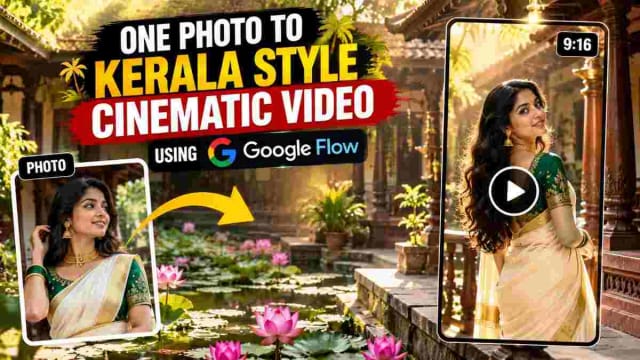
Is a single portrait pic enough to create a 30sec cinematic video of a heritage home with lotus pond, wooden pillars and soft sunlight? I made this workflow myself and in this guide, I will show you my prompt structure and settings, plus my thoughts and notes.
Please keep in mind that Google Flow's available models, interfaces and credit system are constantly changing, so this guide reflects only my experience at the time of writing this article.
What is Google Flow?
Google Flow is an AI creative tool to generate videos from text prompts and a reference photo. Everything is browser-based, so there is no need to download or install anything. In this guide, I'm using a single reference photo and a multi-scene prompt to generate one vertical 9:16 video from ingredients.
In this guide, I'm using a single reference photo and a multi-scene prompt to generate one vertical 9:16 video from ingredients.
What I Made in This Experiment
I wanted to see if I can generate a romantic vertical video in the style of Kerala traditional homes. I've split the video into three 10-sec clips that continue the same subject, so that altogether they make a 30-sec short film. The video features:
- Dark wood architecture, railings, pillars
- A peaceful lotus pond with lily pads and pink-purple flowers
- Sunlight streaming through the leaves
- A woman in a traditional Kerala Kasavu saree with a gold border
- Lots of close-ups of jewelry, bangles and fabric
- Slow panning with a shallow field of view
Step-by-Step: How to Create This Video
First, find a clear reference photo. The photo should be well-lit and showcase the subject's clothing. You can use any photo that you own or have permission to use.
Step 1: Choose a Reference Photo
Second, go to Google Flow's website and log in to your Google account to start a new project and upload your photo. I've selected Video and Ingredients mode to indicate that I'm using a reference photo of a person.
Step 2: Set Video Settings
Set the aspect ratio to 9:16 for Instagram Reels and YouTube Shorts and select Video, 720p quality, 10-sec duration and 2 outputs (to compare two variations to each other).
Step 3: Write Your Prompt in 3 Parts
The prompt is split into three parts since a 10-sec clip can't include a complex story. Part 1 describes the subject, the setting, the clothing. Part 2 and Part 3 begin with the phrase Continue the same style, same subject and setting.
The prompt structure includes:
| Prompt structure includes |
|---|
| Setting (heritage home, wooden deck, lotus pond) |
| Subject (clothing, jewelry, hair, makeup) |
| Shot-by-shot timeline (what happens at 0:00, 0:03, 0:06, etc.) |
| Style line (slow panning, shallow field of view) |
| Continuity line for Part 2 and Part 3 ("Continue the same style..." ) |
Step 4: Generate, Review, Continue
Generate Part 1, then use the same prompt to generate Part 2 and Part 3 by selecting the same reference photo. Review faces, hands, jewelry, and the background in the generated video before you proceed.
A Sample Prompt Breakdown
Each part of the prompt has a specific purpose.
Setting describes the environment, whereas the subject lists clothing, accessories and makeup. Then we write a shot-by-shot timeline, the style line, and a continuity line for Part 2 and Part 3. Here is the prompt I used in this experiment:
The Exact Prompt I Used
✨ AI PromptVertical 9:16 cinematic aesthetic montage. Lush tropical heritage home setting with dark polished wooden architecture, railings, pillars and a serene pond densely covered with green lily pads and blooming pink-purple lotus flowers. Bright natural dappled sunlight filtering through trees. Warm, romantic, peaceful mood. **Subject:** Young woman in a traditional cream/off-white silk saree (Kerala Kasavu style) with subtle gold border. Emerald green short-sleeved blouse with intricate silver/gold floral embroidery. Traditional gold jewelry: delicate choker necklace, large gold jhumka earrings with pearl drops, stack of vibrant green glass bangles, simple gold rings. Long dark wavy hair left open, cascading over shoulders. Natural glowing makeup with subtle eyeliner and soft neutral lips. **SHOT-BY-SHOT:** **[0:00–0:02]** Opens on a dark wooden staircase adorned with potted spider plants. Lotus pond visible to the left. The woman is partially visible leaning against the railing. **[0:02–0:04]** She walks away on a wooden deck, then turns to look back over her shoulder at the camera, holding the pallu of her saree gracefully. Traditional sloping tiled roof and dense green foliage in the background. **[0:04–0:06]** Close-up on her torso and hand. Her hand (adorned with green bangles and a gold ring) rests gently over her heart on the cream silk saree, highlighting the fabric texture and jewelry. **[0:06–0:10]** She leans casually against the dark polished wooden railing of a porch. She looks directly at the camera with a calm serene expression, then turns her head and rests her cheek on her hand. Lotus pond softly blurred in the background. **Style:** Smooth slow camera movement, shallow depth of field, natural dappled sunlight, elegant and tranquil atmosphere. Continue the same vertical 9:16 cinematic aesthetic style, same subject, same lush tropical heritage setting with wooden architecture and lotus pond. Natural dappled sunlight. No dialogue. **SHOT-BY-SHOT:** **[0:00–0:05]** Intimate close-ups by the pond. She poses with her hand gently resting under her chin or touching her jawline, gazing softly at the camera. At one point she playfully brings her bangle-adorned hand up to partially cover her eye and forehead in a shy, alluring gesture. **[0:05–0:07]** Camera shoots through the dark wooden pillars of the deck, framing her as she leans against the railing. She rests her cheek on her hand, looking at the camera with a soft inviting expression. **[0:07–0:10]** Mood shifts to candid and joyful. She stands by the pond, laughing and smiling brightly. She looks down shyly then looks back up. Sunlight catches her hair, creating a soft halo effect. **Style:** Same warm natural light, shallow depth of field, smooth slow movement, focus on facial expressions and jewelry details. Continue the same vertical 9:16 cinematic aesthetic style, same subject and setting. Natural dappled sunlight, peaceful romantic mood. No dialogue. **SHOT-BY-SHOT:** **[0:00–0:04]** Slow deliberate posing. She leans against the railing and stands by the water, alternating between looking directly into the lens with a piercing soft gaze and looking slightly away. Her hand frequently rests under her chin or gently touches her neck and earrings. **[0:04–0:07]** Beautiful profile shot: she closes her eyes and places her hand on her forehead, as if enjoying a gentle breeze or the warmth of the sun. She then looks down, seemingly adjusting or admiring her green bangles. **[0:07–0:10]** Final medium and close-up shots. She leans against the railing one last time, then stands gracefully by the lotus pond with her hands clasped gently in front of her, offering a final peaceful look to the camera. **End.** **Style:** Same elegant cinematography, shallow depth of field, soft natural light, tranquil and romantic closing mood.
SHOT-BY-SHOT:
My Experience With This Workflow
As a person who has tested this workflow, here are some things I noticed.
The three-part structure helps to make the video engaging throughout.
Each part is short, so you can make changes to individual shots rather than the whole prompt.
Generating two variations helped too, since a single clip might have glitches in movement or appearance.
The 2x generation option is perfect for choosing between two variations of the same scene.
Faces are important in video, so I've noticed that using a higher quality reference photo and Ingredients mode helps to keep faces consistent.
The same goes for other elements like hands or jewelry, such as bangles, which have a higher chance of appearing differently in various scenes.
Using the phrase Continue the same style, same subject and setting in Part 2 and Part 3 helped to keep the video's subject and setting consistent across all three parts, although I noticed some variations in the women's clothing.
Testing with a shorter duration helped me to get a sense of timing before I committed to a longer clip.
The 10-sec duration allowed me to see how much motion was too much for the duration. For movement-heavy scenes, a higher duration may be needed to avoid making the video look like a slideshow.
Credits and time:
My settings (720p, 10-sec duration, 2x generation) consumed approximately 30 credits per sample, based on the on-screen estimate, and took only a few minutes to generate. Your experience may be different.
What didn't work:
Fast or complex movements appeared less realistic than slow ones. Additionally, some small details might require regeneration.
Tips for Better Results
- Use a high-quality image as a reference.
- Describe the clothing in detail to help maintain consistency.
- Avoid complex and fast movements.
- Use timestamps to help the AI understand the shot-by-shot description.
- Add a continuity line to generate connected video clips.
- Test your prompts with a shorter duration to save credits.
- Review the final result for errors before sharing.
Who Can Use This Technique?
- Saree and traditional wear creators
- Jewellery and boutique promotion
- Travel and heritage visuals
- Instagram Reels and YouTube Shorts
- AI filmmaking
Responsible Use of AI Video
- Always use reference photos of people who have given you permission to use their image.
- Do not use this to impersonate or defame others.
- Label videos made with AI as such when you post them on social media or other platforms. Google Flow's privacy settings allow you to disclose AI-generated content to specific people.
- Avoid using this technique to create harmful or deceptive content.
Frequently Asked Questions
Why is the prompt split into three parts?
Each video part is relatively short (around 10 seconds), so it makes sense to use a three-part structure to describe the entire video. Each part describes the scene, subject, and shot-by-shot instructions for a particular segment.
Will the outfit and face stay the same?
It depends on how well you describe the subject and what reference photo you use. Using a photo with high resolution and Ingredients mode should give you better results, but you may notice some variations. Always review the generated video.
Which aspect ratio is better for a video?
It depends on where you plan to post your video. Use 9:16 for Instagram Reels and YouTube Shorts and 16:9 for standard videos.
Is Google Flow free?
Google Flow is free to use, but you may need to purchase credits to use certain features.
Can I change the location or outfit?
Yes, you can change the location, outfit, and shot-by-shot description while keeping the same prompt structure.
Final Thoughts
You don't need a camera to set up a cinematic video concept. Using one strong reference photo, a well-structured multi-scene prompt, plus some experimentation, I managed to create a 30-sec short film with a slow pace, romantic vibe, and lots of close-ups of jewelry, bangles and sarees in the style of traditional Kerala homes. All that is needed for such a concept is a detailed prompt, realistic expectations and review of every result.
Disclaimer: The purpose of this article is purely educational. The tools and techniques mentioned may change over time, so it is important to do your own research and experimentation. The video described in this article is generated using AI.
DINESH
Lead EditorEditorial expert testing, curating, and documenting the best AI tools, gadgets, creative setups, and lifestyle gear in India.
Continue Reading
Recommended Stories
How to Use One Photo to Create Cinematic Short Vertical Video Using Google Flow
Can one ordinary photo become a cinematic video without any filming? In this guide, I share my Google Flow workflow, the exact prompt structure, and the mistakes to avoid.
Turn a Photo Into an AI Video With Google Flow, Step-by-Step on Your Mobile
Learn how to turn a single photo into a cinematic 10-second vertical video using Google Flow. This guide includes the exact prompt, recommended 9:16 settings, and simple steps to create an AI-generated video while keeping the uploaded reference image consistent.
12 AI Prompts to Turn One Photo of a Garment into a Full Fashion Shoot
Discover 12 AI garment prompts to turn one saree, dress, or shirt photo into professional mannequin displays, boutique images, studio model shoots, fashion editorials, catalog images, e-commerce visuals, and Instagram-ready content.