
How to Use One Photo to Create Cinematic Short Vertical Video Using Google Flow
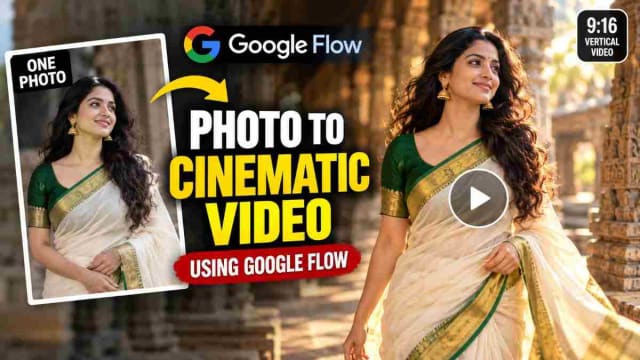
Is there a way to use any photo to create a short cinematic version of it without filming? I decided to test it out myself using Google Flow, and here, in this article, I will tell you how exactly I did it, what I wrote in the prompt, and what to avoid.
By the end of this article, you will understand how to transform a still photo into a cinematic vertical 9:16 video for your Instagram Reels or YouTube Shorts.
Note: Google Flow's features, modes, and credits are subject to change. These steps might have been made using an older version.
What is Google Flow?
Google Flow is an AI tool created by Google that allows you to create videos from a prompt and a reference image. This tool is browser-based, meaning that you do not have to download any apps.
In this article, I will show you how to make a video using a photo using Google Flow. That is, I uploaded an image and told the AI what to do with it.
What I created
I used a common photo as a reference image and transformed it into a cinematic vertical video with the environment, movement, and camera of your choice, suitable for a Reels or Shorts.
Here is the result: a 9:16 video demonstrating a woman wearing a saree-style traditional dress walking naturally in a temple environment with natural lighting, close-ups, and the environment, with realistic movement of materials.
How to do it: Photo to Video Cinematic
Let's begin!
Step 1: Find a Good Photo
Ensure that the photo you want to use has the face and/or clothing you want to see in your video since the AI will only keep those.
Only use your photos or any other photos you have permission to use; otherwise, it would be a breach of privacy.
Step 2: Upload and Describe
This is probably the most important step: make sure to describe the video you want! Otherwise, if you just told the AI to "make this photo into a video," you would get random results every time. However, if you describe the video you want to see, it will turn out better!
A good prompt will have the following:
- Subject: what you want to be kept.
Make sure to preserve the face, hairstyles, clothing, colors, jewelry, and overall styling of the subject in the photo.
- Movement: what you want the subject to do in the video.
Show a natural movement of the body and subtle clothing movement.
- Camera: how you want it to be filmed.
A cinematic tracking shot, or a mix of close-ups and wide shots can look great!
- Environment: where you want it to take place
Put the subject in an interesting environment with nice lighting.
Step 3: Choose a Vertical Ratio
Make sure to choose the 9:16 ratio if you are making a video for Instagram Reels or YouTube Shorts. If you want a standard YouTube video, go with the 16:9 ratio.
Step 4: Make and Review
Once you have generated a video, review the face, hands, clothes, and environment before publishing somewhere.
The Prompt I used
✨ AI PromptVIDEO GENERATION PROMPT Create a 13-second ultra-realistic cinematic traditional fashion reel using the supplied reference image as the STRICT visual identity reference for the female character. REFERENCE IMAGE — IDENTITY LOCK: Use the supplied reference image as the PRIMARY and STRICT reference for the woman. The generated woman must be the EXACT SAME PERSON as shown in the reference image. Preserve her exact: - Facial identity - Face shape - Facial proportions - Eyes - Eyebrows - Nose - Lips - Jawline - Cheek structure - Skin tone - Natural facial asymmetry - Hairline - Hair characteristics - Age appearance - Overall recognizable appearance The reference image must NOT be treated as inspiration or a generic character reference. It is the exact identity source. Every shot must contain the SAME woman. Do NOT generate a similar-looking woman. Do NOT replace her face. Do NOT beautify or redesign her face. Do NOT change her facial proportions. Do NOT alter her skin tone. Do NOT change her age appearance. Do NOT create an AI-looking face. Her face must remain sharp, natural, realistic and clearly recognizable whenever visible. Maintain perfect identity consistency across every camera angle, pose, movement, lighting condition, transition and shot. IMPORTANT: Use the supplied reference image for the woman's identity and facial appearance. Use the wardrobe and environment specifications below for the video. FORMAT: Aspect Ratio: 9:16 vertical Duration: EXACTLY 13 seconds Style: Ultra-realistic cinematic Indian traditional fashion reel Quality: 4K No dialogue No captions No text ================================================== SUBJECT & WARDROBE ================================================== The Woman: Long dark wavy hair flowing naturally loose. Small bindi. Natural soft smile progressing into a bright genuine laugh. Attire: White/cream lehenga-skirt with a broad maroon-gold zari border featuring traditional temple/elephant motifs. Deep-maroon pallu/dupatta with a detailed gold edge draped naturally across the torso. Blouse: Blueish check-weave body with maroon sleeves featuring gold zari elephant motifs. The blouse has back-tied strings, clearly visible during rear shots. A gold waist-belt should subtly glint at the back. Jewelry: Gold jhumkas with pearl fringes. Stacked gold bangles. Gold wristwatch. Delicate rings. Henna-free hands. Keep the exact same outfit, hairstyle, jewelry and styling throughout the entire video. Do not change wardrobe between shots. ================================================== SETTING ================================================== A colorful South-Indian temple complex during bright daytime. The environment contains: Painted shrine/chariot structures with red, green and blue panels. Golden sphere finials. Scalloped colorful eaves decorated with deity figures. Green metal fencing. A tall golden pillar / dhwajastambha. A golden kalasha with lotus-bud finial on a railing post. Blue-painted curb. Pink step edges. Lush green foliage. Tiny background crowds of devotees naturally crossing the bright plaza. Orange traffic cones. Distant temple roofs. Keep background people softly blurred and secondary. The woman remains the primary subject. ================================================== 0:00 — SHOT 1 — FADE-IN BLUR ================================================== Begin from a dark, softly blurred frame. The darkness gradually blooms into a bright sunlit temple passage. The temple architecture slowly becomes visible. Reveal the woman naturally entering the frame. Her identity must already match the supplied reference image. No face distortion during the transition. ================================================== 0:01–0:02 — SHOT 2 — REAR TRACK ================================================== Camera follows the woman from directly behind as she walks naturally through the temple passage. Show: Maroon pallu flowing over her shoulder. Back-tied blouse strings. Gold waist-belt subtly catching sunlight. Long dark wavy hair moving naturally. Painted shrines, golden spheres and green fencing slide past in the background. Use smooth handheld cinematic tracking. Maintain realistic fabric and hair physics. ================================================== 0:03–0:04 — SHOT 3 — THE TURN ================================================== The woman gracefully turns toward the camera. Her face becomes clearly visible. She gives a natural bright smile. Her hair fans gently with the movement. Her gold jhumkas sway naturally. Camera moves into a cinematic close-up. Behind her: Golden pillar. Bright white temple plaza. Softly blurred background devotees. CRITICAL: Her face must remain EXACTLY the same as the supplied reference image. Do not generate a different face during the turn. ================================================== 0:05–0:06 — SHOT 4 — JEWELRY POSE ================================================== Medium close-up. The woman gently tilts her head. She raises her fingers toward her jhumka/hair in a natural traditional fashion pose. Her stacked gold bangles catch the strong sunlight. She gives a subtle coy half-smile toward the camera. Keep her face clear and sharply focused. Preserve exact facial identity. ================================================== 0:07–0:08 — SHOT 5 — FULL-BODY TWIRL ================================================== Full-body cinematic shot. The woman gracefully performs one elegant twirl on the pink-edged temple step. Her white/cream lehenga flares outward naturally. The broad maroon-gold zari border becomes clearly visible as the skirt moves. Her maroon pallu follows the rotation with realistic cloth physics. Colorful temple eaves and deity figures frame the upper background. Use tasteful cinematic slow motion. Maintain the exact same woman and outfit. No body distortion. No extra limbs. ================================================== 0:09–0:10 — SHOT 6 — HAIR POSE + WHIP LAUGH ================================================== The woman raises both hands naturally and sweeps her flowing hair back. Her gold bangles flash in the sunlight. She breaks into a genuine joyful laugh. Use a fast cinematic whip-blur movement. The camera briefly follows her movement while maintaining her identity. End the movement with her face briefly visible and naturally smiling. No face morphing during motion blur. ================================================== 0:11–0:12 — SHOT 7 — KALASHA LEAN ================================================== The woman rests/folds her arms naturally on top of the golden lotus-bud kalasha finial. She leans her cheek gently near her wrist. She gives a bright, genuine smile toward the camera. Her watch and bangles catch the sunlight. Soft fern and green foliage bokeh fills the background. Keep her face extremely clear and photorealistic. Exact reference identity must remain unchanged. ================================================== 0:13 — SHOT 8 — FINAL CLOSE ================================================== End with a cinematic medium close-up. The maroon pallu rests naturally over her shoulder. She gives a gentle closed-lip smile. Her eyes look warmly toward the camera. Deep green foliage creates soft background bokeh. Hold the final expression naturally for the ending frame. The final frame must still show the exact same woman from the supplied reference image. ================================================== CINEMATOGRAPHY ================================================== Handheld cinematic follow shots. Smooth tracking. Orbiting turn. Stable intimate portrait framing. Slow-motion full-body twirl. Fast whip-blur transition. Natural cinematic depth of field. Keep the woman sharply focused. Keep distant temple architecture and background devotees softly blurred. Use realistic motion blur. Use natural lens characteristics. No excessive artificial camera movement. ================================================== LIGHTING & COLOR ================================================== Bright high-key Indian noon sunlight. Natural strong sunlight and realistic shadows. Slight dreamy overexposure on the bright white temple plaza. Saturated maroon and gold against: White stone. Green foliage. Blue details. Colorful shrine paint. Natural warm skin tones. Realistic gold reflections. Premium cinematic color grading. ================================================== REALISM ================================================== Ultra-photorealistic real-world camera footage. Natural Indian woman. Realistic skin texture. Visible natural hair strands. Realistic jewelry reflections. Physically accurate fabric movement. Realistic wind. Natural body movement. Realistic sunlight. Realistic temple materials. No CGI appearance. No 3D-rendered appearance. No cartoon appearance. No plastic skin. ================================================== STRICT IDENTITY CONSISTENCY ================================================== The supplied reference image is the ONLY identity reference for the woman. The same exact woman must appear throughout the entire video. Maintain: SAME FACE. SAME EYES. SAME NOSE. SAME LIPS. SAME JAWLINE. SAME FACE SHAPE. SAME SKIN TONE. SAME HAIR CHARACTERISTICS. SAME AGE APPEARANCE. SAME NATURAL IDENTITY. Different camera angles must NOT produce a different face. Rear view → same woman. Turn-around → same woman. Close-up → same woman. Full-body twirl → same woman. Whip movement → same woman. Final close-up → same woman. Whenever the face becomes visible, it must match the supplied reference image. ================================================== STRICT NEGATIVE PROMPT ================================================== No face change. No face morphing. No identity drift. No different woman. No face replacement. No face swap. No facial redesign. No beautification. No age change. No skin-tone change. No different eyes. No different nose. No different lips. No different jawline. No different face shape. No AI-looking face. No plastic skin. No artificial facial features. No facial flickering. No facial warping. No facial melting. No duplicate woman. No extra person. No body duplication. No extra fingers. No extra limbs. No distorted hands. No distorted jewelry. No outfit change. No hairstyle change. No jewelry change. No random accessories. No background characters becoming prominent. No text. No captions. No subtitles. No logos. No watermark. No CGI. No cartoon. No 3D render. No unnatural motion. No unnatural cloth physics. No environment reset. MOST IMPORTANT: REFERENCE IMAGE = EXACT FEMALE IDENTITY. Use the supplied reference image to generate the SAME REALISTIC WOMAN throughout the entire sequence. Do not reinterpret her face. Do not create a similar woman. Do not change the storyline or shot progression. The supplied reference image controls the woman's identity; the prompt controls the specified wardrobe, temple environment, actions, camera choreography and cinematic style. The final result must look like a professionally filmed Indian traditional fashion reel featuring the EXACT WOMAN from the supplied reference image.
You can copy this prompt and use it as is or change some parts according to your needs/environment/movement.
My Experience with This Workflow
I have used this workflow myself, and here are some tips I have to say.
Your Face Can Look Different Depending on How You Set It Up
I have found that if you generate in "plain video" mode, your face looked very different in every variation. However, using "ingredients" mode, which uses your photo as a reference for the person in the video, helped with that.
Shorter Videos Look Better for Testing Purposes
When I tried putting the duration to 10 seconds, the spinning/rotating parts had way more motion blur than the other parts of the video. Instead, start with something shorter and only increase the duration if you are satisfied.
Simple Movement Looks Better
The slow walking and rotating looked better than any other complex movements. Moreover, when I tried putting more than one action in one prompt, the movement did not look as good.
Describing Everything Helps the AI Know What to Do Better
Make sure to put specific descriptions about the clothing: colors, border, jewelry, and lighting.
Tips for Getting Better Photo-to-Video Results
Use a Good Photo
A good photo will make sure that more things get preserved.
Mention the Clothing Details
The colors, pattern, border, fabric, and jewelry are all worth mentioning.
Keep It Simple
The slow walking and rotating looked better than anything else.
Describe the Camera You Want
Mentioning tracking, close-up, and/or wide shots helps.
Generate Multiple Times
Try generating 2 or 3 variations and then pick the best parts of each to put together.
Start Low and Go Up
Try lower quality or a shorter version before going full length or quality.
Always Review the Video
The AI might make mistakes with the hands, face, or other small description parts.
Who Can Use This Technique?
This technique can be useful for:
- Fashion and saree content
- Showcasing traditional outfit
- Jewellery and boutique promotion
- Travel-style
- Personal branding
- Instagram Reels and YouTube Shorts
- AI filmmaking
Responsible Use of AI Video
AI videos should be used responsibly:
- Use photos of people who gave you permission to use them.
- Do not use videos that can impersonate real people.
- Label AI videos as such when posting them (both YouTube and Instagram have an option for that).
- Do not use this for malicious, harmful, or inappropriate content.
Frequently Asked Questions
Do I Need to Download an App to Use Google Flow?
No. It is browser-based and can be used on both a computer and a phone.
Which Aspect Ratio Should I Pick?
I recommend using the 9:16 ratio for Instagram Reels and YouTube Shorts and the 16:9 ratio for standard YouTube videos.
Will the Face Look the Same?
Not necessarily. However, using a good photo and the "ingredients" method should help you get better results.
Is Google Flow Free?
It depends on your account, but every prompt you make will cost you some credits depending on the video's length and quality. See how many credits you have in the Google Flow website for more details.
Can I Use the Same Photo for Other Things?
Yes! You can use the same photo but different prompts to make multiple videos with the same person but different appearances, keeping their appearance somewhat consistent.
Final Thoughts
You do not always need a camera to build a video concept! With just one reference photo, a good prompt, and some testing, you can make a short cinematic version of it for your Instagram Reels or YouTube Shorts. The most important things are a good prompt and reviewing everything. If you try this out, try starting with a short version and test out different parts of the prompt.
Disclaimer: This article is for educational purposes. Google Flow's features, modes, and credits are subject to change. The video described in this article was made with AI.
DINESH
Lead EditorEditorial expert testing, curating, and documenting the best AI tools, gadgets, creative setups, and lifestyle gear in India.
Continue Reading
Recommended Stories
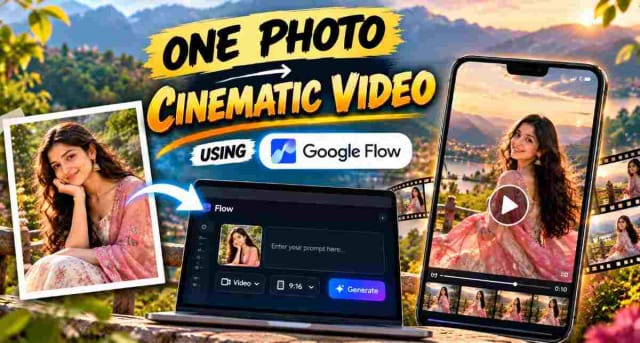
Turn a Photo Into an AI Video With Google Flow, Step-by-Step on Your Mobile
Learn how to turn a single photo into a cinematic 10-second vertical video using Google Flow. This guide includes the exact prompt, recommended 9:16 settings, and simple steps to create an AI-generated video while keeping the uploaded reference image consistent.
12 AI Prompts to Turn One Photo of a Garment into a Full Fashion Shoot
Discover 12 AI garment prompts to turn one saree, dress, or shirt photo into professional mannequin displays, boutique images, studio model shoots, fashion editorials, catalog images, e-commerce visuals, and Instagram-ready content.

12 AI Prompts to Turn One Photo of a Garment into a Full Fashion Shoot
Discover how to use 10+ ChatGPT prompts for clothing businesses to create professional fashion product images without a traditional studio setup. From /mannequin store and /boutique display to /street style and /studio model, these prompts can help turn simple saree or dress photos into polished marketing visuals for your brand. Perfect for clothing stores, boutiques, resellers, and fashion entrepreneurs looking to create product content faster with AI.