
Why Your Instagram Reels Get No Views: How to Analyze Using ChatGPT
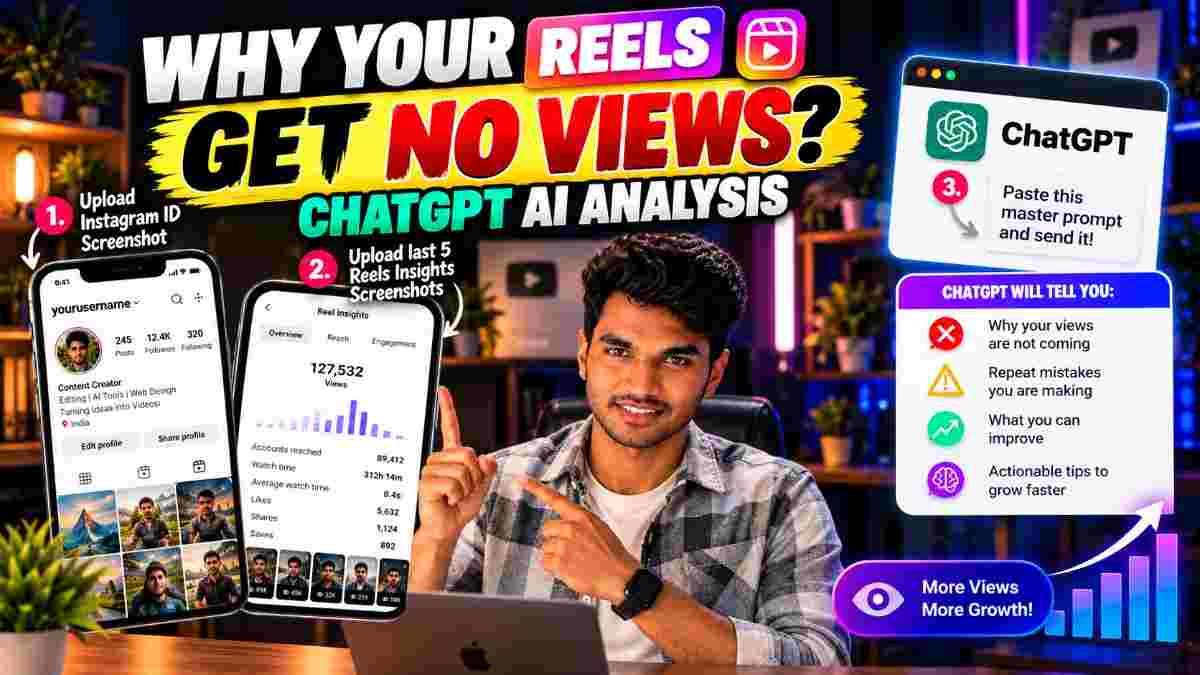
You post to reels and the views aren't there. Rather than guessing what went wrong, you could upload your Instagram data to ChatGPT and have it analyze why it may be happening. This article has the details you need to do this, and the master prompt to get started.
The process includes taking a screenshot of your profile and the insights of your last 5 reels and uploading to ChatGPT, where it will analyze and provide a profile-assessment, comparison of the insights, areas of improvement, and a 7-day improvement plan.
What Is ChatGPT Instagram Account Analysis?
It is a process of using AI to ingest the information you provide it from your screenshots of your profile and reels insights and analyze it to provide a general idea of what issues you could be facing and how to address them, depending on the information it has available from the screenshots you provide.
It will examine: How much your profile tells an incoming viewer about your niche and what your content is about. How your last 5 reels are performing and what patterns can be observed about them. What similarities are there between the higher-performing and lower-performing reels. What common mistakes are there in the lower-performing reels. What minor tests could you run on your next few reels to see what engages your audience more and help your reels grow. What a 10-reels plan, relevant to your niche, with possible hooks and explanations for each, and a 7-day improvement plan.
ChatGPT cannot analyze your account directly, as it can only analyze what you provide it with from your screenshots.
How to Analyze Your Instagram Reels Using ChatGPT
Step 1: Take a screenshot of your Instagram profile
Go to your profile and take a screenshot, so ChatGPT can analyze how much information it provides about your niche and posts. You can obscure any personal information you don't want visible, but make sure that your username, follower count, and visible text is visible for analysis.
Step 2: Take screenshots of insights of the last 5 reels
Go to your most recent 5 reels, go to their Insights, and take screenshots. Depending on your account, you can get a variety of statistics - views, who saw your reel (non-followers vs. followers), likes, comments, shares, saves, watch time and more. Use the most recent 5 reels, as a single reel isn't enough to find a pattern. You could observe that certain topics get better engagement or shares, or that certain types of openings get better watch time.
Step 3: Run the master prompt
Now, upload the photos to ChatGPT and run the following prompt:
✨ AI PromptAct as an Instagram content strategist and Reels performance analyst. Analyze the Instagram profile screenshot and the screenshots of my latest five Reels Insights that I uploaded. Please provide a detailed, practical analysis covering: 1. Profile Audit: Review my profile presentation, bio, niche clarity, and visible content consistency. 2. Reels Performance: Compare the available metrics from my latest five Reels and identify noticeable patterns. 3. Recurring Mistakes: Identify potential weaknesses in my hooks, topics, video structure, captions, or content strategy based on the evidence provided. 4. Low-View Analysis: Explain possible reasons my Reels may be underperforming. Clearly distinguish evidence from assumptions. 5. Content Improvements: Suggest specific changes I can test to improve viewer retention, shares, saves, engagement, and reach. 6. Next 10 Reels Plan: Recommend 10 content ideas relevant to my niche, including a hook and a short explanation for each. 7. Action Plan: Create a practical 7-day improvement plan with measurable goals. Use only the information visible in my screenshots and clearly state when additional data is needed. Do not invent metrics, guarantee viral results, or claim that you know Instagram's internal algorithm. Make the recommendations specific, realistic, and easy for a content creator to implement.
Step 4: Critically assess the recommendations
Don't take every recommendation at face value. Some may not apply to your content. If a recommendation suggest that the topic of your reel is an issue, test it by replacing it with another topic. If it suggest that your opening is weak, experiment with a different type of opening.
Step 5: Create a testable, narrowed plan
Rather than adjusting everything at once, narrow it down to 1-3 adjustments to test at a time. You could test a stronger opening, a shorter introduction, a different topic. Apply these changes across 3-5 reels, and see if the results improve.
My Experience Testing This Method
[REPLACE THIS SECTION WITH YOUR OWN REAL TEST BEFORE PUBLISHING. Write 3 to 5 sentences covering: which account you tested this on, which findings from ChatGPT turned out useful, which suggestions you ignored and why, and what you changed in your next Reels. Do not publish this article with this placeholder text still in it.]
What can the analysis tell you about no views?
These are some common issues, but they aren't guaranteed in every case. There's a combination of things that contribute to low views, and sometimes a detailed analysis requires more information than can be obtained from a screenshot.
Weak or unengaging opening: If the first few seconds of your videos fail to hook the audience, they might not watch the rest. Test different openings, such as a direct statement, a question, or a surprising fact.
Unclear niche or topic: If your reel covers several different topics, or it isn't immediately obvious what they're about, an incoming viewer might not feel inclined to watch.
Low watch time: If the audience watches only a small portion of your reel, it can impact its reach, as Instagram favors content that people watch in full. Look at the average watch time of your reels, and if it is lower than expected, experiment with a shorter introduction.
Lack of shares and saves: Practical tips or information that people want to refer to later encourages shares and saves. See what type of content performs better in this area and test similar topics.
Inconsistent testing: Changing multiple aspects of your videos at once can prevent you from identifying what change had an effect. Instead, change one thing at a time, and compare the results of at least 3-5 similar reels.
Tips for getting good results
Take clear screenshots, with visible numbers
Upload several reels, not just one
Inform it of your niche and target audience, if it isn't clear from your profile
Ask clarifying questions about anything you aren't sure of
Ask for examples of hooks for your next few reels
Repeat the process in a few days, if you have more content
Never give away your password or authorization code to any AI
FAQ
Can ChatGPT analyze my Instagram account?
It can analyze the data you provide it from your screenshots. It isn't able to analyze your account directly, so it can only analyze what you tell it.
Why are my Reels getting no views?
Some common reasons include a weak opening, unclear topic, low watch time, or a lack of shares or saves. You can use your Insights to determine which of these may be the issue, but there isn't a single certain cause.
How many Reels should I upload?
Start with the last 5, as it provides the necessary for analysis. If you have more, you can upload them as well.
Is the master prompt free?
Yes, the text above is free to use. Whether image uploading is available depends on your plan and the AI you're using.
Can ChatGPT guarantee more views?
No, as it cannot directly impact how your reels are distributed. It can only provide information and make suggestions, not promises.
Should I delete Reels with low views?
Not necessarily, analyze to see what could be done differently.
Does this work for new accounts?
It can, but there might be less information to work on.
Conclusion
Reviewing your profile and insights can help you go from guesswork to testing specific changes to improve your content. Upload your profile screenshot and last 5 Reels Insights, paste the master prompt, then test the suggestions it provides in small increments. View ChatGPT as an analytical tool, not a guarantee of success.
Written by Dinesh, full-stack developer and content creator covering practical AI workflows for creators.

DINESH
Lead EditorEditorial expert testing, curating, and documenting the best AI tools, gadgets, creative setups, and lifestyle gear in India.
Continue Reading
Recommended Stories
20 viral ai food animation video prompts omni flash
Create viral-style AI videos in just 2 minutes using Google Flow! 🎬✨ Learn the simple steps to generate amazing videos with AI prompts and discover 15+ ready-to-use video concepts for your next viral reel.
How to Make Viral-Style AI Miniature Video With One Photo
Turn a single photo into a viral-style AI miniature video using ChatGPT and Google Flow. In this guide, learn how to create a miniature image from your photo, animate it into a cinematic video, and generate eye-catching content with simple AI prompts. Perfect for Instagram Reels, Shorts, and creative social media content.
How to Make a Kerala Style Cinematic Lotus Pond Video From One Photo Using Google Flow
Can one photo become a cinematic lotus pond video? Here's my 3-part Google Flow prompt workflow, with tips and honest testing notes.