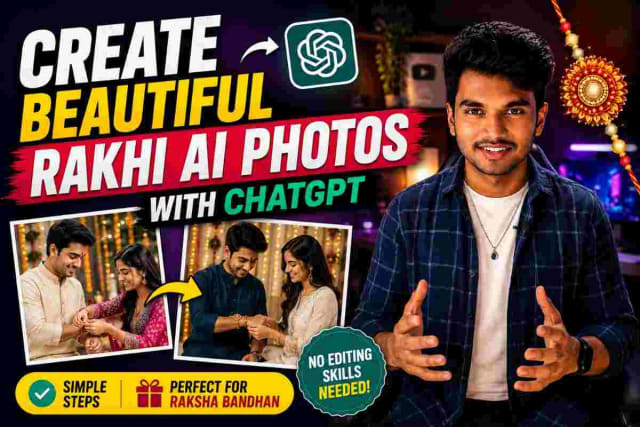
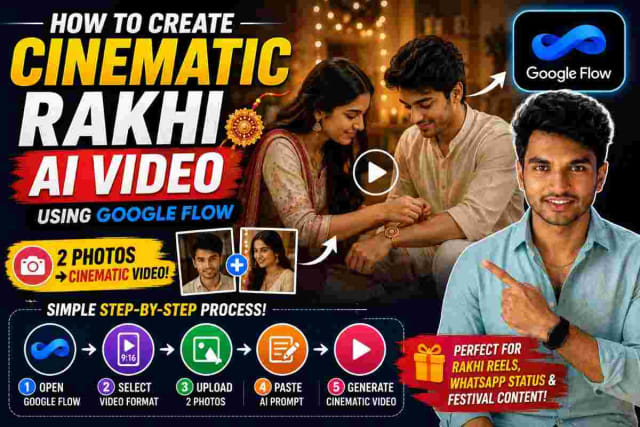
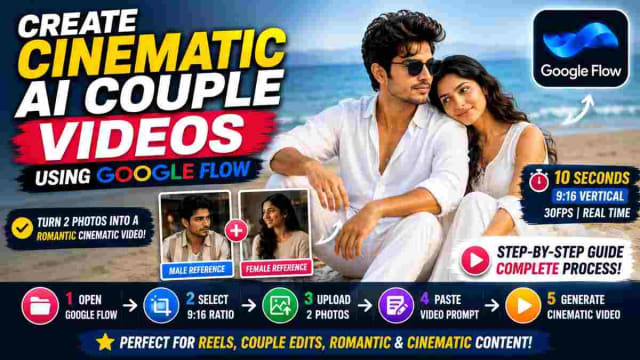
How To Create AI Couple Video With Google Flow Using Your Photos

SCROLL DOWN FOR FULL PROMPT
Are you wondering how this Cinematic AI couple video was made? Don't worry, just follow the below instructions and create an AI couple video, romantic AI video, siblings video and cinematic social media reel with your photos and a prompt.
The process is rather simple, as you can use your lover's, sister's, brother's, friend's or even someone else's photo as a reference and explain what you want in a detailed prompt to create your AI video.
What Is An AI Couple Video?
An AI couple video is a short video created with the help of AI. This video uses your reference photos and a prompt to explain what you want the video to depict. Rather than recording a full couple video, you will be providing your reference photos and describing the environment, actions, camera angles and visual styles you would like to see in your video.
For instance, you can request a cinematic beach scene where the couple can sit and gaze at each other, or take a walk on the beach.
The quality of your reference photos and prompt will determine the outcome of your video.
How To Create An AI Video With Google Flow
To begin with, you will want to open Google Flow and select the video generation option available.
Before jumping into video creation, you will want to think about which scene you would like to record. You can choose between a romantic beach scene, cinematic city, festive environment or even a travel vlog.
The next step is to prepare the photos you would like to use as references. The clearer the photos of the faces you want to replicate, the easier it will be for you to achieve the desired appearance in the generated photos.
Upload the necessary reference photos and enter your video prompt. A video prompt is a description of what you want the AI to generate.
Step 1: Decide Your Video Requirement
Before entering your video prompt, decide what your video requirement is going to be.
For Instagram reels, you will most likely want a 9:16 vertical video. Decide on the environment, clothing and expressions you need. Decide how long you want the video to be, how it should look like, what actions the characters should perform, the camera angles, etc. For instance, your requirement can be as follows:
Two people as a couple
Open beach location
White clothing
Cinematic style
Natural expressions
Calm ocean in the background
Soft daylight
Natural movements
Romantic but realistic
Providing clear instructions to the AI can help you achieve a controlled output.
Step 2: Upload The Person's Photo
The next step is to upload the person's photo you want to recreate in the video. Choose a clear photo with visible facial features. Avoid using heavily blurred or unclear photos, as it might be harder for the generation system to recreate the appearance.
If you want to record a video featuring two people, be sure to provide the necessary reference photos and describe their roles in detail in the prompt.
Step 3: Add The Secret AI Video Prompt
This step might be the most difficult one, as you will have to describe what you want in detail. Rather than entering a simple prompt saying "Create a romantic couple video of these two people", you will have to give clear instructions and describe the video in detail. A good prompt generally includes the following details:
Characters:
Who is in the video and how do they have to look like?
Location:
Where does the action take place? At a beach, in a city, at home, at a wedding, etc.
Clothing:
What should everyone be wearing? What style is required?
Actions:
What are the characters supposed to do? Describe in detail.
Camera:
Do you want a wide, medium or close-up view? Do you want the camera to move or not?
Lighting:
What kind of lighting is required? Daylight, soft, cinematic, etc.
Visual quality:
Do you want realistic skin, natural hair and movement, realistic clothes and environment effects, etc?
The more specific you are about describing the scene, the easier it will be for you to achieve the desired result.
Step 4: Focus On Natural Movement
One major tip for creating an AI video is to focus on natural movement. Movement is a very important part of AI video generation, as the characters cannot simply look like paper-cuttings. Your prompt should specify natural blinking, breathing, head movements, realistic movements and fabric or hair movement.
For a romantic video, you don't have to ask the AI to act dramatically. Simply looking at each other, sitting together, smiling and gazing at the ocean is enough to make a romantic video.
Step 5: Record Multiple Short Clips
Rather than recording long videos, you can record several short video clips. A 30-second Instagram reel, for instance, can consist of three 10-second video clips:
First clip: introduce your video and characters
Second clip: show the main action or cinematic moment
Third clip: end the video with a nice shot or a call to action
This approach can also help you control your video better and edit the clips together.
Why The Prompt Is Important
While the reference photo tells the AI what the character should look like, the prompt tells the AI what to do with the photos. A detailed prompt can help you control almost every aspect of the environment, composition, lighting, camera angles, expressions, movements and visual styles of the video. For instance, rather than asking for a romantic beach video, you can ask for a calm blue-grey ocean, gentle waves and beige sand with soft daylight, natural hair movement, relaxed expressions, shallow depth of field and cinematic composition.
This way, you get a more specific direction for your video.
Tips For Better AI Couple Videos
To get better results, it is advisable to use clear reference photos and avoid editing too many visual aspects. You can keep the same environment, clothing and visual styles when recording multiple video clips for a single reel. Keep your actions simple, as complex actions can sometimes lead to undesirable results.
It is also important to review every single video clip before posting the video. Pay attention to the characters' faces, hands, clothing, environment and movements. If something looks wrong, tweak your prompt and record the video again.
PROMPT
✨ AI Prompt-CINEMATIC TRADITIONAL TWIRL — 20 SECOND CONTINUOUS VIDEO -- GLOBAL REFERENCE & FACE LOCK — HIGHEST PRIORITY **@Image1 = FEMALE / WOMAN REFERENCE IMAGE** Use **@Image1 as the ONLY exact identity reference for the woman**. The woman in the generated video must be the **same exact woman shown in @Image1**. Her facial identity must remain **100% consistent with the reference image throughout all 20 seconds**. Preserve exactly and naturally: * Face shape * Eyes and eye shape * Eyebrows * Nose * Lips * Jawline * Cheek structure * Skin tone * Facial proportions * Natural facial asymmetry * Age appearance * Natural skin texture * Overall recognizable identity -- ABSOLUTE FACE PRESERVATION **Do not change the woman's face at any point.** No face morphing. No face replacement. No identity drift. No face swap. No beautification that changes her identity. No facial restructuring. No different eyes. No different nose. No different lips. No different jawline. No age change. No skin-tone change. No artificial facial features. Her expression may naturally change during the movement, but her **underlying facial identity must remain exactly the same as @Image1**. The face must look like a **real photograph brought naturally to life**, not an AI-generated face. **FACE CONSISTENCY IS MORE IMPORTANT THAN CAMERA MOVEMENT, EFFECTS OR BACKGROUND DETAILS.** --- - VIDEO 1 — [0:00–0:10] -- FEET CLOSE-UP → WALK → MANGO TREE **OUTPUT: 16:9 HORIZONTAL — STRICTLY 16:9** **DURATION: EXACTLY 10 SECONDS** **30 FPS — NORMAL 1× SPEED** --- [0:00–0:03] — FEET CLOSE-UP Begin with an elegant cinematic close-up of the woman's bare feet walking slowly across a naturally wet ground. She is barefoot. Traditional golden payal/anklets are clearly visible around both ankles. With every step, her feet make subtle natural contact with the wet surface. Small realistic water movement and reflections appear beneath her feet. A slight glimpse of the yellow petticoat is visible beneath the traditional skirt. Camera remains low and close to the feet. Realistic skin texture. Realistic wet-ground reflections. No unnatural foot movement. --- [0:03–0:06] — WALKING REVEAL Camera slowly tilts upward while she continues walking naturally. Reveal her traditional outfit: **Rich brown and deep maroon traditional lehenga/skirt with matching dupatta.** Fine golden border detailing is clearly visible on both the skirt and dupatta. The clothing must move naturally with her walking. Her long, silky, open hair moves gently in the breeze. Do not change the outfit from the reference image if clothing is visible in **@Image1**. Maintain the same colors, patterns and overall appearance. --- [0:06–0:08] — ARRIVAL UNDER MANGO TREE She reaches a lush green mango tree and naturally stops underneath it. The tree canopy creates a beautiful natural frame around her. Wet ground remains visible beneath her. Soft daylight filters through the leaves. She gently adjusts her dupatta with one hand. Her long hair moves softly in the breeze. --- [0:08–0:10] — BEGINNING OF TWIRL She begins a graceful slow twirl underneath the mango tree. The lehenga starts opening outward naturally. The dupatta follows her rotational movement. Camera begins moving upward smoothly toward an overhead perspective. --- VIDEO 1 END FRAME — CRITICAL At **0:10**, she is midway through the graceful twirl. Her body position, clothing movement, hair direction, dupatta position, lighting and environment must remain consistent. **VIDEO 2 MUST START FROM THIS EXACT MOMENT.** --- - VIDEO 2 — [0:10–0:20] -- FULL TWIRL → TOP-DOWN REVEAL → BEAUTIFUL FINAL FRAME **OUTPUT: 16:9 HORIZONTAL — STRICTLY 16:9** **DURATION: EXACTLY 10 SECONDS** **30 FPS — NORMAL 1× SPEED** --CONTINUITY LOCK Start **directly from the final frame of Video 1**. No reset. No new character. No outfit change. No hairstyle change. No location change. No lighting change. No weather change. The woman must continue the **same exact twirl** naturally. --- --- [0:10–0:13] — CONTINUOUS TWIRL Continue the graceful circular spin from Video 1. Her rich brown and deep maroon lehenga expands outward into a beautiful natural flare. The fine golden borders create elegant circular movement. Her matching dupatta flows naturally behind and around her. Her long silky hair follows the rotation and gently lifts with the movement. Clothing must obey realistic fabric physics. No floating fabric. No unnatural stretching. No fabric morphing. -- [0:13–0:16] — CAMERA RISES OVERHEAD The camera smoothly rises into a cinematic top-down angle. Reveal the woman centered beneath the lush green mango tree. The tree leaves create a natural circular/organic frame around her. Wet ground remains visible through gaps in the foliage. Natural reflections remain visible. The woman's twirling movement remains graceful and continuous. -- [0:16–0:18] — TOP-DOWN HERO SHOT Reach a beautiful overhead composition. The woman continues spinning gracefully. Her lehenga creates a wide circular flare. Golden borders become clearly visible as the skirt rotates. The dupatta follows naturally. Her hair moves in harmony with the spin. Keep the woman centered in the composition. -- [0:18–0:20] — FINAL EMOTIONAL FRAME The twirl gradually slows naturally. She finishes the rotation and gently settles into a graceful standing position. Her dupatta and hair continue moving for a moment before naturally settling. Camera remains overhead but gently lowers slightly toward her. If her face becomes visible, it must remain **exactly consistent with @Image1**. She gives a subtle, natural, peaceful expression. End on an elegant cinematic frame of the woman beneath the lush mango tree, surrounded by green leaves and reflected wet ground. No sudden stop. No freeze frame. No pose change. --- --OUTFIT & APPEARANCE CONSISTENCY Maintain the same traditional appearance throughout both videos. **Rich brown + deep maroon lehenga/skirt** **Matching dupatta with fine golden border detailing** **Traditional golden payal/anklets** **Yellow petticoat subtly visible beneath the skirt** **Long, silky, open hair** If any clothing details are visible in **@Image1**, preserve those exact visual details instead of inventing new patterns. No random outfit. No color change. No pattern change. No jewelry swapping. --- --ENVIRONMENT & ATMOSPHERE Lush green mango tree. Dense natural green leaves. Wet outdoor ground. Subtle reflections on the wet surface. Natural outdoor daylight. Soft diffused lighting. Gentle breeze. Fresh post-rain atmosphere. Elegant peaceful Indian traditional aesthetic. Cinematic but realistic. No artificial fantasy environment. --- --CAMERA & MOTION Start with an intimate feet-level close-up. Gradually move upward. Transition naturally toward the woman. Follow her movement as she reaches the mango tree. Smoothly rise into a top-down overhead perspective during the twirl. Maintain elegant cinematic camera movement. No sudden camera jumps. No random camera angles. No excessive zoom. No shaky camera. No unnatural spinning camera. The camera movement must complement the woman's natural twirl. --- -- REALISTIC PHYSICS Realistic barefoot walking. Realistic wet-ground contact. Realistic anklet movement. Realistic skirt fabric physics. Realistic dupatta movement. Realistic hair movement. Realistic wind interaction. Realistic shadows. Realistic reflections. Natural body balance during the spin. Natural weight transfer. No floating feet. No sliding feet. No impossible body movement. --- -- VISUAL STYLE Ultra-photorealistic cinematic live-action. Natural Indian traditional aesthetic. Natural skin texture. Natural hair detail. Realistic fabric texture. Soft cinematic focus. Natural depth of field. Elegant composition. Subtle cinematic color grading. Soft natural daylight. Fresh rainy-season atmosphere. The final result should look like **a real cinematic camera recording of the same woman from @Image1**, not an AI-generated person. --- -- ABSOLUTE NEGATIVE PROMPT No face change. No face morphing. No face swap. No identity drift. No different woman. No facial redesign. No beautification. No artificial face. No plastic skin. No AI-looking face. No different eyes. No different nose. No different lips. No different jawline. No age change. No skin-tone change. No facial distortion. No facial flickering. No face inconsistency between frames. No hairstyle change. No outfit change. No lehenga color change. No dupatta change. No jewelry change. No disappearing anklets. No disappearing Rakhi/jewelry. No fabric morphing. No floating fabric. No broken fabric physics. No unnatural hair physics. No unnatural body movement. No sliding feet. No extra limbs. No extra fingers. No malformed hands. No duplicated body parts. No body deformation. No environment morphing. No tree morphing. No weather change. No lighting flicker. No camera shake. No jump cuts. No sudden teleportation. No CGI. No cartoon. No oversaturated colors. No artificial beauty filter. No text. No subtitles. No watermark. --- -FINAL OUTPUT REQUIREMENTS **VIDEO 1 — [0:00–0:10]** Feet close-up → walking → mango tree → beginning of twirl. **VIDEO 2 — [0:10–0:20]** Continue twirl → overhead camera rise → full top-down reveal → graceful finish. **TOTAL DURATION: 20 SECONDS** **ASPECT RATIO: STRICTLY 16:9 HORIZONTAL** **FRAME RATE: 30 FPS** **SPEED: NORMAL 1×** **STYLE: ULTRA-PHOTOREALISTIC CINEMATIC** -- HIGHEST PRIORITY **@Image1 = FEMALE REFERENCE — EXACT NATURAL FACE IDENTITY.** **The woman's face must remain unchanged and naturally photorealistic throughout all 20 seconds.** **Video 1 → Video 2 must look like ONE continuous shot of the same woman.** **Do not sacrifice face consistency for any visual effect.**
Conclusion
Creating an AI couple video with Google Flow can be an easy way to experiment with AI-generated cinematic content. Using your reference photos and a detailed prompt, you can create amazing couple videos with people you love.
The entire process is as simple as opening Google Flow and choosing your video requirements, uploading your reference photos, pasting your detailed prompt and generating the video.
For Instagram reels and shorts, it is advisable to plan your content as multiple short clips, as it can be a fun way to control your video and edit it later. With proper reference photos, instructions, natural movements and a cinematic concept in mind, you can turn your photos into amazing AI video content.
Continue Reading