How To Create Cinematic Rakhi AI Video with Google Flow
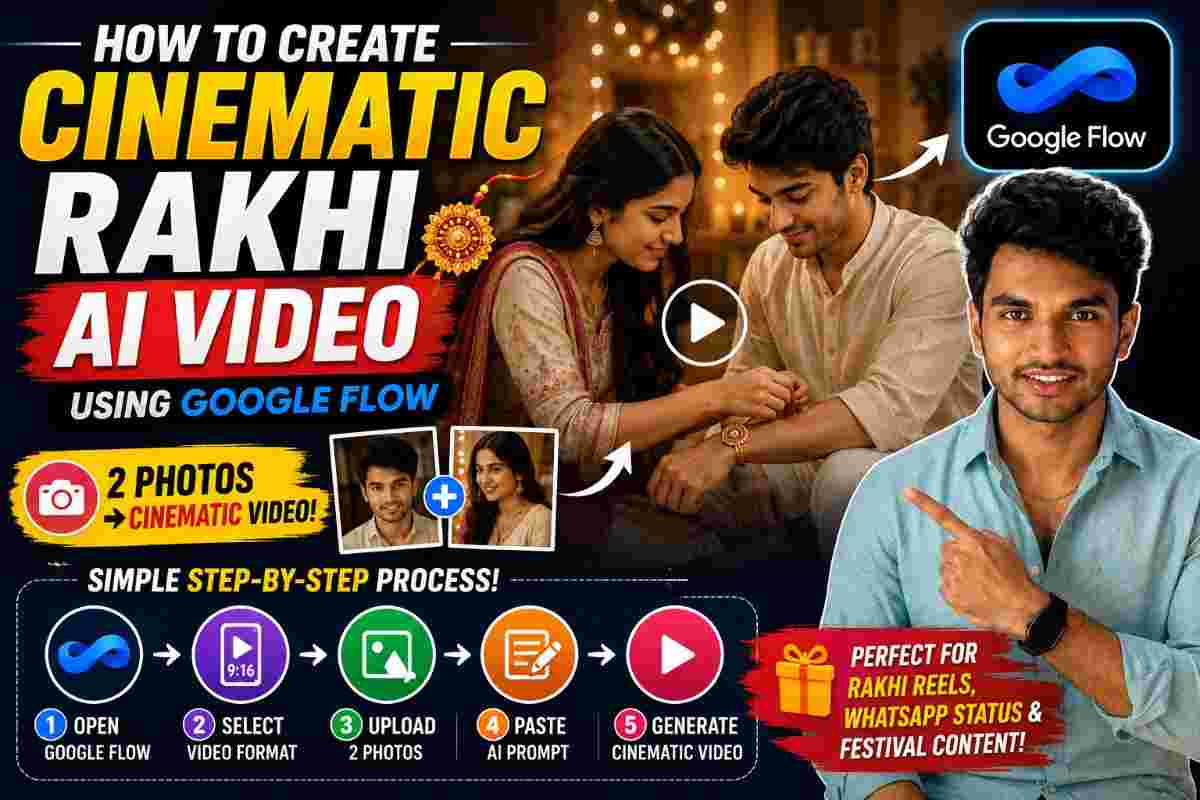
Create Cinematic Rakhi AI Video with Google Flow
SCROLL DOWN FOR FULL PROMPT
Raksha Bandhan is one of those occasions where people tend to witness the relationship between a brother and a sister. Rather than sharing a regular Rakhi picture this year, one could opt to create a cinematic Rakhi AI video using Google Flow and turn their photo into a fascinating short video.
Using two pictures, one video requirement, and one detailed AI video prompt, one could create an exclusive Rakhi theme video for their Instagram Reels, WhatsApp Status, Facebook, or YouTube Shorts.
By following this guide, one would know how to create a cinematic Rakhi video using Google Flow, adding their images, video requirement, and prompt to generate a Rakhi AI video.
What is a Cinematic Rakhi AI Video?
A cinematic Rakhi AI video is a type of short AI-generated video that uses photos of a brother and sister as reference images. One could use this approach to turn the simple photos of their siblings into a cinematic video instead of sharing the images side by side and making it a Rakhi photo.
The whole point is to create an exclusive digital asset that embodies the relationship between a brother and a sister.
One could use this idea to make:
• Raksha Bandhan Reels
• Brother sister Video
• Sister brother Memories
• WhatsApp Status
• Instagram Stories
• Family Social Media Post
• Emotional AI Video
• Festival AI Video
All these variations would depend on the quality of the photo and a detailed video prompt one would insert to turn it into a cinematic Rakhi AI video.
What one needs to create the Rakhi video
Before anything else, one needs to make sure that they have two photos of their choice, Google Flow , a detailed Rakhi AI video prompt, and a video requirement or format that they would like to choose.
One should try to choose two beautiful photos where their faces, as well as the faces of their siblings, are visible so that the AI could recognize them and create the best Rakhi AI video.
Step 1: Open Google Flow
The first step is to open Google Flow and start generating the video.
One could use Google Flow to create an AI-generated video scene using their reference images and a detailed prompt. Once inside the video generation window, one should choose the video requirement for their Rakhi video .
If one is making an Instagram or WhatsApp Rakhi video, it would be best to select a vertical video option.
Step 2: Select your Video Requirement
Before inserting images, one should select the video requirement or the video format according to the platform where they would like to post their Rakhi video and the final size of the video itself.
If one is making a Reel, they could choose a vertical video size that would be most suitable for mobile viewing. By choosing the best video requirement at the beginning, one would avoid having their Rakhi video cropped unnecessarily at the end.
Step 3: Upload your photo and sibling's photo
Next, one needs to upload their photo and their sibling’s photo so that the AI could use them as reference images to generate the Rakhi video.
It is best to choose the best photo with clear faces, minimal or no blurriness, and natural emotions.
If one chooses a bad photo with unclear faces, extreme blurriness, or hidden faces, the Rakhi AI video would not look good since the AI would not recognize the images correctly.
Step 4: Insert the Special Rakhi Prompt
This is the most important step in AI video generation. After inserting the photos, one needs to insert the special Rakhi prompt inside Google Flow .
A detailed prompt would help the AI video generator to recognize what one wants to achieve with the given photos. Instead of simply saying “Make a Rakhi video”, one should give a detailed description of what Rakhi video they want to see.
An ideal prompt should describe the following:
• Characters: Brother and Sister from the given images.
• Environment: Suitable festive environment in which the action would take place.
• Action: How and where the characters would perform the action.
• Expressions: What kind of emotions the characters need to show so that they appear natural and real.
• Camera: What kind of camera movement would be required to make the video look cinematic.
• Lighting: How realistic and soft the lighting should be to avoid harsh effects.
• Visuals: How photorealistic the video should look to maintain realistic skin texture and other visual effects.
• Identity: Maintain the image quality of the given photo.
These instructions could make a big difference in the final appearance of one’s Rakhi AI video. A good prompt could also help the AI to recognize the characters and their identities so that they can be maintained throughout the video.
Step 5: Generate the Cinematic Rakhi Video
With the photos and a detailed prompt inserted into Google Flow , all that one needs to do is to click the generate button and wait for the Rakhi AI video to appear.
According to the video prompt, it would take some time for Google Flow to generate and process the final output. Once one has seen the final Rakhi video, they should make sure that the faces, movement, expressions, and overall look appear natural. If the Rakhi video looks too artificial and unreal, one should edit the prompt.
Why a detailed prompt is important for AI video generation
A detailed prompt is always important when one is working with an AI-video generator. It helps the tool to understand their concept better and gives it enough information to generate the best output.
A detailed Rakhi prompt could describe the characters, environment, action, expressions, camera movement, lighting, and other effects that one wants to see in their cinematic Rakhi AI video.
One should also make sure to maintain the image quality according to the given photos and make sure that the identity of the characters does not change.
Make your Rakhi video more emotional
The main advantage of making a Rakhi video based on siblings is that it creates a strong emotional connection. Instead of making a regular Rakhi video, one should make an emotionally-charged simple story that showcases the bond between a brother and a sister.
One should make sure to describe a natural Rakhi event that would demonstrate the affection and love between siblings. They should also avoid making complex actions because they may look artificial. The whole point is to make a simple Rakhi AI video that looks realistic.
Share your AI Rakhi video
After creating a cinematic Rakhi AI video, one could share it on various social media platforms such as Instagram Reels, WhatsApp status, Facebook, YouTube Shorts, etc. They could also send this video to their siblings as a Raksha Bandhan message directly.
For content creators, this is also a great opportunity to make an informative video about how they created the Rakhi AI video since people are always interested in such content.
Tips for Rakhi AI video with Google Flow
To create the best Rakhi AI video with Google Flow , one should remember a few simple tips, including:
• Use high-quality reference images.
• Make sure the faces are visible and clear.
• Avoid using heavily-edited photos as a reference.
• Insert a detailed Rakhi AI video prompt.
• Choose the best video format.
• Mention the natural movement.
• Avoid adding too many movements in a short Rakhi AI video.
• Always review the video before they share it.
• Keep editing the prompt if the characters’ appearance looks weird.
PROMPT
✨ AI Prompt- RAKHI EMOTIONAL MOMENT — 20-SECOND CONTINUOUS VIDEO -- GLOBAL REFERENCE RULE — HIGHEST PRIORITY **@Image1 = MALE / BROTHER** **@Image2 = FEMALE / SISTER** Use **@Image1 only for the brother's exact facial identity** and **@Image2 only for the sister's exact facial identity**. Both faces must look **100% natural, photorealistic and directly consistent with their respective reference images**. --- STRICT FACE IDENTITY LOCK The brother's face must remain exactly consistent with **@Image1** throughout the entire 20 seconds. The sister's face must remain exactly consistent with **@Image2** throughout the entire 20 seconds. Preserve: * Face shape * Eyes * Eyebrows * Nose * Lips * Jawline * Skin tone * Age appearance * Facial proportions * Natural facial asymmetry * Natural skin texture * Overall identity **ZERO FACE DRIFT.** Expressions may naturally change according to the story, but the underlying facial identity must never change. No face morphing, no face swap, no identity drift, no facial redesign, no beautification, no artificial skin, no plastic-looking skin, no AI-looking facial features. The characters must look like the **actual people from @Image1 and @Image2 naturally filmed on camera**, not AI-generated replacements. --- - VIDEO 1 — [0:00–0:10] -- RAKHI TYING + BROTHER'S EMOTION **OUTPUT: 16:9 HORIZONTAL — STRICTLY 16:9** **DURATION: EXACTLY 10 SECONDS** **30 FPS — NORMAL 1× SPEED** --- [0:00–0:04] — RAKHI TYING Begin with a cinematic close-up of the sister's hands gently tying a beautiful Rakhi around her brother's wrist. Her movements are slow, careful and affectionate. Show realistic finger movement, natural wrist movement and realistic Rakhi thread physics. The brother keeps his wrist naturally relaxed. Use warm indoor lighting with a soft cinematic background blur. The Rakhi must remain physically attached to the brother's wrist and must not disappear or change. --- [0:04–0:07] — SISTER'S DIALOGUE The camera slowly moves upward from the hands toward the sister's face. The sister looks at her brother with a soft, emotional smile. She gently says in natural Telugu: **SISTER:** **"ఈ రాఖీ ఎప్పుడూ నీకు గుర్తు చేస్తూ ఉండాలి అన్నయ్యా… నేను ఎప్పుడూ నీతోనే ఉంటాను."** Her voice should be soft, warm and genuinely emotional. Natural Telugu pronunciation and accurate lip synchronization. No exaggerated crying or theatrical acting. Her face must remain **exactly consistent with @Image2**. --- [0:07–0:10] — BROTHER LOOKS AT RAKHI The camera smoothly moves toward the brother. He looks down at the newly tied Rakhi. His eyes become slightly emotional. A gentle, natural smile slowly forms. He naturally blinks. He softly touches the Rakhi with his other hand. His face must remain **exactly consistent with @Image1**. --- VIDEO 1 — FINAL FRAME At **0:10**, end with the brother looking down at the Rakhi with a quiet emotional smile. Keep his hand, wrist, Rakhi, facial expression, clothing, lighting and environment stable. **VIDEO 2 MUST START DIRECTLY FROM THIS EXACT MOMENT.** --- - VIDEO 2 — [0:10–0:20] -- BROTHER'S EMOTIONAL RESPONSE + SIBLING BOND **OUTPUT: 16:9 HORIZONTAL — STRICTLY 16:9** **DURATION: EXACTLY 10 SECONDS** **30 FPS — NORMAL 1× SPEED** -- CONTINUITY LOCK Start **exactly from the final frame of Video 1**. There must be no reset or visual discontinuity. Maintain the same: * Brother * Sister * Faces * Facial expressions * Clothing * Rakhi * Wrist position * Hand position * Lighting * Environment * Background * Camera continuity **No face change. No outfit change. No character replacement.** -- [0:10–0:13] — BROTHER LOOKS UP The brother slowly lifts his eyes from the Rakhi and looks toward his sister. His expression is warm and genuinely emotional. His eyes show affection and gratitude. His subtle smile remains. He naturally blinks once. His head movement should be slow and realistic. His face must remain **exactly the same as @Image1**. -- [0:13–0:17] — BROTHER'S DIALOGUE The brother looks warmly at his sister and softly says: **BROTHER:** **"నువ్వు నా చెల్లెలిగా ఉన్నంత వరకు… నాకు ఇంకేం భయం లేదు."** His voice should be warm, slightly emotional and natural. Accurate Telugu pronunciation. Accurate lip synchronization. No theatrical crying. No exaggerated facial expression. His face must remain **100% consistent with @Image1**. -- [0:17–0:20] — FINAL SISTER MOMENT The camera smoothly transitions toward the sister's face. She looks at her brother with a warm emotional smile. Her eyes become slightly moist, but keep the emotion subtle and realistic. No exaggerated tears. She softly smiles and says: **SISTER:** **"అన్నయ్యా… నువ్వు సంతోషంగా ఉంటే చాలు."** Natural Telugu pronunciation and accurate lip synchronization. The brother remains naturally visible in the background. End with both siblings sharing a quiet, heartfelt moment. --- --EMOTIONAL PERFORMANCE The scene must feel like a **real brother-and-sister Rakhi moment**, not a movie performance. Use: * Subtle smiles * Natural eye movement * Soft blinking * Small head movements * Gentle breathing * Natural micro-expressions * Slight emotional eyes * Genuine affection Avoid: * Loud crying * Overacting * Dramatic gestures * Forced smiles * Excessive tears * Artificial expressions The emotional tone should be **warm, genuine, intimate and heartfelt**. --- --TELUGU DIALOGUE + LIP-SYNC All dialogue must be spoken in **natural Telugu**. The voice must sound human and emotionally believable. Lip movement must accurately match every spoken Telugu word. --- VIDEO 1 — SISTER **"ఈ రాఖీ ఎప్పుడూ నీకు గుర్తు చేస్తూ ఉండాలి అన్నయ్యా… నేను ఎప్పుడూ నీతోనే ఉంటాను."** --- VIDEO 2 — BROTHER **"నువ్వు నా చెల్లెలిగా ఉన్నంత వరకు… నాకు ఇంకేం భయం లేదు."** --- VIDEO 2 — SISTER **"అన్నయ్యా… నువ్వు సంతోషంగా ఉంటే చాలు."** Use calm emotional delivery with tiny natural pauses. No robotic voice. No exaggerated movie-style dialogue delivery. --- -VISUAL STYLE Ultra-realistic cinematic live-action. Warm indoor lighting. Soft natural background blur. Natural skin texture. Realistic eyes and facial reflections. Natural blinking. Realistic hand and finger movement. Realistic Rakhi thread physics. Subtle emotional expressions. Cinematic close-up framing. Slow emotional pacing. Premium family-film visual quality. No artificial beauty filter. No plastic skin. No CGI appearance. No cartoon style. --- -AUDIO Clear natural Telugu dialogue. Soft indoor room ambience. Subtle clothing movement. Very light hand movement sounds. Natural Rakhi/thread movement. Soft breathing. No loud background noise. No distracting sound effects. No music overpowering the dialogue. If background music is generated, keep it extremely subtle and emotional. --- -ABSOLUTE NEGATIVE PROMPT No face change. No face morphing. No face swap. No identity drift. No different brother. No different sister. No facial redesign. No beautification. No artificial skin. No plastic skin. No AI-looking face. No different eyes. No different nose. No different lips. No different jawline. No age change. No skin-tone change. No facial distortion. No facial flickering. No expression distortion. No unnatural blinking. No exaggerated crying. No excessive tears. No robotic lip-sync. No incorrect lip movement. No robotic Telugu voice. No unnatural hand movement. No extra fingers. No malformed hands. No duplicated hands. No floating Rakhi. No broken Rakhi thread. No Rakhi disappearing. No clothing change. No character change. No scene reset. No jump cuts. No camera shake. No CGI. No cartoon. No text. No subtitles. No watermark. --- -- FINAL OUTPUT **VIDEO 1 — [0:00–0:10]** **VIDEO 2 — [0:10–0:20]** **TOTAL DURATION: 20 SECONDS** **ASPECT RATIO: STRICTLY 16:9 HORIZONTAL** **FRAME RATE: 30 FPS** **SPEED: NORMAL 1×** **STYLE: PHOTOREALISTIC CINEMATIC EMOTIONAL FAMILY MOMENT** * HIGHEST PRIORITY **@Image1 = BROTHER'S EXACT NATURAL FACE.** **@Image2 = SISTER'S EXACT NATURAL FACE.** The faces must remain **natural, photorealistic and unchanged from their respective reference images throughout all 20 seconds**. **VIDEO 1 → VIDEO 2 must look like ONE uninterrupted 20-second Rakhi moment.**
Final thoughts
Creating a cinematic Rakhi AI video using Google Flow is always a great idea for Raksha Bandhan this year.
Instead of sending a regular Rakhi photo, one could generate a cinematic Rakhi AI video using their photos as reference images and a detailed video prompt.
As one could see in this guide, the whole process is super simple. All that one needs to do is to open Google Flow , select the video requirement, insert their photo and sibling’s photo, insert the Rakhi prompt, and generate the Rakhi AI video.
Using high-quality photos and a detailed prompt, one could experiment with various Rakhi scenes and create a great Rakhi AI video for their Instagram Reels, WhatsApp Status, and other platforms.
Continue Reading