How to make Thread Art videos with AI
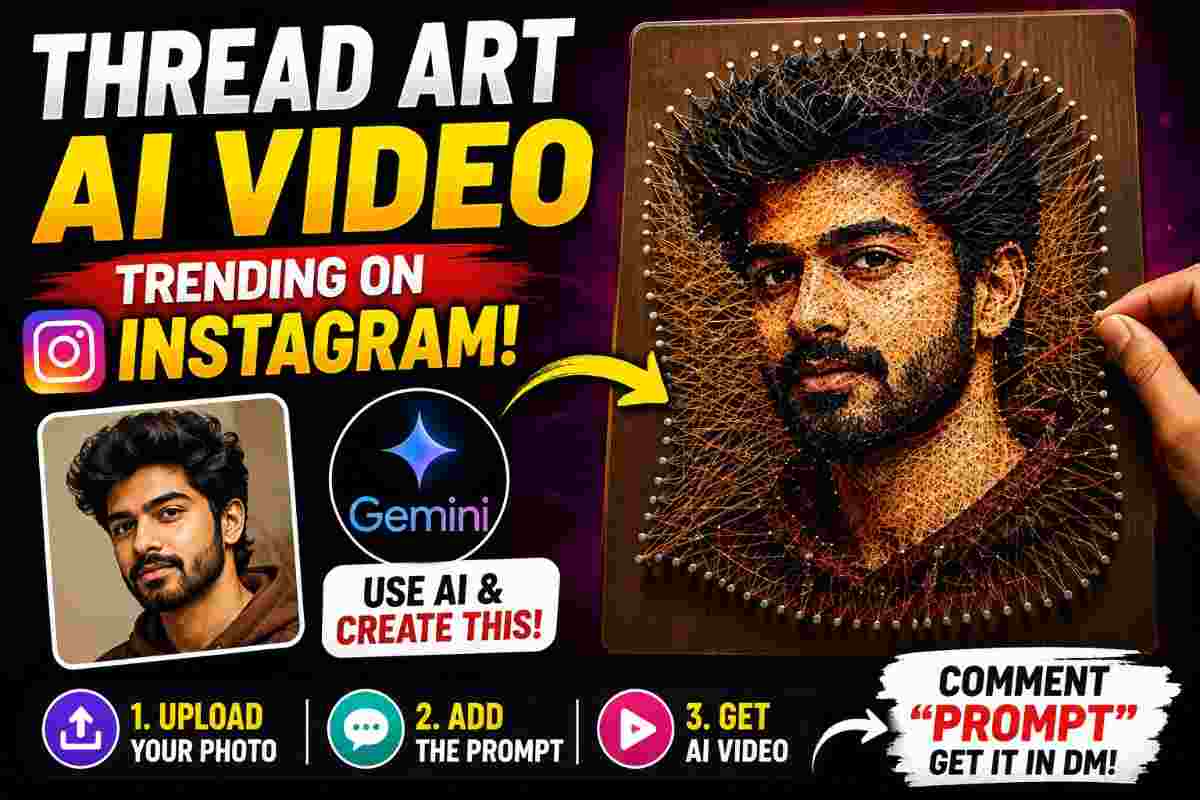
SCROLL DOWN FOR THE PROMPT
Thread art is the latest viral content creation trend on Instagram because it involves transforming an ordinary image into a beautiful piece of art using the right colors of threads, proper nail placement, and turning it into an amazing art piece. The thread art videos are trending on Reels.
Luckily, you do not have to sweat creating such content as you can simply use an image and a prompt and let AI turn it into a thread-art creation of a person or object.
What is a thread art?
Thread art is a popular art style where images or portraits are created using various threads in different colors attached to nails or pins as separate elements but altogether form a picture pleasing to the eye.
An AI can virtually recreate such an image by transforming a reference photo into a realistic thread image, a video of the transformation process can then be made thus creating a more attractive visual than a still image may allow.
How to create an AI thread art video
The process of creating such a video is actually quite simple.
First, you need to pick an image
you would like to use as a reference photo. The image should be clear and depict something you would like to see transformed into a thread art. You can use a portrait, couples, families, or any other image you may want to use as a reference.
Next, you need to open the Gemini website or application and either use the video creation tab or follow prompts on your screen to open it up and upload the reference image you want to use for your video.
Finally, use the following prompt or the one you may want to use:
Realistic wooden canvas
Nails and colorful threads
Realistic hands
Lighting
Camera movement
Coming together as the artwork
More notes of your choosing
You can pick whatever you want to include in your video but essentially, the prompt suggests what elements should be included in a video by AI so it can virtually recreate it for you thus showing how the image would look in a thread-art creation, so it is important to include all elements necessary for such a transformation.
Keep the reference image consistent
You should keep the image you are using as a reference image consistent throughout the video because AI will be using it as inspiration for virtually everything else. If you are using a portrait, keep the facial expression, body language, and clothes the same throughout the video. You can also indicate this in your prompt by telling AI to keep the composition consistent or use the uploaded image as a reference image.
Make the video realistic
The more realism you incorporate into the video, the more impressive the result may be. You can suggest to the AI that it virtually recreates the following elements:
• Realistic wooden canvas • Nails and colorful threads • Realistic hands • Shadows • Texture of the threads • Macro shots • Camera movement • Cinematic lighting • Realistic artwork transformation
The more such elements are incorporated into the video the more impressive the final result may be.
Why thread art are good for Instagram
The thread art transformation videos are great for Instagram because they provide the most unexpected reveal which may intrigue your audience and encourage them to watch the video till the end. The very concept of such a video implies that some ordinary-looking picture can virtually transform into an amazing portrait made of hundreds of colored threads thus potentially going viral.
This way, such content may go viral on your Instagram reels by using this hook as a way to attract the attention of your followers. The following structure can be used for the Instagram reel:
Hook
Reference photo
Threads and nails setup
Transformation process
End result
Call-to-action
Create thread art from different images
You can virtually use such a video to recreate different images. You can use pictures of couples, weddings, babies, friends, and family members, and famous people. The only limiting factor is your creativity and the power of your AI.
Best practices for AI thread art transformation
It is important to note that you should use a high-resolution image as a reference photo because otherwise, the end result may be underwhelming especially if you were to post it on Instagram as a story. The background of the image should also be simple so that AI has fewer elements to take into consideration when virtually recreating it. Keeping the prompt descriptive but simple is also a good idea. If you want the AI to use specific colors from the image you are using as a reference, make sure to specify that in your prompt or ask it to retain the colors of the image.
When creating such a video for Instagram make sure to keep the 9:16 aspect ratio in mind while also keeping the camera movement minimal but realistic so the shots at the end of the threads and nails would look realistic.
PROMPT
✨ AI PromptCreate one **10-second vertical 9:16 photorealistic string-art process video**, using the **uploaded reference image as the ONLY and STRICT visual reference**. ***STRICT REFERENCE IMAGE RULE The uploaded image is the complete source of truth. **Do not assume or specify whether the subject is a woman, man, child, person, animal, object, character, or anything else.** Automatically identify the main subject and reproduce **exactly what is visible in the reference image** as string art. The final string-art artwork must match the reference image as closely as physically possible, including: * Exact subject and silhouette * Exact pose, shape and proportions * Exact composition and positioning * Exact colors visible in the reference * Exact color distribution and patterns * All major details and decorative elements * Overall visual appearance ** EXACT COLOR MATCH Use **thread colors derived directly from the uploaded reference image**. Do not use a predefined color palette. Do not randomly change or add colors. Every major color visible in the reference image should be represented by a corresponding thread color in the string artwork. If the reference contains multiple shades, gradients or color variations, reproduce them using appropriately similar thread colors and varying thread density where physically possible. **VIDEO SEQUENCE **0–2 seconds:** Start with a realistic wooden canvas. Show realistic hands carefully placing and hammering small nails around the outline and important structural areas of the subject from the reference image. Nail placement must progressively follow the exact shape of the reference. **2–4 seconds:** Begin weaving threads between the nails. Use the **same colors found in the reference image**. Build the subject progressively from the inside and outside areas. Every thread must physically connect between nails and remain attached. **4–6 seconds:** Continue weaving downward and across the artwork. Gradually reproduce all major shapes, colors and patterns from the reference image. Maintain realistic thread tension, intersections and nail connections. **6–8 seconds:** Move into an extreme macro view of the detailed areas. Carefully add the remaining fine thread patterns, color details and edges visible in the reference. Trim excess threads naturally with scissors where appropriate. **8–10 seconds:** Smoothly zoom out to reveal the completed string-art artwork. The final artwork must visually correspond to the **uploaded reference image**, with the same subject, composition, proportions, colors, patterns and major details. ** REALISTIC PHYSICAL PROCESS The artwork must be created **progressively and physically**, starting from nails and individual threads. Nothing should appear instantly. Use: * Photorealistic human hands * Real wooden canvas * Real metal nails * Real thread fibers * Accurate thread tension and intersections * Natural shadows and lighting * Realistic workshop environment * Authentic hammering, thread movement and scissors sounds **No music.** ** ABSOLUTELY NO No gender assumptions, no subject redesign, no altered subject, no different colors, no predefined color palette, no painting, no printing, no digital drawing, no instant artwork generation, no floating threads, no disconnected threads, no missing nails, no impossible thread physics, no morphing, no jump cuts, no flickering, no CGI, no cartoon style, no artificial-looking hands, no watermark, no text. **The uploaded reference image must determine WHAT the artwork is, WHO or WHAT the subject is, HOW it looks, and WHICH thread colors are used. The video should simply show that exact image being physically recreated as realistic string art.**
Final thoughts
The very idea of using AI to create thread art videos is actually pretty fascinating and can be easily achieved by virtually anyone. Instead of spending hours trying to place hundreds of threads in the right spot, you can simply use this tool and save yourself a lot of time and effort in the process.
Continue Reading