
How to Create a Netflix-Style Poster Using ChatGPT
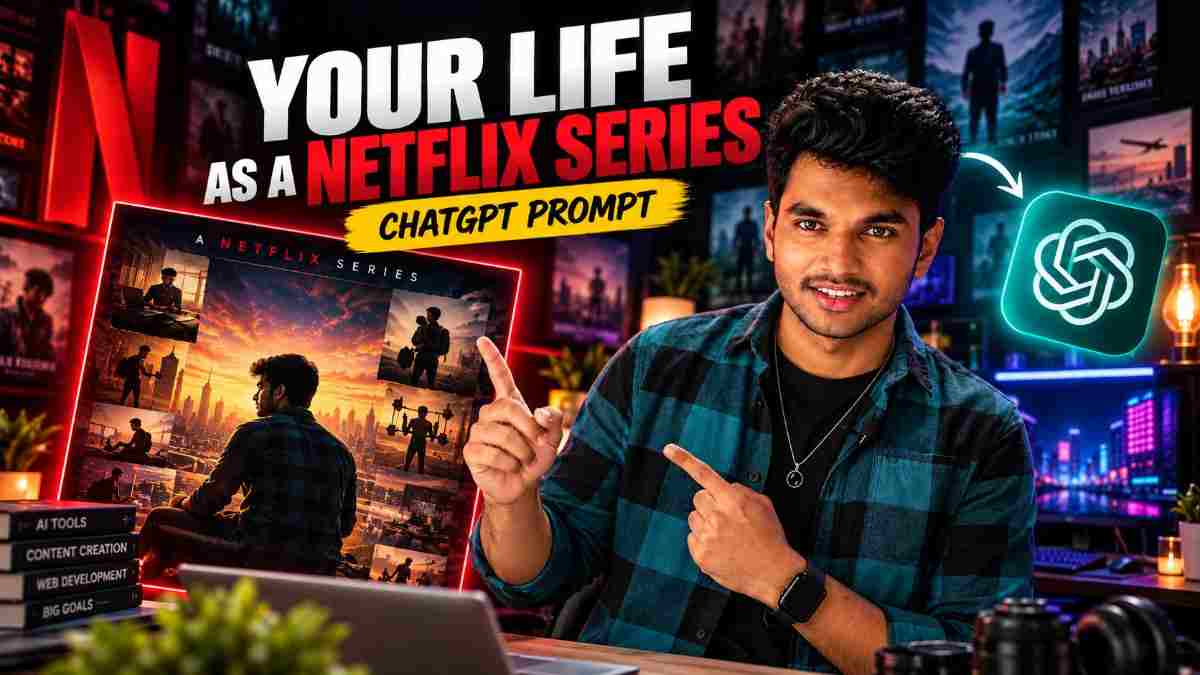
Imagine your life being shown in a series where you are the main character. Use ChatGPT to create an image using your clear photo and create a unique one-liner. You’ll get a poster in just a few minutes!
In this guide we’ve provided you with the prompt, alternative prompt for when ChatGPT doesn’t know your story, and 5 types of genres. We’ve also outlined how to overcome common issues that people come across, including having the wrong face and messy text.
Note: These posters are based on the overall style of streaming series art. It is not official art from any streaming companies. Do not add any real streaming company logos or names.
Requirements
ChatGPT – Image uploading and image generation capabilities (this depends on your plan). A clear front facing photo of you, previous conversations with ChatGPT about your interests and goals (you can turn memory/chat history on). Or type in a few facts. Free editing tool e.g Canva.
Step 1 – Upload a Clear Photo
Start a new chat and upload a clear, well lit front facing photo.
Step 2 – Copy the Poster
Prompt
✨ AI PromptUse my uploaded photo as the main character reference and transform my life story into a premium Netflix-style series poster. **FACE & IDENTITY PRESERVATION:** Use my uploaded photo as the exact facial reference. Preserve my real facial identity, face shape, skin tone, hairstyle, and recognizable features. Make sure the main character in the poster clearly looks like me. Do not replace my face with a different person or unnecessarily alter my appearance. **PERSONAL STORY:** Based on the information available from our conversations, create a creative series title that represents my personality, ambitions, interests, challenges, and personal growth. Include only details that are actually known about me. Do not invent personal events or facts. **POSTER DESIGN:** Create a cinematic, premium streaming-series poster with dramatic lighting, rich colors, realistic textures, professional composition, and a compelling visual narrative. Show me as the central character, with subtle background scenes and visual symbols representing my journey, dreams, creativity, and future ambitions. **TITLE & TYPOGRAPHY:** Generate a powerful, memorable series title and display it prominently. Add a short cinematic tagline that fits my journey. Keep all text clean, readable, and professionally arranged. **VISUAL QUALITY:** Photorealistic face, natural body proportions, realistic skin texture, cinematic color grading, dramatic atmosphere, premium movie-poster quality, high detail, vertical 2:3 composition. The final result should look like an official Netflix-style biographical drama poster about my life, with me as the lead character. My face must remain recognizable and closely match the uploaded reference photo.
When ChatGPT Does Not Know Your Story
prompt
✨ AI PromptThis prompt relies on ChatGPT knowing some information about you from your previous chats. If you have memory/chat history off or are using a new account, there won’t be much information and your poster will be generic. To overcome this change the PERSONAL STORY section of the prompt. PERSONAL STORY: Only use the following facts about me. Do not make up any. I am a [YOUR WORK/STUDY]. My goal is to [YOUR GOAL]. I have faced [YOUR CHALLENGE]. I am defined by [ONE TRAIT]. Create a title and tagline.
Step 3 – Choose a Genre (Optional)
Add a line stating what genre you want the poster to be. This can be "Genre: inspirational drama". This will change the overall feel of the poster.
Genre Style Title Idea
Inspirational Drama Warm golden lighting, positive expression The Long Way Up
Coming of Age Pastel colours, city or campus background Late Bloomer
Thriller Dark teal and orange, shadows, tense feel Zero Hour
Futuristic Neon blue, glass buildings, glowing screens Next Build
Sports Drama Light from stadium, movement, determined feel Final Round
Step 4 – Generate and Review
Send your prompt with your image. Once generated review the following:
Face – Does it look like you? Text – Is the title spelt correctly? Facts – Are there any false facts about you? Extra – Are there any extra fingers or strange shapes?
If ChatGPT asks any questions answer them so it has more real information to use.
Step 5 – Overcome Common Issues
Issue Question to Ask ChatGPT
Wrong Face Make the face more similar to my reference image. Keep my exact features.
Misspelt Title The title must be [TITLE]. Make the text clear.
Incorrect Title Create the poster without text and add the title in Canva.
Too Bright Create a darker and more cinematic palette.
Too Busy Simplify the background. Keep one central point.
Looks Like an Ad Make it look more like a dramatic series.
Tips
Use a clear image with even lighting. Keep your title short (2-3 words). Provide 3-5 facts. Make one change at a time. Save your best version and note what prompt you used.
Privacy
Your face is personal information. Ensure you have checked the privacy and data settings of the tool you are using. Do not upload someone elses photo without their permission. Do not use any images of children. Do not include any personal information. When posting state that it is an AI generated image and creative interpretation. Do not add any real streaming service logos or studio names.
My Experience
The main thing to note is that the poster will only be as personal as the information ChatGPT has. In a chat where I had spoken about my coding projects, content and goals the background symbols and title reflected this. However in a new chat with no history I received a generic poster about a determined person in a city. Now I include a few facts myself.
The next thing to check was the face. Most of the time the posters looked like me. However the overall look can change slightly with small details such as the face shape. I ensured to compare against my reference image. If it didn’t match well enough I asked for it to be more similar. The next thing was the title text. Sometimes image models will get the text wrong. I created the poster without text and added the title in an editor. This made it look neater.
I also ensure there are no false facts. Whilst the prompt says not to make up personal stories, it is still worth checking each line.
FAQs
Does ChatGPT know my life story?
ChatGPT will only know what you tell it during the conversation. If memory is turned on it will know what you have saved. To ensure you get a reliable poster include facts.
Will the face match my image?
Not always. Ask it to make it more similar. Use a clear image.
Why is the text on the title wrong?
Image models can often get the text wrong. Create the poster without text and add the title in an editor.
Can I use this on Instagram?
Yes, however ensure you follow the platforms rules. State it is an AI generated image.
Can I create a poster for someone else?
Only if they give clear permission. Do not use any children.
Is this an official poster from a streaming service?
No, it is an original image with a general cinematic style. Do not add any real logos or brand names.
Do I need any design skills?
No, however using a free editor e.g Canva will help with the text.
Summary
For a personalised series poster ensure ChatGPT knows some real facts, use a clear image and keep the genre simple. Use the prompt above. If ChatGPT does not know your story add your own details. Ensure the face looks right and the text is correct. If the title is incorrect create the poster without text and add it in an editor. Share your poster as a fun AI created image.
Written by Dinesh, Full Stack Developer & Content Creator who is experimenting with AI image prompts.
Continue Reading
Recommended Stories
How to Turn a Selfie Into a One-Page Report With ChatGPT
Full ChatGPT prompt to turn a selfie into an AI face analysis infographic, with honest notes on what the scores mean and privacy tips.
Navratri Love Story AI Video: 2-Clip Prompt With Tenglish Dialogue
Make a 20-second Navratri love story from two connected 10-second clips, with Tenglish dialogue and face and outfit continuity. Includes both Google Flow prompts.
Navratri Garba AI Video Prompt
Face-locked Navratri Garba AI video prompt for Google Flow: a 12-second, 6-shot dance sequence with camera settings and a negative prompt.