How to Make a Cinematic Romantic AI Couple Video using Google Flow
INTRODUCTION
SCROLL DOWN FOR FULL PROMPT
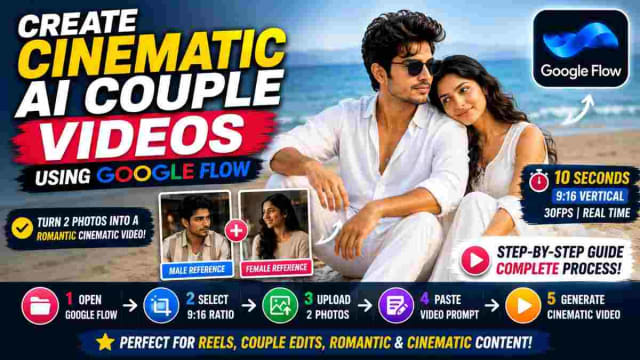
Creating cinematic couple videos with AI becomes an amazing way to make your ordinary photos special. Using the right reference photos and a detailed video prompt, you can turn your favorite couple into a romantic beach video with their faces, clothes, expressions, environment, and cinematic look kept intact.
In this Google Flow guide, you will learn how to make a realistic AI couple video using Google Flow, two reference photos, and a detailed AI video prompt. Simply prepare your reference photos, open Google Flow, add your video prompt, set your video settings, and generate the cinematic couple video.
What Is an AI Couple Video?
An AI couple video is a cinematic scene created using two reference photos of a couple. Instead of actually filming the scene, AI can generate a scene with the same people but in a different environment and doing different actions.
For example, the prompt below instructs the AI to generate a romantic beach scene using the two people in the photos. The male and female characters in the photos are placed on a beach with an ocean view.
The generated video has a particular storyboard instead of being random. First, the female character sits on the sand, the male character joins her, the two characters have a romantic look, and the video ends with the couple looking at the ocean.
Such a prompt can be used to make Instagram Reels, AI couple edits, romantic videos, cinematic content, and more.
What You Need to Make an AI Couple Video
Before you open Google Flow , prepare the necessary reference material.
In particular, you will need:
• A reference photo of a male character
• A reference photo of a female character
• An optional reference video of a specific style
• A detailed AI video prompt
• Google Flow with the video generation functionality
The quality of your reference photos will determine the quality of the final video. In particular, avoid using pixelated images and make sure that the faces of the people in the photos are visible.
Step 1: Prepare the Two Reference Photos
Open Google Flow and create a new video generation project. Select the video generation mode and set your video settings. For this prompt, the video is set to 9:16 ratio to fit Instagram Reels as a short vertical video.
The prompt sets the following video settings:
• 10-second long video
• 9:16 video ratio
• 30 FPS
• Normal real-time speed
• Cinematic photorealistic appearance
Those settings are tuned to create a social media post rather than a cinematic movie.
Step 2: Upload the Male and Female Images
Upload your two reference photos of a male and female character to Google Flow. The first photo is used as the reference for the male character, and the second photo is used as the reference for the female character.
The prompt asks to use separate reference photos so that the AI can use each image for one character’s face and identity. The two characters in the generated video will not mix their appearances.
Make sure to upload high-quality photos with visible faces.
Step 3: Add the Video Reference
If you have a video reference that demonstrates the desired style, add the video according to the reference options in your Google Flow UI.
The prompt asks to use the reference video for the following elements:
• Wardrobe
• Hairstyle
• Body posture
• Environment
• Composition
• Lighting
• Color palette
• Overall visual atmosphere
This way, the generated video will not be random but will follow the specific visual style of the reference video.
Step 4: Paste the Detailed AI Video Prompt
Now, it is time to actually paste the detailed AI video prompt. The prompt asks to generate a cinematic romantic beach video with the following elements:
• Beach environment
• Specific clothing
• Camera angles
• Character movements
• Lighting
• Facial identity
• Ocean view
• Color grading
• Scene timeline
Instead of asking to generate a random romantic beach video, the prompt specifies every detail so that the generated video has a particular storyboard and does not look random.
How to Follow the Timeline of the Video
One of the most important parts of the prompt is the timeline. In particular, the prompt specifies how the video should look at various points during the 10-second long generation:
0–1.4 Seconds: Opening Shot
The video begins with the female character sitting on the beach. The shot is shallow-focus with bokeh in the foreground to make the character the center of attention. The lower part of the male character’s body is seen in the center of the frame to suggest that he will soon join the female character.
1.4–2.8 Seconds: The Male Character Joins
The male character walks up to the female character and sits next to her. The movement is slow and calm rather than sudden and dramatic. The camera maintains a slightly higher front view.
2.8–4.3 Seconds: Couple Establishes
The couple is now sitting on the sand. The male character looks at the female character while she looks at him. The ocean is seen in the background.
The prompt asks to make sure that the characters breathe naturally and move so that the video does not look rigid.
4.3–5.8 Seconds: Emotional Moment
The couple shares a quiet emotional moment. Their facial expressions are calm rather than overly dramatic. The wind gently moves the female character’s hair and the loose parts of their white clothes.
5.8–7.4 Seconds: Closer Composition
The camera moves in for a closer romantic composition. The female character leans slightly against the male character’s shoulder while both remain relaxed.
7.4–8.8 Seconds: Portrait Shot
The male character is shown in a closer composition while he wears the sunglasses as seen in the reference photo. The female character rests her head on the male character’s shoulder. The prompt asks to make sure to add an extremely subtle cinematic push-in.
8.8–10 Seconds: Final Ocean Shot
The video ends with the couple sitting on the sand while looking at the ocean. The camera slowly moves back slightly to create a cinematic effect before freezing on the final frame.
Why a Detailed Prompt Is Important
A detailed prompt is important because it specifies what the AI should do. In this case, the prompt tells the AI what to show, how to show it, and what not to show. For example, the prompt asks to avoid the following elements:
• Additional characters
• Additional wardrobe
• Additional location
• Sunset lighting
• Harsh shadows
• Fast movements
• Artificial slow-motion
• Additional lens flare
• Facial distortion
• Identity drifting
• Duplicate characters
• Additional fingers
• Text or watermarks
The prompt specifies which elements should and should not be present in the generated video.
Maintaining Face and Character Consistency
One of the main challenges of generating videos with AI is maintaining the same character in different shots. This prompt asks to maintain the following elements:
• Facial structure
• Eyes
• Eyebrows
• Nose
• Lips
• Jawline
• Skin tone
• Age
• Facial proportions
This way, the characters in the generated video should look the same throughout the 10-second long clip.
However, keep in mind that in some cases, you may need to ask the AI to generate the same video multiple times. In particular, some AI tools may struggle to maintain the same facial structure in different shots and may distort the characters’ faces.
Creating the Cinematic Beach Look
The visual appeal of the video is another important detail to follow. In particular, the beach environment uses a pale color palette:
• Warm sand
• Blue-grey ocean
• White clothes
• Bright natural light
The prompt asks to avoid overly bright sunshine and to use only subtle highlights, natural skin tones, and desaturated cinematic colors. This way, the resulting video will look romantic but not overly dramatic.
PROMPT
✨ AI PromptCreate a 10-second, 9:16 vertical, 30fps, normal real-time-speed, ultra-photorealistic cinematic romantic video using @IMAGE1 only as the strict male face/identity reference and @IMAGE2 only as the strict female face/identity reference; preserve both identities exactly throughout the entire sequence, including facial structure, eyes, eyebrows, nose, lips, jawline, skin tone, natural age and facial proportions, with no face morphing, beautification, identity drift or actor replacement, while taking all wardrobe, hairstyle styling, body posture, environment, composition, lighting, color palette and visual characteristics from the uploaded video reference. The scene takes place at the same open sandy beach, with dry textured beige sand covering the foreground and middle ground, a calm blue-grey ocean visible behind the couple, soft low waves rolling toward shore, a very distant hazy horizon, and no prominent buildings or distracting people; maintain the same peaceful open beach geography throughout with bright diffused daylight and soft atmospheric illumination, no harsh directional sunlight, creating the video's characteristic high-key pale blue, white and warm-sand color palette, slightly desaturated cinematic grading, soft contrast, gentle highlights and natural skin tones. The male character wears the same loose all-white beach outfit seen in the reference: relaxed white long-sleeve shirt with the upper buttons naturally open, white/light cream relaxed trousers, white footwear when visible, and dark sunglasses only in the later close-up portion exactly as they appear in the reference, while the female wears the same elegant all-white flowing outfit from the reference, with a sleeveless/short-sleeve white dress or kurta-style silhouette, soft flowing fabric, minimal delicate jewelry, open long naturally wavy dark hair and bare feet, keeping both wardrobes completely unchanged throughout; fabric must move naturally in the light sea breeze. 0.0–1.4s: begin with the same dreamy shallow-depth-of-field composition as the reference, the female sitting alone on the beach sand in the foreground while the male's lower body/legs enter the frame beside her, with large soft circular foreground bokeh/light flare partially obscuring the image, the woman looking forward calmly with a slightly emotional expression while the camera remains almost static and gently settles focus from the soft foreground flare toward her face; 1.4–2.8s: transition to the same medium composition where the woman sits on the sand with her knees drawn slightly upward and arms resting naturally around them, while the man moves into frame and lowers himself to sit beside her, his white shirt and trousers catching the soft daylight, his movement slow and relaxed, no sudden gestures, camera maintaining the same slightly elevated front angle; 2.8–4.3s: both are now seated side-by-side on the sand exactly like the reference, the man resting one arm casually across his raised knee while turning his head toward the woman, and the woman sitting close beside him looking toward him with a quiet affectionate expression, their bare feet naturally visible against the sand, subtle sea waves behind them, camera holding a stable medium two-shot with gentle natural breathing; 4.3–5.8s: maintain the same seated composition as the couple exchange a soft prolonged look, the man slightly turning his shoulders toward her while she keeps her gaze on him, their expressions restrained and intimate rather than exaggerated, a gentle sea breeze moving individual strands of her hair and the loose edges of their white clothing, with the ocean softly blurred behind them; 5.8–7.4s: move into the same closer romantic composition from the reference, the man sitting beside her and looking calmly toward her while she subtly leans closer toward his shoulder, both remaining relaxed and emotionally connected, maintaining the exact seated posture and spacing seen in the reference, with soft pale-blue highlights around their white outfits; 7.4–8.8s: transition to the same close portrait framing where the male is foregrounded wearing the dark sunglasses seen in the reference, his white shirt slightly open at the chest, while the woman sits immediately beside/behind him and gently rests her head against his shoulder, her expression peaceful and affectionate, her long wavy hair falling naturally over her shoulder, the camera making an extremely subtle cinematic push-in; 8.8–10.0s: finish with the same rear wide composition as the reference, both characters now sitting together on the sand with their backs toward camera and looking quietly toward the ocean, the man's white shirt forming the central foreground shape and the woman's long dark wavy hair flowing down her back, their shoulders close together, calm waves moving in the distance, camera slowly pulling back a few inches and holding on the peaceful ocean-facing couple until the final frame. Maintain the exact soft-white wardrobe aesthetic, same beach sand texture, same blue-grey sea, same bright diffused daylight, same pale pastel color grading, same relaxed seated body language, same emotional restraint, same natural hair movement, same overall composition and visual atmosphere as the uploaded video. Use realistic cinematic optics, shallow natural depth of field on close shots, subtle lens softness, realistic skin pores, individual hair strands, physically accurate white fabric, natural sand texture, realistic ocean movement, soft atmospheric haze and restrained film grain. No location change, no additional characters, no wardrobe changes, no different colors, no dramatic sunset, no golden-orange lighting, no harsh shadows, no dancing, no running, no exaggerated romance, no kissing, no theatrical expressions, no fast movements, no artificial slow motion, no speed ramping, no camera shake, no excessive lens flare, no CGI appearance, no plastic skin, no face distortion, no identity drift, no hairstyle replacement, no body-shape changes, no extra fingers, no warped hands, no duplicated characters, no text, no watermark; every shot must feel like the same continuous real-life beach moment and visually match the uploaded reference video as closely as possible.
Final Thoughts
Making a cinematic AI couple video with Google Flow is easy with the right reference photos and prompt. In particular, everything comes down to preparing two reference photos, opening Google Flow , setting the 9:16 ratio, adding the reference photos, adding an optional reference video, pasting the detailed AI video prompt, and generating the video. The most important part of the prompt is specifying what you want the AI to show, how you want it to look, and what you do not want the AI to show or do.
Using this approach, you can generate various different cinematic AI couple videos including beach, wedding, friendship, travel, couple edit, and more.
dinxsh7
EditorEditorial contributor researching practical guides, tech discoveries, and curated recommendations for Dinesh Picks.
Continue Reading