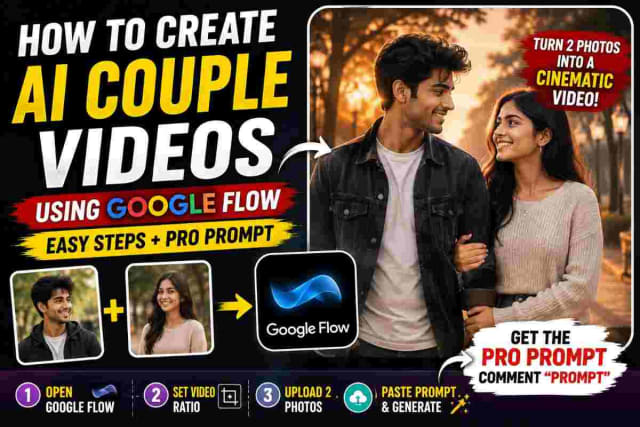
How to Make AI Couple Video with Google Flow and Custom Prompt
SCROLL DOWN FOR FULL PROMPT
AI video generation is a great way to turn two or more photos into a creative concept. Making an AI couple video is a quick and easy way to make a cinematic concept with two or more persons, focus on their friendship or love storyline, family drama, cool concept for a reel, or something more. All you have to do is take the necessary photos and describe vividly what you want to see on the video. Below are some important tips for making an AI couple video with Google Flow, by changing the ratio, uploading two images, and a custom prompt. Also, we added several ideas for different types of videos with couples for Instagram or other platforms. Let’s get started.
What Is An AI Couple Video?
An AI couple video is a video of the two persons from the reference image. Instead of making a normal video with a couple, describe your idea and give a reference image to Google Flow and wait for the results.
An AI couple video can be made in various styles, for example, cinematic, romantic, friendship, party, and others. The main point is that the person wants to see the reference image in the video. A custom prompt is also a good way to show what the person wants to see in the video, how to shoot it, the actions, and the style.
How To Make An AI Couple Video
In this case, making an AI couple video is not difficult; instead of making a video, it is enough to give reference photos to the AI assistant. The process has several steps, including choosing two photos, opening Google Flow, and uploading two images with a prompt.
Step 1: Choose Two Photos
The first thing to do is to find two photos of the persons that the person wants to see in the video. Make sure that the photos are good quality and have a visible face for the reference because Google Flow will recognize them. Furthermore, it is best to use the best photos of the persons so that Google Flow can make a beautiful couple video. You can use photos of:
• a couple;
• two friends;
• families (parents, children);
• two different characters;
• two persons (unrelated);
• etc.
Of course, it is important to pay attention to the quality of the photos because that affects the results of the video.
Step 2: Open Google Flow
Once the reference photo is ready, it is time to open Google Flow and make a video. First of all, it is necessary to choose the ratios for the video; if the person wants to post the video on Instagram Reels or other platforms with a vertical view, make sure that the ratio of the AI video is also vertical.
Step 3: Upload Two Images
The next step is to upload two images for reference. Make sure to choose the corresponding photos in the corresponding fields because the photos represent two people, and everything must be carefully selected. Check everything twice before going to the next step and writing the prompt. The Google Flow will recognize the person and will show them in the video.
Step 4: Add Your Video Prompt
The most important step is to write a description of what you want to see in the video, instead of writing “create a couple video,” , you can write a custom prompt that will vividly describe the situation, actions, appearance of the people, the view of the camera, and other details of the video. For example, it is possible to describe a cinematic walk of two persons with a view of the sky above them, or mention other effects and actions that you want to see in your AI couple video.
It is always important to describe a scene in as much detail as possible in the prompt to get the best results.
Why Are Reference Images Important?
The reference image is very important in training the AI to recognize the persons in the video. If you want to see the characters similar to the ones in the reference image, make sure to provide better quality photos that will not have a significant blur and occlusion of the persons’ face. Also, you can ask the AI to maintain the same character traits of the persons in the reference images. However, it is important to understand that the results may vary because the AI algorithm will recognize the character according to its data set.
Create Different Types Of AI Videos
Of course, there are more different types of AI videos that can be created, and a couple’s video is only the beginning. Below are some examples of different videos that can be created with AI.
Romantic Couple Videos
Romantic videos are the easiest variation of generated videos with two photos. They are a cinematic version of a love story, walk in various locations (gardens, streets, beaches, cafes), dating, and other romantic activities.
Friendship
For friendship, it is possible to use two photos of your friends and create a cinematic concept of your relationship, for a fun and cool reel or video.
Family
Another variation is to create a family video with the photos of siblings or parents.
Cinematic Reels
For cinematic reels, it is possible to describe various movement and camera effects to make the video more interesting and engaging.
Tips For Better AI Video
In addition, there are also some useful tips and tricks for making a better AI video. The most important recommendations include:
• using clear reference photos for the video;
• making the prompt more specific;
• describing the movements and the behavior of the camera;
• choosing the best ratio for the video;
• keeping the scene simple;
• focusing on one interesting idea instead of trying to add multiple actions and concepts;
• using CTAs (calls to action), hashtags, or other marketing ideas to promote the generated video.
AI Couple Videos For Instagram Reels
AI couple videos are a popular way to create a short Instagram reel, because they are easy to make and represent a short concept that an Instagram viewer can watch in one take. Moreover, you can also make an educational Instagram reel about how to make an AI couple video, using Google Flow. Such reels usually have a hook at the beginning, an engaging fact or question that will keep an Instagram viewer interested in watching the rest of the reel. Then, it is necessary to show how you are going to make an AI video and what steps are being taken. At the end, it is possible to ask your Instagram followers to comment below or follow you on social media so that they can receive more educational content. For example, you can ask your Instagram followers to write a prompt or a description of the video in the comment below, so that you can use it for making the Instagram couple video. You can also mention that you have used a certain prompt in the created couple AI video. In this way, you can make the Instagram reels more interesting and educational, not only show how cool the results of Google Flow can be.
PROMPT
✨ AI PromptStyle: Ultra-realistic cinematic film, emotional Bollywood atmosphere, natural acting, realistic skin texture, shallow depth of field, soft monsoon daylight, overcast sky, rain droplets visible on skin, smooth handheld camera movement, cinematic close-ups, emotional instrumental background music only, no dialogue, no lip movement. Character References: @img1 male lead @img2 = female lead Scene 1 (0s-3s) Extreme close-up of monsoon raindrops falling on leaves and puddles. Cut to a close-up of @img1 standing under light rain during daytime. Wet hair, rain droplets on his face, emotional eyes looking ahead. Camera slowly pushes toward his face. He notices @img2 in the distance. Close-up of @img2 looking back through the rain, soft natural smile, white outfit gently moving in the wind. Scene 2 (3s-6s) Close-up shot of @img2's face. Rain softly falling around her. Water droplets resting on her hair and eyelashes. She lowers her eyes briefly, then looks toward @img1 with warm emotional expression. Camera slowly circles around her face with dreamy background blur. Cut to close-up of @img1 smiling softly, eyes filled with emotion. Scene 3 (6s-95) Alternating close-ups of both faces. Rain intensifies. Slow-motion droplets running down their cheeks. Emotional eye contact through the monsoon rain. Camera gently shakes handheld for realism. Wind moves their hair naturally. Background fades into soft bokeh while only their expressions remain in focus. Scene 4 (9s-12s) 2.Create Video Close-up of their hands as they slowly walk toward each other through the rain. Water splashes around their feet. Fingers almost touching but not fully meeting. Emotional tension builds. Camera captures detailed rain droplets falling from their hands and sleeves in slow motion. Scene 5 (12s-15s) Extreme close-up of @img2 looking up with a gentle emotional smile. Cut to close-up of @img1 gazing at her. Rain falls softly between them. Camera slowly moves around both faces while the background dissolves into beautiful monsoon bokeh. Romantic emotional ending, soft instrumental music only, realistic Bollywood film feeling. Keywords: Close-up shots, daytime monsoon, emotional romance, rain aesthetics, natural expressions, realistic Bollywood cinema, soft bokeh, shallow depth of field, overcast daylight, cinematic handheld camera, no dialogue, no lip movement. Style: Ultra realistic cinematic film, emotional Bollywood atmosphere, natural acting, realistic skin texture, monsoon daylight, soft overcast lighting, shallow depth of field, smooth handheld camera movement, emotional instrumental music only, no dialogue, no lip movement. Scene 6 (15s-18s) Wide cinematic shot in a lush green park during monsoon rain. @img2 joyfully spins in circles with her arms open, enjoying the rain freely. Her white dress flows naturally with the wind. Rain splashes around her feet as she laughs silently. Camera slowly rotates around her, capturing the carefree moment. Scene 7 (18s-21s) 3.Create Video Medium tracking shot. @img1 walks toward her through the rain from the opposite side. He smiles warmly while watching her enjoy the weather. Water splashes beneath his footsteps. The background is filled with green trees, mist, and soft monsoon atmosphere. Scene 8 (21s-24s) Wide shot. @img2 continues twirling happily in the rain. @img1 reaches near her and begins enjoying the rain as well. Both walk playfully through puddles without speaking. Camera follows them with smooth handheld movement. Their happiness feels natural and genuine. Scene 9 (24s-27s) Cinematic slow-motion shot. @img2 runs lightly through the rain while @img1 follows beside her. Rain droplets fly through the air. They exchange joyful glances while walking together. The monsoon breeze moves their hair and clothes naturally. Scene 10 (27s-30s) Beautiful wide ending shot. Both stand side by side in the open rain, looking toward the cloudy horizon. Camera slowly rises upward, revealing green landscapes, rain falling everywhere, and the peaceful monsoon atmosphere. Emotional romantic ending, realistic Bollywood movie feeling, soft instrumental music only.
Final Thoughts
Making an AI couple video can be a fun and easy way to make a creative and engaging concept out of two photos for a reel or a short video. The steps for such a video are simple: take two clear photos, open Google Flow, choose the ratio, upload the images, and add a vivid description of the video prompt. The quality of the results depends on these two factors: a specific description and the quality of reference photos. In addition, you can also experiment with different scenes, actions, camera view, and other elements to come up with your own concept for a reel or a YouTube short. In general, the making of an AI video for Instagram or other platforms is easy with a clear prompt, two photos, and Google Flow as an AI video generator.
In short, two photos, Google Flow, and a custom prompt can make an amazing AI couple video.
dinxsh7
EditorEditorial contributor researching practical guides, tech discoveries, and curated recommendations for Dinesh Picks.
Continue Reading