Create 3D Banner Videos for Business
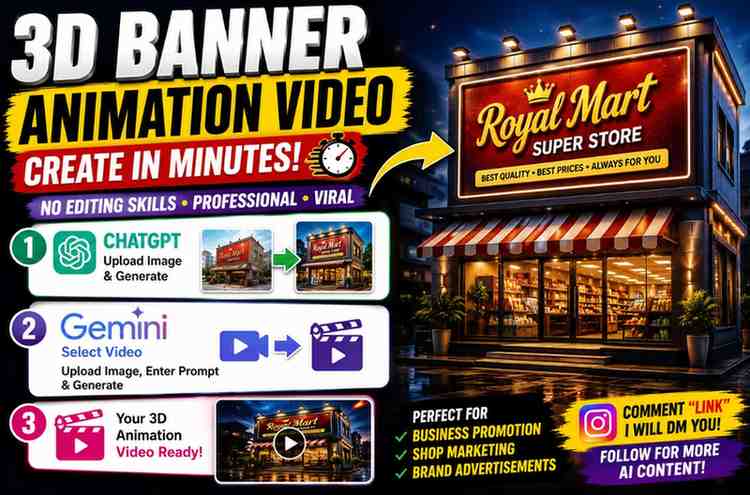
How to Make 3D Banner Animation Videos for Business Using ChatGPT and Gemini AI
3D banner animation videos have become one of the most eye-catching Instagram trends for promoting storefronts, billboards, and brand signage. A short cinematic clip of the advertisement being installed or unveiled that you can create using ChatGPT and Google Gemini without a camera crew or motion-design software.
Step 1: Create the Banner Mockup Image in ChatGPT
Upload two images to ChatGPT: a photo of your actual building or storefront and your advertisement design (logo, offer, or banner artwork). The prompt below will lock the building exactly as photographed and insert your design into the existing signage area, rather than generating a new building or redesigning your artwork.
Prompt
✨ AI PromptUsing the first uploaded image as the building/location reference and the second uploaded image as the advertisement design, create an ultra-photorealistic architectural billboard mockup. Keep the building, location, camera angle, lighting, perspective, architecture, surroundings, landscape, roads, sky, and environment exactly the same as in the first image. Do not redesign or alter the building or its surroundings. Replace the existing billboard/signage/banner/display area with the second uploaded design. Apply the artwork naturally with perfect perspective matching, realistic scaling, and seamless integration into the structure. The uploaded design must remain 100% unchanged: • Preserve all colors • Preserve typography • Preserve logos • Preserve branding • Preserve layout • Preserve aspect ratio • Do not crop, stretch, redesign, or generate new elements Make the advertisement appear professionally installed with: • Hidden mounting system • Premium aluminum frame • Realistic banner tension • Correct edge alignment • Natural shadows • Accurate reflections • Subtle fabric or display texture (depending on the billboard type) • Physically correct perspective and depth Use: • Professional architectural photography • Sony Alpha A7R V • 85mm lens • HDR • Golden-hour natural lighting (or match the lighting from the reference image) • Ray-traced reflections • Global illumination • Cinematic compositionSignage Hyper-realistic materials • Commercial advertising mockup quality • Ultra-detailed • 8K resolution The final image should look like a real photograph captured on location, with the uploaded design appearing as if it was originally installed on the building. The only modification should be replacing the existing billboard/display with the second uploaded artwork while preserving every other aspect of the first image. ---
Step 2: Animate the Mockup in Google Gemini
Once you're happy with the still mockup, upload it to Gemini's video generation tool and use the prompt below. This one is built around a specific, physically believable action -- a rolled-up banner unfurling under gravity and locking into place -- rather than a vague "animate this" instruction.
Prompt
✨ AI PromptUsing the uploaded image as the only reference, create a 10-second ultra-photorealistic architectural animation. Preserve every element exactly as shown in the reference image, including the building, architecture, perspective, camera angle, composition, surroundings, roads, vehicles, trees, grass, sky, lighting, shadows, reflections, and the advertisement artwork. Do not redesign, regenerate, replace, crop, stretch, or alter any part of the scene. The advertisement is a single continuous premium PVC mesh cloth banner mounted inside a hidden aluminum housing at the roofline of the building. At the beginning of the animation, the banner is completely rolled up and concealed. The hidden mechanism releases, allowing the heavy fabric banner to slowly unroll vertically from the top of the building, naturally covering the facade under gravity until it reaches its final installed position. The animation must simulate only the physical movement of the cloth. The printed advertisement is permanently printed on the fabric and must remain 100% fixed throughout the entire video. Artwork Lock (Highest Priority) Use the uploaded advertisement as one single locked texture. The artwork must remain permanently attached to the fabric. The design must never regenerate. Never create new graphics. Never recreate the typography. Never modify logos. Never change colors. Never alter branding. Never change layout. Never change aspect ratio. Never crop the artwork. Never stretch the artwork. Never warp the artwork. Never scale the artwork. Never slide the artwork. Never drift the artwork. Never flicker the artwork. Never reposition any element of the printed design. Maintain perfect pixel-to-pixel consistency from the first frame until the last. Cloth Simulation The banner behaves like a real heavy commercial outdoor PVC mesh banner. Gravity-driven unfolding. Heavy fabric weight. Natural inertia. Realistic cloth simulation. Soft folds while unfolding. Temporary wrinkles during deployment. Gentle wind ripples. Slight edge flutter. Accurate collision with the building facade. Fabric naturally brushes against architectural surfaces. Hidden aluminum mounting frame. Reinforced stitched edges. Professional outdoor installation. Automatic tensioning once fully deployed. Banner Position Lock (Critical) The banner unfolds only once from top to bottom. Once the banner reaches its final position: Lock the banner immediately into place. Keep the banner perfectly aligned with the building. Keep the banner centered exactly as shown in the reference image. Maintain identical scale and perspective. Do not allow any vertical movement. Do not allow any horizontal movement. Do not rotate the banner. Do not bounce. Do not swing. Do not sway. Do not oscillate. Do not drift. Do not shift after installation. Do not stretch or compress after deployment. Keep the artwork in exactly the same position until the video ends. Only an almost imperceptible flutter at the extreme bottom corners is allowed. The main body of the banner must remain completely stationary after tensioning. The final installed position must match the reference image exactly. Camera Maintain the original framing throughout the animation. Slow cinematic forward dolly. Gentle upward tilt. Very subtle left-to-right parallax. Smooth gimbal stabilization. No handheld movement. No zoom jumps. No sudden camera movement. Slow architectural showcase style. Lighting Match the original lighting perfectly. Bright natural daylight. HDR. Global illumination. Ray-traced reflections. Physically accurate shadows. Ambient skylight. Natural exposure. High dynamic range. 10-Second Animation Timeline 0.0–1.5 Seconds Static establishing shot. The banner is completely rolled inside the hidden roof housing. Only subtle environmental movement such as a light breeze in the grass. 1.5–6.5 Seconds The hidden mechanism releases. The banner smoothly unrolls downward under gravity. The cloth exhibits realistic folds, slight ripples, and accurate collision with the building. The printed artwork remains perfectly locked to the fabric with zero movement relative to the cloth. 6.5–8.5 Seconds The banner reaches the bottom. A hidden tension system tightens the fabric. Minor wrinkles disappear naturally. The banner becomes perfectly flat and professionally installed. 8.5–10.0 Seconds The banner is fully deployed and immediately locks into its final position. The camera performs a subtle cinematic push-in while the banner remains completely fixed. No further movement of the banner or artwork occurs. The final frame must match the uploaded reference image exactly. Rendering Specifications Ultra Photorealistic Sony Alpha A7R V 85mm Lens HDR Photography Global Illumination Ray-Traced Reflections Physically Based Rendering (PBR) Hollywood-Level Cloth Simulation Architectural Visualization Quality Commercial Advertising Mockup Hyper-Realistic Materials Ultra-Detailed PVC Mesh Fabric 8K Resolution 60 FPS Cinematic Color Grading Film-Quality Rendering Negative Prompt Do not generate new graphics, do not redesign the advertisement, do not replace text, do not recreate logos, do not add extra banners, do not duplicate the design, do not morph, do not stretch, do not warp, do not crop, do not change colors, do not change perspective, do not allow texture swimming, do not allow artwork drifting, do not reposition the banner after deployment, do not bounce, sway, oscillate, rotate, or slide the banner, do not change the building, lighting, environment, or camera framing. The only animation should be the single realistic top-to-bottom unfolding of the cloth banner. Once fully deployed, the banner and its printed artwork must remain completely fixed and identical to the reference image until the end of the 10-second video.
Why these videos work for businesses
A moving banner will grab attention in the first second of a scroll, hold a viewer's interest longer than a static image, and make a business look more premium than a plain photo -- perfect for clothing stores, restaurants, real estate agencies, medical shops, and almost any other storefront business.
My experience using these prompts
The artwork-lock and banner-position-lock sections aren't just extra wording -- skipping them in an earlier test caused the final design to drift slightly during the "settle" phase (6.5-8.5s), with the logo shifting a few pixels as the tension system tightened. Keeping those lock instructions explicit fixed it. The mockup image step (Step 1) is worth getting right before animating -- if the billboard placement or perspective looks even slightly off in the still image, that error will carry straight through into the video.
Where you can use these videos
Clothing stores, restaurants, coffee shops, salons, real estate agencies, medical stores, electronics and grocery stores, jewelry shops, hotels, gyms, and educational institutions -- anywhere a storefront or billboard promotion needs more visual interest than a static banner photo.
Tips for better results
Use a high-resolution photo of your actual storefront or billboard location, make sure your advertisement design file is clean and final before uploading (since the prompt is built to preserve it exactly), and keep your branding consistent if you generate multiple versions.
FAQ
Do I need video editing experience for this?
No -- both the image mockup and the animation are generated through prompts; no editing software is required.
Which businesses can use this format?
Almost any storefront or signage-based business -- the examples above cover retail, food, real estate, healthcare, and more.
Which platforms is the 10-second format best for?
Instagram Reels, Facebook Reels, YouTube Shorts, and WhatsApp Status all suit this vertical, short-form length well.
Why does the video prompt specify such a long negative-prompt list?
Locking down what should NOT happen (no redesign, no drift, no warping) is what keeps the final frame matching your actual advertisement exactly, rather than letting the model "reimagine" the artwork partway through.
Final thoughts
A 3D banner animation gives a storefront or billboard promotion far more visual impact than a static photo, and the two-step mockup-then-animate workflow above keeps your actual branding locked in place throughout -- no redesign, no drift, just a clean, professional unveiling shot.
Written by Dinesh -- full-stack developer and content creator testing AI image and video prompts for real-world business use.
Continue Reading
Recommended Stories
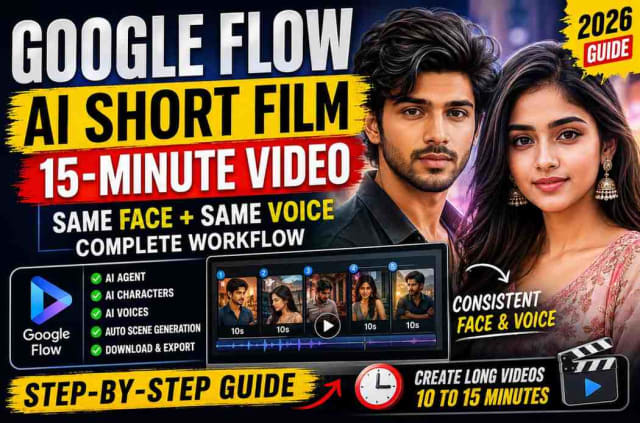
How to Create AI Short Films & 15-Minute Videos Using Google Flow (Same Face & Voice Consistency)
Learn the complete Google Flow AI Short Film workflow for creating professional 10–15 minute AI videos with consistent characters and voices. This beginner-friendly guide explains how to generate scripts with ChatGPT or Gemini, create AI characters, assign voices, use Google Flow's AI Agent, generate multiple scenes automatically, combine clips into one movie, and export the final project. If you want to create AI stories, animated short films, YouTube videos, or cinematic content with the same face and voice consistency, this step-by-step tutorial covers everything you need to know.

5 Powerful ChatGPT & Gemini AI Prompts Everyone Should Know in 2026