
Sparkler Night Portrait Prompt – Saree Diwali Photo
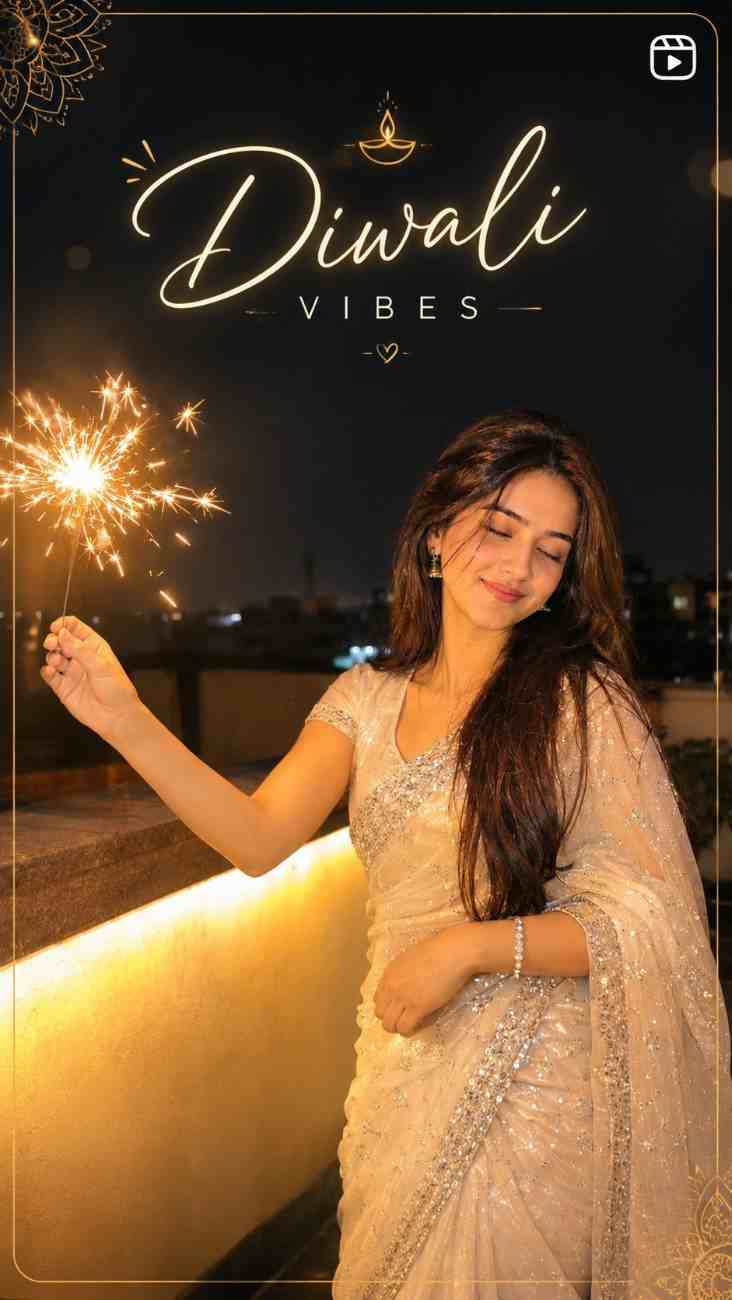
A detailed image generation prompt designed to create an authentic nighttime rooftop portrait of an individual holding a sparkler during Diwali.
Prompt Text
Ready to copy & executeUse the uploaded photo only as the facial identity reference. Keep the face,
facial features, skin tone, and identity 100% accurate to the uploaded photo
— do not alter, smooth, or beautify the face. Do not copy the pose, body
position, or composition from the uploaded photo — generate a new pose and
composition based on the description below.
Create a nighttime outdoor portrait on a terrace/rooftop, shot in low-light
ambient style, as if captured on a real phone camera at night (not a studio
render). The subject stands at a three-quarter angle to the camera, eyes
gently closed, soft content smile, head tilted slightly, holding a lit
sparkler (phuljhadi) in one raised hand, arm extended outward and slightly
bent at the elbow. The other hand rests gently near the waist.
Lighting — this is the most important part: the sparkler is the dominant
light source on that side of the frame. Its warm golden-orange glow must
visibly spill onto the nearest side of the face, arm, hair, and saree,
creating uneven, flickering warm highlights and soft orange rim light along
the cheek, jaw, and shoulder closest to the sparkler. The opposite side of
the face and body stays dimmer and cooler, lit only faintly by ambient city
light, creating real directional contrast between the two sides. Fine
sparks should scatter and fade in the air with motion blur trails, casting
tiny warm glints on nearby hair strands and sequins. The saree's sequins
and embroidery must catch and reflect the sparkler's light with small,
scattered specular highlights, not an even all-over glow.
Outfit: a white/ivory sequined saree with silver embroidered border, draped
traditional pallu style, matching earrings, bracelet on the free hand.
Background: dark navy-black night sky fading into a dim city skyline
silhouette, slightly underexposed, with a warm-lit parapet wall/ledge beside
the subject acting as a weak secondary light source. Add natural image
grain/noise consistent with low-light phone photography, slight motion
softness is acceptable, no HDR glow, no even studio lighting, no symmetric
glam lighting.
Camera style: vertical 3:4 or 9:16 portrait, natural phone-camera look,
shallow depth with subject in focus and background softly dark and slightly
noisy. Realistic skin texture with visible pores and natural shadow falloff
from the sparkler — not flat, not plastic, not AI-smooth.
Keep body proportions and build natural and realistic — do not slim,
thicken, or distort the figure.Introduction
This prompt is engineered for AI image generators that accept reference photos, specifically targeting realistic identity retention and contextual mood. It outlines precise instructions to replicate facial features accurately while placing the subject in a brand new Diwali celebration setting. By emphasizing natural phone-camera imperfections rather than polished studio aesthetics, it achieves a candid, personal look.
Prompt Details
Concept & Creative Objective
To generate a lifelike nighttime portrait of a specific individual wearing a traditional saree, illuminated primarily by the warm, directional glow of a handheld sparkler on a rooftop terrace.
Why This Prompt Works
The prompt succeeds by explicitly defining the dominant light source and its interaction with the subject, requiring warm golden-orange highlights on one side of the body and cooler ambient shadows on the other. It also requests specific texture details like natural skin pores, motion blur trails on sparks, and sequin reflections, while strictly forbidding artificial smoothing or studio lighting.
Prompt Breakdown
The text is structured into clear operational constraints: using the uploaded image strictly for facial identity without alteration, establishing a low-light phone-camera aesthetic, setting specific lighting rules for the sparkler, detailing the white/ivory sequined saree outfit, describing the dark navy-black city skyline background, and mandating natural skin texture with image grain.
Instructions
Customization Tips
You can modify the outfit color by changing the 'white/ivory sequined saree' description to another color while maintaining the textile details. You can also adjust the setting from a rooftop terrace to a balcony or garden patio by editing the background parameters.
Generation Best Practices
Ensure your chosen AI tool supports image-to-image uploading for facial identity reference. Use the requested vertical 3:4 or 9:16 aspect ratio settings to match the intended phone-camera composition.
Help & Answers
Frequently Asked Questions
No. The prompt locks only your face and identity from the uploaded photo. The pose, body position, and composition are generated fresh from the description, so your result won’t mirror your reference image’s stance.