
Create Your Own Romantic Heart Aesthetic Portrait 💗
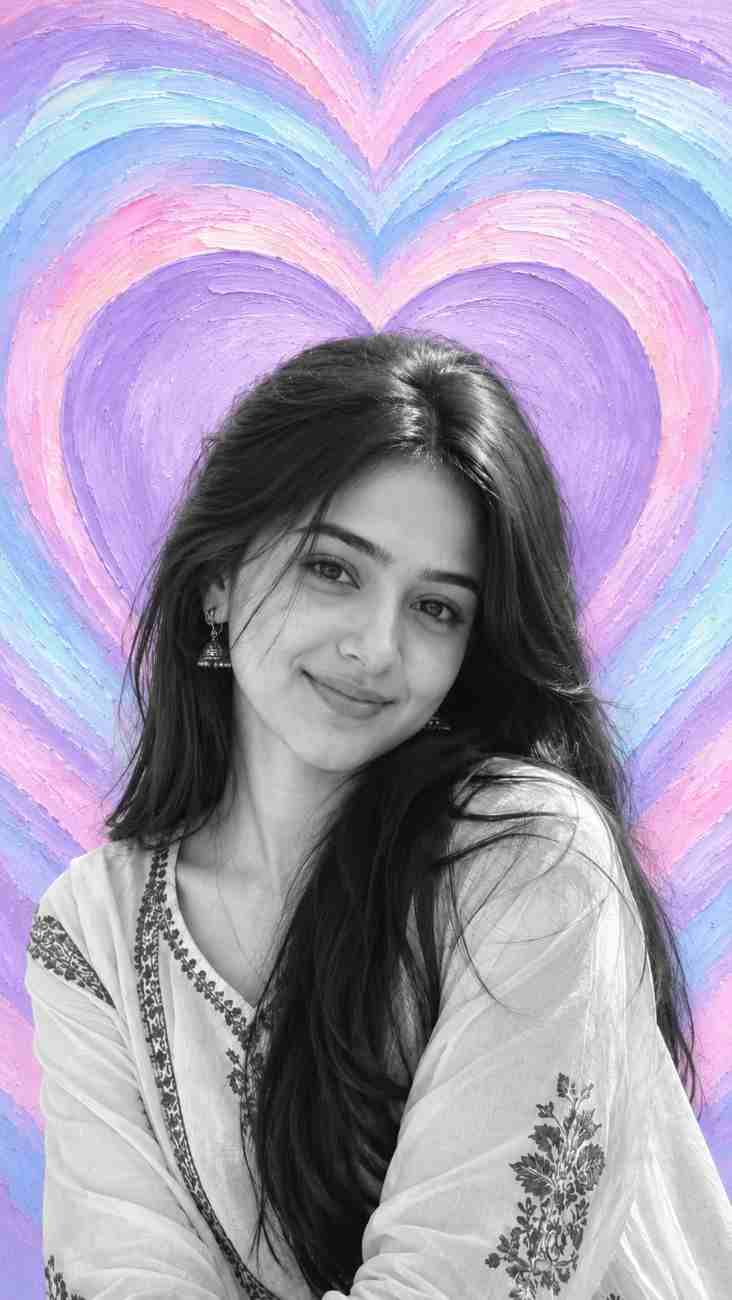
Generate a romantic, heart-themed artistic portrait by combining an uploaded personal photo with a pastel hand-painted background.
Prompt Text
Ready to copy & executeUse my uploaded photo as the ONLY source for the person's identity.
Create a visually stunning portrait featuring me, inspired by a romantic artistic heart-themed composition.
**PERSON REPLACEMENT & IDENTITY:**
Place me as the main subject in the composition. Preserve my exact facial identity, facial structure, eyes, nose, lips, hairstyle, facial hair, skin tone and natural expression from my uploaded photo. Do not generate a different face or alter my identity.
**BACKGROUND DESIGN:**
Create a beautiful, full-frame, hand-painted artistic background featuring multiple large, concentric heart-shaped layers arranged vertically and symmetrically.
The hearts should have flowing, wavy outlines with layered painterly brush strokes. Use a beautiful pastel colour palette consisting of lavender purple, soft pink, baby blue, light cyan and subtle white highlights. Add visible artistic paint textures and curved brush strokes throughout the heart patterns.
The innermost heart should be positioned directly behind the subject's head, creating a beautiful framing effect. The outer heart layers should extend naturally towards all four edges of the image.
**SUBJECT POSITION & COMPOSITION:**
Position the subject in the lower-middle portion of the frame, with the head prominently visible and the upper body extending towards the bottom edge. Use a slightly tilted, natural portrait pose with a relaxed, expressive appearance. Keep the subject large enough to occupy the lower half of the composition.
**PHOTOGRAPHIC TREATMENT:**
Render the person in natural black-and-white photography while keeping the entire artistic heart background in vibrant pastel colours. Maintain realistic facial details, natural skin texture, sharp hair details and authentic photographic contrast.
**FINAL REQUIREMENTS:**
Create a vertical 9:16 portrait. Maintain a seamless integration between the subject and background. No additional people, no text, no logos, no borders and no watermarks.
The final image should look like a professionally designed romantic artistic portrait, with the exact identity of the person in my uploaded photo.Introduction
This prompt is designed to transform an uploaded user photo into a stylized portrait framed by a hand-painted heart aesthetic. By separating the subject in natural black-and-white photography from a vibrant pastel background, it creates a high-contrast visual focus. It includes clear structural directives for identity preservation, color palettes, and vertical composition.
Prompt Details
Concept & Creative Objective
To produce a professional, romantic portrait that accurately preserves the user's facial identity while placing them inside a symmetrical, multi-layered pastel heart artistic background.
Why This Prompt Works
The prompt relies on precise compartmentalized instructions, clearly separating instructions for identity preservation, background design, subject position, and photographic treatment. Specifying a black-and-white treatment for the subject against vibrant pastel background colors creates a striking contrast that keeps the focus on the person.
Prompt Breakdown
The prompt mandates using an uploaded photo exclusively for the person's identity, forbidding face alterations. It instructs the AI to build a vertical 9:16 frame featuring concentric, wavy heart-shaped layers in lavender, soft pink, baby blue, light cyan, and white. The subject is positioned in the lower-middle portion of the frame with a natural black-and-white photographic treatment.
Instructions
Customization Tips
You can modify the color palette instructions in the background design section if you prefer different pastel tones or alternative color combinations. The specific positioning instructions can also be adjusted if you want the subject framed differently.
Generation Best Practices
Ensure you upload a clear, high-resolution source photo showing the person's face clearly, as the prompt strictly relies on this image as the only source for identity. When using tools that support reference images or image inputs, make sure the input image is properly attached.
Help & Answers
Frequently Asked Questions
Yes! Upload your photo and paste the prompt to recreate yourself in this beautiful heart-themed design.