
Cold Dystopian Portrait – Cinematic Black & White AI Photo Editing Prompt
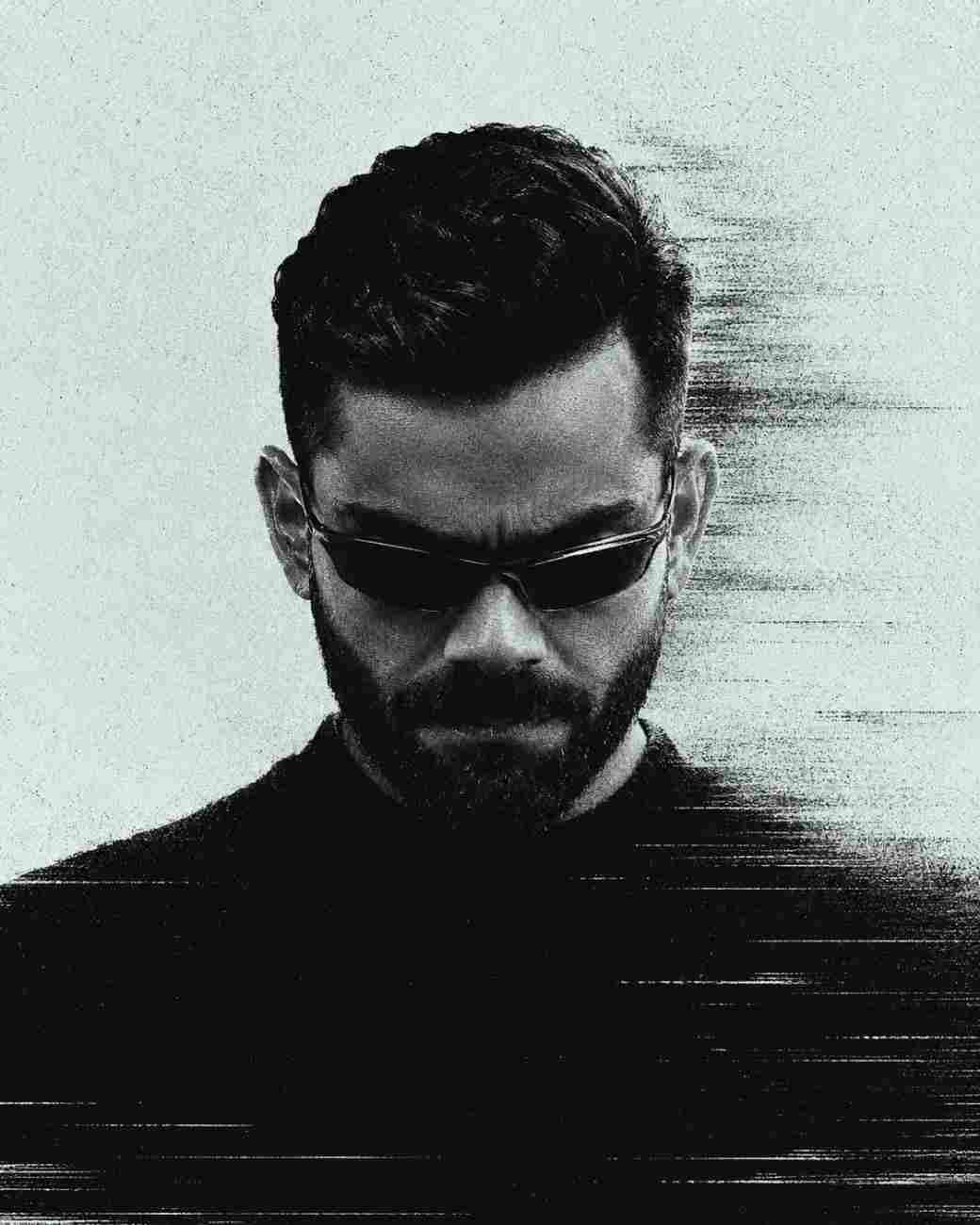
Transform an uploaded portrait into a cold dystopian print featuring a high-contrast black and pale tone aesthetic with glitch textures.
Prompt Text
Ready to copy & executeTransform the uploaded person into a cold dystopian print portrait; preserve face, nose, lips, jaw and hair silhouette. 4:5, centered head upper-middle, ample pale space above, solid black torso filling the lower half. Slight low angle; head deeply bowed, gaze down, lips closed, jaw tense. Thin wraparound sunglasses with one reflection line; black collarless top. Hard upper-right backlight, face nearly black, faint nose, lips, chin and crown highlights. Only black and #DDE6E6. Dense stochastic dither dots, photocopy grain and fine horizontal scanlines throughout. Head, glasses and shoulders smear right into dusty grain, sandy edges, lower signal bands. Techno album-cover mood.Introduction
This prompt edits an existing user-uploaded photo to convert it into a stylized dystopian print portrait. It combines precise facial preservation instructions with stark lighting rules and digital artifacts like stochastic dither dots, photocopy grain, and horizontal scanlines.
Prompt Details
Concept & Creative Objective
The creative goal is to produce a moody, techno album-cover style graphic featuring a severely shadowed subject against pale negative space, utilizing a strict black and #DDE6E6 color palette.
Why This Prompt Works
The prompt relies on specific visual composition rules, such as a 4:5 aspect ratio, a centered head placement with ample pale upper space, and a solid black lower torso. It dictates precise lighting angles (hard upper-right backlight) and distinct glitch elements like smear effects and dusty grain to achieve its unique aesthetic.
Prompt Breakdown
Key instructions include preserving the original subject's facial features (face, nose, lips, jaw, and hair silhouette), a low camera angle, a bowed head with a downward gaze, thin wraparound sunglasses with a reflection line, and a limited dual-tone color scheme.
Instructions
Customization Tips
You can experiment with changing the hex code #DDE6E6 to a different pale accent color if you prefer a tint other than off-white. Adjusting the framing keywords can alter the placement of the subject within the 4:5 frame.
Generation Best Practices
Ensure you upload a clear portrait photo as the source image before running the prompt in a compatible AI tool like ChatGPT or Gemini to give the model sufficient facial data to preserve.
Help & Answers
Frequently Asked Questions
Upload your photo to ChatGPT or Gemini, paste the prompt and generate a cinematic monochrome dystopian portrait.