
Top 50 ChatGPT Prompt Shortcuts (2026): The Ultimate Guide to Boost Productivity, Study, Coding & Content Creation
Introduction
SCROLL DOWN FOR PDF LINK
Artificial intelligence has genuinely been a disruptive force in the modern world, and it has been instrumental in enabling people to learn, work, produce content, write, and code. Instead of typing out long prompts, some individuals may want to take advantage of prompt shortcuts to get better results from chatbots and other AI platforms.
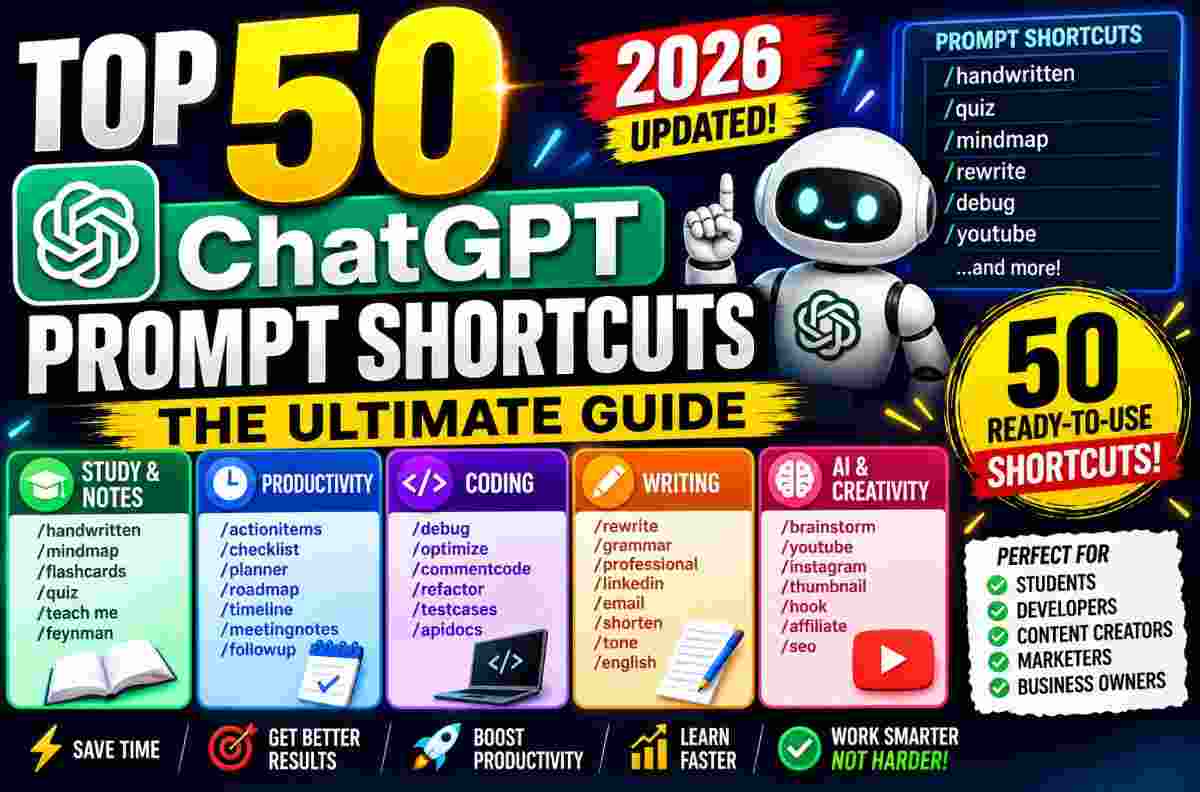
Top 50 ChatGPT Prompt Shortcuts is an ultimate guide consisting of ready-made slash commands for studying, productivity, coding, writing, AI, and content creation. The guide is further split into five sections for convenience.
Whether you are a student, a developer, a content creator, or a business owner, these prompts shortcuts will enable you to achieve more in a significantly shorter time.
What are ChatGPT Prompt Shortcuts?
Prompt shortcuts are short commands that enable users to tell an AI what they want it to do.
For instance, instead of typing out a long prompt, you could type out:
- /handwritten
- /quiz
- /roadmap
- /debug
- /rewrite
and many other commands.
Each of these commands instructs ChatGPT on how to respond to the request. In general, prompt shortcuts are useful in obtaining better results from large language models.
Why Use Prompt Shortcuts?
Prompt shortcuts can be used to:
- Save time
- Get consistent responses
- Improve the quality of results
- Reduce the time it takes to write prompts
- Boost productivity
- Have prompts that one can always rely on
- Learn faster
In short, using these prompts can help you achieve your goals faster.
Instead of asking "how do I phrase my query to get X response from ChatGPT?", one can use existing prompt shortcuts to get the desired response.
Study & Notes Prompts
One of the largest sections in this guide is dedicated to studying and notes.
This section consists of prompts that one can use to create handwritten notes, flashcards, mind maps, exam, revise, summarize, and quiz oneself on various topics.
/handwritten
This command is useful if one wants to convert digital notes into handwritten ones.
For instance, the user could type out:
✨ AI Prompt/handwritten Photosynthesis
/mindmap
Similarly, the command /mindmap can be used to create a mind map from a given topic.
Example:
✨ AI Prompt/mindmap Artificial Intelligence
/flashcards
As the name suggests, this prompt can be used to create flashcards from notes.
This command is perfect for:
- NEET
- JEE
- UPSC
- Semester exams
- College revision
- Short-term exam preparations
/quiz
This command is ideal for creating self-assessment quizzes from notes.
Instead of simply reading through notes, one can type:
✨ AI Prompt/quiz [topic]
to test their knowledge on a particular subject.
/teach me
This command can be used to obtain a detailed explanation of a particular concept.
/feynman
This command is useful in breaking down complex concepts.
Productivity Prompt Shortcuts
Productivity prompts are ideal for individuals who want to extract actionable insights from information.
Prompt Shortcuts
- /actionitems
- /checklist
- /planner
- /roadmap
- /timeline
- /meetingnotes
- /followup
Coding Prompt Shortcuts
This category is dedicated to prompts that are useful in coding and software development.
/debug
This command can be used to debug code.
For instance, the user can simply paste an error message, and ChatGPT will explain:
- What the error means
- Why it occurs
- How it can be fixed
/optimize
This command helps developers optimize their code.
It works with:
- React
- JavaScript
- Python
- Java
- TypeScript
- Many other programming languages
/commentcode
This command is useful in adding comments to code.
/refactor
This command helps developers refactor their code.
/testcases
This command can be used to write test cases in:
- Jest
- Vitest
- PHPUnit
- Many other testing frameworks
/apidocs
This command helps generate API documentation from code.
Writing Prompt Shortcuts
Writing prompts are ideal for rewriting, editing, or polishing text.
Prompt Shortcuts
- /rewrite
- /grammar
- /professional
- /shorten
- /tone
- /tenglish
All these prompts are particularly useful in content marketing and business writing.
AI & Creativity Prompt Shortcuts
This category consists of prompts that can be used in brainstorming, writing YouTube video scripts, captioning Instagram photos, prompt improvement, table creation, writing Reels hooks, describing affiliate products, and suggesting SEO titles, among other tasks.
Prompt Shortcuts
- /brainstorm
- /youtube
- /thumbnail
- /hook
- /affiliate
- /seo
Who Should Use These Prompt Shortcuts?
Anyone interested in boosting their productivity, learning, and content creation can use these prompts to get better results from ChatGPT.
These prompts are particularly useful for:
For Students
Students can use these prompts to:
- Create better revision materials
- Create handwritten notes
- Prepare for exams
- Create flashcards
For Developers
Developers can use these prompts to:
- Debug code
- Write tests
- Optimize code
- Write API documentation
For Bloggers
Bloggers can use these prompts to:
- Improve SEO
- Write blog posts
- Edit meta descriptions
- Edit headlines
For Freelancers
Freelancers can use these prompts to:
- Improve communication with clients
- Create meeting notes
- Plan projects
For Digital Marketers
Digital marketers can use these prompts to:
- Create Instagram captions
- Write YouTube video scripts
- Engage in affiliate marketing
- Plan content
Tips for Getting Better Results
The following tips will help you get better results when using these prompts.
First, always add a context/topic after the slash command.
For instance:
✨ AI Prompt/seo Top AI Tools
Besides the topic, one can also specify:
- Target audience
- Preferred response format
- Additional instructions
FULL SHORTCUTS DRIVE LINK
https://drive.google.com/file/d/1VnBga1_rzynAo_BC4RKGDMUB1TNREGn0/view?usp=sharing
Why Prompt Shortcuts Matter
The ultimate guide to the best 50 ChatGPT prompts discussed above is crucial for individuals who want to get more out of AI.
As generative AI continues to dominate the modern landscape, it is imperative to have a list of ready-made prompts that one can use to get better results from large language models.
In this way, one does not have to spend a lot of time figuring out how to phrase a particular prompt.
Instead, the user can simply type out a prompt shortcut and obtain the desired response.
Continue Reading
Recommended Stories

How to Create 3D Travel Map Animation Videos Using ChatGPT, Gemini & Google Flow (2026 Guide)

5 Best AI Prompts to Design Ganesh Mandal Banner, Logo, Song & T-Shirts (2026 Guide)
