
Top 10 Premiere Pro Text Effects to Make Your Videos Look Professional (2026 Guide)
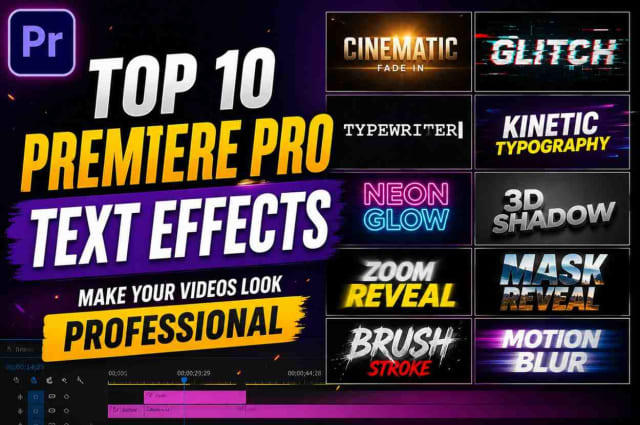
Top 10 Premiere Pro Text Effects to Make Your Videos Look Pro Article
Adobe Premiere Pro is one of the world’s most popular platforms for video editing. People use it for YouTube, movies, social media, and other purposes. Though the most important part of any video will always be the visual content, animated text overlays could give your productions an additional boost that will make them stand out from the competition. They could be used as titles and captions to make the most of your content or attract more viewers’ attention to certain ideas and text elements. Animated text could even be used in various ways for different video types. For instance, nice animated titles could be the most compelling aspect of your YouTube videos while animated overlays could help you score more views on TikTok and Instagram.
Regardless of whether you are creating content for YouTube, Instagram Reels, TikTok, product placements, tutorial or gaming videos, films, or even wedding or travel vlogs, animated text could help you level up your production quality to the next level. In fact, a catchy animated title could sometimes be more attractive than any fancy after-effect. Therefore, it is essential to know how to use text overlays to maximize their effect.
Premiere Pro Text Effects: Why They Matter
Text is often underestimated even though it is one of the most powerful tools for enhancing your video content or social media posts. Text could be added to your videos or images to convey certain information to your target audience in a much clearer way. In addition, animated text elements could significantly improve the appeal of your visual content. More importantly, combining the right text, color, and animation could create a strong branding image that could be recognized across all of your social media accounts or YouTube channel. After all, most YouTubers and social media stars want to give their viewers a unique experience that is why they often use familiar animations and typography.
Moreover, text elements could help you maximize the engagement factor of your videos. Animated text overlays could help you retain viewers’ attention throughout the whole video while providing a bit more information than regular video content. They could also help you add more context to your visual content in a more accessible way. Therefore, it is not surprising that animated text is now one of the most popular tools among YouTubers and social media managers who use them in almost any type of their content.
Top Benefits of Using Text Effects in Your Videos
You could see that there are numerous benefits of adding animated text elements to your videos or images. The major perks of adding animated text effects to your visual content include:
- Making your videos look more professional;
- Grabbing viewers’ attention at the first seconds of your video;
- Enhancing your content with additional context;
- Helping you convey more information;
- Maximizing the engagement factor of your YouTube videos and social media content;
- Leveling up your branding to a new level;
- Improving your production quality;
- Giving your content a modern and cinematic feel;
- Making your educational or informative content more accessible;
- Encouraging your viewers to take specific actions via animated CTA (call-to-action) text elements.
Where to Use Text Effects in Your Video Content
You could use animated text elements in almost any type of your video content, including YouTube, Instagram Reels, TikTok, Facebook ads, travel, gaming, product placement, educational content, business presentations, advertisement content, documentary-style videos, wedding content, event-related content, music videos, short-film content, and even narrative or cinematic videos.
In other words, you could use animated text elements anywhere you could add some text to your video content. You could animate text in Instagram Stories, YouTube video captions, Facebook posts, TikTok, product descriptions, and much more. Therefore, you should definitely try adding animated text elements to your videos or images to maximize your production quality and engage your target audience better.
Typography: The Key Considerations
Of course, you should always consider your project’s nature, message, and your target audience when selecting the proper typography for your animated titles. For instance, more serious projects will look less engaging with playful and colorful animated text effects. At the same time, animated text effects should have a common font across all of your videos to give your audience a sense of familiarity. It is also vital to choose a decent sans-serif font that looks good on both phone screens and computers. In addition, you should always select a color that contrasts the background and use additional colors for certain words or letters to make your text more prominent. Most creators also avoid using too many text animation effects as it could make the text look unprofessional.
Essential Tips for Making Animated Titles
Most professional video editors use the same major tips to make their animated titles look nice and maximize the effect they have on their viewers.
Do
- Make sure to use short and easy-to-read texts;
- Use professional-looking sans-serif fonts;
- Stick to a small color palette;
- Avoid using too many effects;
- Make sure to have enough spacing between all elements;
- Add dynamic transitions;
- Sync animation with the audio in your video or social media post;
- Make sure the animation speed matches the overall speed of your video or content;
- Keep text elements in the safe area at all times;
- Make sure your animated text looks good on mobile devices.
Don't
- Make your text too small;
- Add too many effects just for the sake of animation;
- Use too many different font styles in one video;
- Let text animation run too fast or too slow;
- Crowd your video content with too many text elements;
- Ignore the mobile viewing experience;
- Use unattractive and distracting background effects;
- Fail to leave enough space between text elements;
- Use poor spacing and font alignment.
Search Engine Optimization Benefits of Text Effects
If you are planning to post your video content on YouTube or any other online platform, it is essential to optimize your titles and text elements for search engines. First of all, you need to make sure that your text is readable and accessible to your target audience. At the same time, you should try to optimize your text for search engines by adding more relevant keywords. For instance, when you are making tutorial or educational content, it is essential to research the most common questions and terms your target audience is looking for and add them to your video title, subtitles, and description.
F.A.Q.
Is Adobe Premiere Pro good for making nice titles?
Adobe Premiere Pro has several in-built tools that could help you make nice text and animate it. Therefore, you will not need any additional programs to animate your text.
Could I make nice animated titles without using any plugins?
Adobe Premiere Pro has several graphic tools that could be used to make nice text animation without any plugins. After all, most animated text effects could be achieved with basic keyframe animations.
What is the best font for animated titles in Adobe Premiere Pro?
There are several nice and easy-to-read sans-serif fonts that look nice in animated titles. Some of the best options include Montserrat, Poppins and Anton. At the same time, you could also use League Spartan, Helvetica, Oswald, Inter, Roboto or Gotham.
Are animated text effects in Adobe Premiere Pro too hard for a beginner?
Anyone who knows the basics of Adobe Premiere Pro should not have any issues with animated text effects since animated video elements are usually quite easy to use, but animated text might require some extra skills that a beginner would need to learn.
Summary
Animated text effects could greatly benefit almost any type of your video content. They could be used to maximize the production value of your social media or YouTube content, attract more viewers’ attention, enhance your storytelling, and even boost your branding to the next level. Animated text could also help you deliver more information to your target audience in an accessible way. Therefore, it is vital to animate text in your YouTube videos, Instagram and TikTok posts to maximize their effect. After all, with the right animation, font, and color, your nice animated titles could give your content a more engaging and cinematic feel.
Credits-@siriki_devarshi
LINK
https://drive.google.com/drive/folders/1AUAzE1S-J76-Cl72knks_cPOd2kRR2lL
dinxsh7
EditorEditorial contributor researching practical guides, tech discoveries, and curated recommendations for Dinesh Picks.