How To Make A Ganesh AI Invitation Video In Google Flow
Introduction
We can now create unique content for Ganesh with the help of AI. Rather than designing a Ganesh invitation poster, I may now create a Ganesh AI invitation video and share it on social media, such as WhatsApp Status, Instagram Reels, and so on.
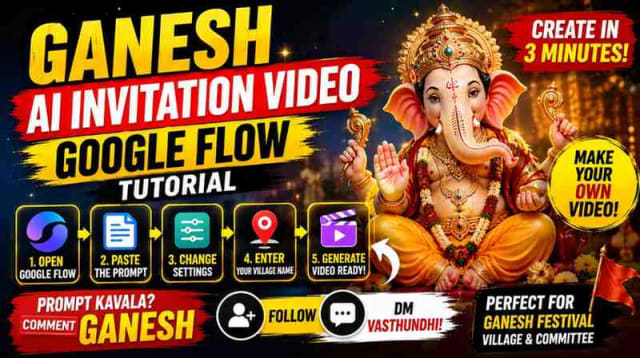
The process is straightforward; create the appropriate prompt for an AI video generator, open Google Flow, make the necessary modifications, insert your village name/committee name, and generate a video. Using the appropriate prompt, you may generate a unique Ganesh invitation video without any effort.
What Is a Ganesh AI Invitation Video?
A Ganesh AI invitation video is an artificially intelligent invitation video for a festival. The video includes your village name, committee name, and other information.
You may create a video using AI rather than attempting to devise each element of your video. This can be significantly simpler, particularly if your prompt is sophisticated.
Ganesh AI Invitation Videos Can Be Created For:
- Ganesh Chaturthi
- Village Ganesh committee
- Youth group
- Festive committee
- Instagram reels
- WhatsApp status
- Social media promotion
Customization is essential because you can alter the village name, committee name, and other elements to your liking.
How To Create Ganesh AI Invitation Video
You may tailor the video to your needs; the procedure is relatively simple and depends heavily on Google Flow.
Step 1: Open Google Flow
The initial step is to launch Google Flow and generate a new project. Choose the appropriate settings for the kind of video you’re going to create. For Instagram Reels and WhatsApp Status, it’s preferable to work with a vertical 9:16 proportion.
Step 2: Copy The AI Video Prompt
The next stage is to duplicate the AI video prompt that was offered for this kind of Ganesh invitation. The prompt is critical because it specifies what the video should be about.
The prompt should therefore have all the essential data about the video that you want to generate. This could contain the setting, the characters that will be in the video, the objects that will be used in the video, and the activities that will take place in the video.
Rather than attempting to develop all of this information, you may simply copy and paste this prompt and add your modifications.
Step 3: Customize Settings
It’s essential to personalize the settings before proceeding.
The available options in Google Flow might differ depending on the program’s current condition. If you’re constructing a social media reel, it’s essential that you choose the appropriate aspect ratio and length.
Step 4: Add Your Village Name
The most crucial modification, in my opinion, is the sample village name that comes with this prompt. You may alter this to a genuine village name in this prompt. In addition, you may make any additional adjustments to the prompt.
Step 5: Generate Your Video
After making the necessary alterations, it’s time to generate your video. Google Flow will generate an AI invitation video based on your prompt when you click the generate button.
After your video has been created, it’s essential that you double-check to ensure that all of your information, such as the village name, is correct.
Why Use AI To Create Ganesh Festival Invitation?
Creating an invitation card traditionally requires graphic design and time; nonetheless, with the assistance of AI, you may create a prompt-based invitation video that may be utilized as a fantastic social media post.
Additionally, as a content creator, this might also help you build more engaging posts.
An invitation video might help you stand out from the competition because other people will be sharing traditional Ganesh invitation poster pictures.
Customize The Video
Your Ganesh AI invitation video should entice the target audience; therefore, it’s essential that you personalize the video.
You May Alter The Following Options:
- Village Name
- Ganesh Committee Name
- Festival Theme
- Invitation Message
- Background
- Style
- Length
- Aspect Ratio
For a local Ganesh committee, it’s essential that you customize the video with the precise village name and committee name since it helps to attract the most relevant spectators.
How To Share The Ganesh Invitation On Social Media
Once the video is prepared, you can share the invitation on various media platforms.
Instagram Reels
A 9:16 Instagram reel is ideal for sharing your Ganesh AI invitation video. Additionally, you may add a caption to your Instagram post so that people are encouraged to view your video.
WhatsApp Status
The WhatsApp Status is a fantastic way to share your Ganesh invitation with friends and family.
Community Groups
In addition, you can also post the Ganesh invitation video in community groups and WhatsApp groups, if necessary.
YouTube Shorts
You may also upload a shortened version of the YouTube video as a YouTube Shorts.
Tips To Make AI Ganesh Invitation Video
Use A Detailed Prompt
It’s essential that the prompt contains all of the necessary information about your Ganesh festival invitation. You should avoid providing any irrelevant information because it could complicate the process.
Keep Information Simple And Clear
It’s critical that you enter the village names and other data correctly so that they appear clearly on the video. You should always double-check to ensure that everything is in order before publishing.
Always Use 9:16 Ratio
As previously stated, a 9:16 proportion is ideal for reels on social media. It’s essential that you adhere to the 9:16 rule.
Review The Video
It’s critical that you examine the video once it has been generated. This is crucial since there are some prompts that might result in undesirable results. Always double-check everything before uploading to social media.
Keep The CTA Simple
If you’re going to share the prompt in an Instagram post, it’s essential that you keep the call-to-action (CTA) simple. For instance, you can request that your followers respond with GANESH to get the prompt.
How To Promote The Ganesh AI Video
Let’s say I’m posting a video on Instagram; I’ll need something to capture attention for the first few seconds before explaining what exactly the video is about.
I may use a text overlay with something like:
"Ganeshudu ki invitation pampisthe... adi mana varake aagipodhu! Direct ga Ganeshudi daggarike velluthundhi."
The objective is to get people to like the video and continue watching until the end.
After you’ve shared your Ganesh invitation, you’ll need to provide a brief overview of how the Google Flow process works. Following that, you may ask your followers to respond to the comment GANESH if they want the prompt.
This Method Can Be Broken Down Into Three Steps:
Hook
Use text overlay to generate a hook in your audience.
Process
Simply explain how the Google Flow process works.
CTA
Ask your audience to respond to your comment with GANESH so that they can get the prompt.
Customization: Make The Video For Your Village
You may modify the prompt to make it more appropriate for your village. The prompt might also be utilized to target several committees for various Ganesh celebrations that take place in various places.
If you’re a part of a local Ganesh committee, you may use the prompt-based Google Flow to generate an AI invitation video for social media without having to start from scratch.
Final Checks Before You Publish The Video
Before publishing the final Ganesh AI invitation video, it’s critical that you double-check the following:
- Village name
- Committee name
- Invitation message
- Date/time (if any)
- Festival location
- Spellings
- Video length
- Aspect ratio
- Quality of video
Make sure that you’re using the right photographs, logos, and other material that you have permission to use.
PROMPT
✨ AI Promptvideo-1-[SCENE 1 — YOUTH INVITATION | 0–5 SEC YANAM village during Ganesh Chaturthi preparations, a group of young Bajrangdal Youth members wearing traditional white kurtas with saffron scarves standing together in a realistic village street, warm evening sunlight, festive decorations, marigold flowers and saffron flags in the background. They respectfully hold a beautiful premium golden Ganesh Chaturthi invitation card together and look toward the camera. Highly realistic Indian faces, natural body proportions, cinematic photography, realistic skin texture, shallow depth of field, 4K detail. Youth Members Dialogue — Telugu, energetic and emotional: “వినాయకుడిని పిలవడం కాదు… మనసుతో ఆహ్వానిస్తున్నాం! గణపయ్యా… మా యానం రా!” Card Text: GANESH CHATURTHI SEPTEMBER 14 YANAM VILLAGE SCENE 2 — INVITATION TO MOOSHIKA | 5–10 SEC A highly realistic divine Mooshika, Lord Ganesha's traditional mouse vehicle, approaches the Bajrangdal Youth members in the village. One youth member respectfully kneels down and hands the elegant Ganesh Chaturthi invitation card to the Mooshika. The mouse carefully receives the card and looks toward the distant mountains. Realistic fur, natural movement, detailed eyes, realistic village environment, cinematic close-up, warm festival lighting, photorealistic 4K. Mooshika Dialogue — Telugu, deep, mysterious and divine voice: “మీ పిలుపు గణపయ్య దగ్గరికి చేరుతుంది… ఈ ఆహ్వానం నేను స్వయంగా తీసుకెళ్తాను!”],video-2-[SCENE 3 — JOURNEY BEGINS | 10–15 SEC The same realistic Mooshika begins its journey carrying the invitation card through a beautiful rural landscape with YANAM village visible far behind, green fields, trees and enormous mountains ahead. Camera follows the Mooshika from a low cinematic angle, then transitions into a wide aerial shot. Realistic fur movement, natural environment, realistic sunlight, cinematic depth, photorealistic 4K. Mooshika Dialogue — Telugu, emotional and determined voice: “ఈ ఆహ్వానం గణపయ్యకు చేరాలి… ఎంత దూరమైనా నేను వెనక్కి తగ్గను!” SCENE 4 — CLIMBING THE MOUNTAIN | 15–20 SEC The same Mooshika climbs a steep rocky mountain path while carefully carrying the invitation card. The environment gradually changes into a majestic high-altitude snowy mountain landscape. Strong wind moves its small traditional cloth, snow particles drift through the air, massive clouds move between mountain peaks. Dramatic but realistic natural lighting, physically accurate environment, cinematic tracking shot, ultra-realistic 4K, no cartoon appearance. Mooshika Dialogue — Telugu, powerful determined voice: “గణపయ్యా… యానం నుంచి నీ కోసం వచ్చిన ఈ పిలుపు… నీ దగ్గరికి తప్పక చేరుతుంది!”],video-3-[SCENE 5 — MEETING LORD GANESHA | 20–24 SEC A completely different cinematic composition: a majestic Lord Ganesha is seated peacefully inside a beautiful ancient stone temple sanctuary located on a mountain summit, surrounded by brass diyas, flowers, subtle incense smoke and golden morning light. The realistic Mooshika enters the temple from the foreground carrying the invitation card and approaches Ganesha. Ganesha looks naturally toward the Mooshika. Wide establishing shot followed by a medium shot. Highly detailed realistic divine statue-like appearance, realistic textures, cinematic lighting, volumetric sunlight, 4K. Mooshika Dialogue — Telugu, respectful and emotional voice: “గణపయ్యా… యానం నుంచి నీ కోసం వచ్చిన ఆహ్వానం ఇది! నీ భక్తులు నిన్ను ప్రేమతో పిలుస్తున్నారు.” SCENE 6 — GANESHA ACCEPTS THE INVITATION | 24–28 SEC Use a completely different camera angle and composition from Scene 5. Cinematic close-up of Lord Ganesha seated peacefully, holding the invitation card in his hands and looking at it with a gentle divine smile. His facial expression changes naturally from reading the invitation to warmly accepting it. He raises one hand in a blessing gesture toward the Mooshika. Soft golden sunlight falls across his face, subtle floating flower petals, realistic jewelry and fabric details, natural depth of field, photorealistic cinematic Indian devotional film style, 4K. Do not reuse the previous shot composition. GANESHA DAILOGUES-(Ganesha Dialogue in Telugu, deep authoritative divine voice: “యానం నన్ను ప్రేమతో పిలిచింది… ఆ పిలుపు నా హృదయానికి చేరింది! సెప్టెంబర్ 14న… నేనే వస్తున్నాను!”],video-4-[SCENE 7 — DIVINE PROMISE | 28–30 SEC A completely new epic final shot. Lord Ganesha stands majestically at the entrance of the mountain temple while looking toward the distant horizon where Ganganpally village lies far below. The rising sun creates a powerful golden silhouette around him, clouds slowly part behind the mountains, flower petals move gently in the wind. The Mooshika stands beside him. Camera slowly pulls backward into a huge aerial landscape shot, revealing the enormous mountains and glowing sky. Emotional, divine, realistic cinematic ending, natural lighting, photorealistic 4K, grand Indian devotional movie atmosphere. Ganesha Dialogue — Telugu, deep powerful divine voice: “యానం నన్ను పిలిచింది… ఆ పిలుపు నేను విన్నాను! సెప్టెంబర్ 14న… గణపయ్య వస్తున్నాడు!” Final Text: GANESH CHATURTHI SEPTEMBER 14 VENUE: YANAM VILLAGE BAJRANGDAL YOUTH “GANPATI BAPPA MORYA!”
dinxsh7
EditorEditorial contributor researching practical guides, tech discoveries, and curated recommendations for Dinesh Picks.
Continue Reading